

Pretty Makeup - Beauty Camera

50M+
Installs
Photo Editor Perfect Corp.
Developer
-
Video Players & Editors
Category
-
Rated for 3+
Content Rating
-
baiwang2013@gmail.com
Developer Email
-
http://makeupcamera.photoeditorperfect.top/PrivacyPolicy/
Privacy Policy
Screenshots
editor reviews
Pretty Makeup - Beauty Camera is a beauty and selfie editing app from Perfect Corp., the same team behind the YouCam series. It's designed for people who want to touch up their selfies with virtual makeup, skin smoothing, and facial reshaping tools. You download it from Google Play or the App Store, and after a quick install, the app greets you with a bright, almost cluttered interface that immediately offers a live camera preview and a row of beauty filters. It's free to download, but you'll quickly notice in-app purchases for premium looks and editing packs, along with ads that pop up now and then. The first impression is that it's very feature-packed, maybe even a bit overwhelming, especially if you just wanted a simple filter for a quick photo.
Once you start using it, the hands-on experience is a mixed bag. The main screen puts a camera viewfinder front and center, and you can take a fresh selfie or pick one from your gallery. From there, you scroll through options like "Skin," "Slim," "Makeup," and "Lips." Each section has sliders and specific tools, so you can adjust the intensity of smoothing or add a virtual lipstick shade. The app actually does a decent job with face detection — it maps facial features accurately, which makes applying virtual makeup look more natural than some budget alternatives. However, navigating between all the sub-menus can feel clunky. There are countless sticker packs and themed looks, but finding a simple "no-makeup" makeup look takes a bit of digging. A practical tip: use the "Quick Look" feature to compare before and after versions, but watch out for the occasional loading delay when switching between editing tools.
After using Pretty Makeup for a while, I think it's a solid choice for someone who enjoys experimenting with different makeup styles without committing to real products. It's not a replacement for full editing suites like Meitu or FaceApp, but it focuses purely on beauty adjustments rather than general photo editing. The app shines when you want to try out bold trends — like a neon eyeliner or a glittery highlight — without buying actual makeup. That said, the constant push toward in-app purchases can be frustrating, and the interface feels a bit dated compared to newer apps. Younger users or influencers who frequently post selfies might keep it installed for the unique looks, but someone just looking for a quick skin-smoothing filter may uninstall it after a few uses for something simpler.
features
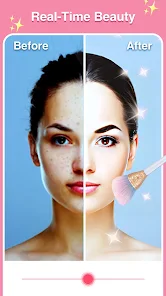
- 🎨 Real-time virtual makeup preview: Unlike YouCam Makeup, which focuses heavily on step-by-step tutorials, Pretty Makeup lets you see the full makeup look live on your face as you move around, making it feel more like a mirror than a photo editor.
- 🖌️ Wide variety of branded makeup looks: The standout feature here is the collaboration with actual cosmetics brands, so you can try on real shades from popular labels directly in the app, something even FaceApp lacks.
- 🤖 Smart face mapping with multiple adjustment points: You can reshape jawlines, eyes, nose, and even the hairline with sliders, offering more fine-grained control than the basic slimming tools in BeautyPlus.
- ⚡ Batch editing for consistent looks: This is rare in beauty apps — you can apply the same set of filters and makeup adjustments to multiple photos at once, saving tons of time when editing a series of selfies.
pros
- 👍 Skin smoothing is surprisingly natural: Compared to Meitu, which sometimes makes skin look waxy, Pretty Makeup's smoothing slider preserves texture and pores instead of blurring everything into plastic.
- 👍 Easy to undo changes with history panel: Most beauty apps make you start over if you mess up, but here you can go back step by step, just like you would in a professional editor like Photoshop Express.
- 👍 Quick auto-enhance button for beginners: If you're overwhelmed by all the sliders, tapping the "Auto" button gives you a decent result in one click, which is much more beginner-friendly than YouCam Perfect.
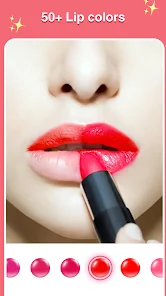
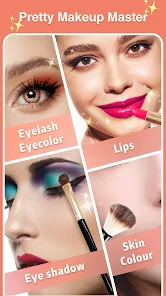
- 👍 Lip and eye color accuracy: The app tracks your lip edges and iris boundaries really well, so even if you turn your head slightly in a photo, the makeup stays in place. B612 struggles with this a lot.
cons
- 👎 Too many ads between edits: Unlike BeautyPlus which keeps ads mostly in a separate gallery, Pretty Makeup throws full-screen video ads between you and your editing screen, which gets annoying quickly.
- 👎 Premium subscription is pricey for what you get: YouCam Makeup offers more tutorial content for a similar price, whereas Pretty Makeup's paid features are mostly just stickers and filters that feel overpriced.
- 👎 Interface feels cluttered with icons: Meitu has a cleaner layout despite offering more features; here, the screen is packed with tiny buttons, sticker banners, and pop-ups that make navigation confusing for new users.
- 👎 No proper undo button for accidental touches: If you accidentally tap a preset, it applies immediately without asking, and finding the history panel to revert it takes several clicks, unlike FaceApp's simple back button.
Articles
![]()
Guide
How to Update Google Play Store on Android 2026
![]()
Guide
How to Download Older Versions of Android Apps
![]()
Guide
How to Download Apps Without Google Play Store
![]()
Guide
What Is an APK File for Android?
If you use an Android phone, you may have seen the term APK while searching for apps or games online. Some websites offer an APK download instead of a Google Play install button. Some users also mention APK files when talking about apps that are not available in their region, older app versions, or Android games downloaded outside the Play Store.
![]()
Guide
How to Install Games from Google Play for Beginners
Installing games on an Android phone is usually simple, but for beginners, the process can still feel confusing at first. You may not know where to search, which button to tap, whether the game is safe, or why Google Play sometimes asks for account settings, storage access, or payment information. If you are using an Android phone for the first time, learning how to install games from Google Play is one of the easiest ways to get started.
![]()
Guide
How Useful Gemini Is for Everyday Questions and Quick Tasks
emini feels different from many AI apps because it is not only trying to be a chatbot. After using it for everyday questions, quick writing, image understanding, and planning, I think its biggest strength is convenience.
![]()
Guide
What to Know Before Downloading APKs
For many Android users, downloading an APK is a common way to install apps and games. Sometimes an app is not available in a certain country.
![]()
Guide
ChatGPT Review: Is It Still the Best AI App in 2026?
![]()
Guide
Seedance 2.0 vs Sora: The Future of AI Video Generation
The AI video race has intensified dramatically over the past two years. Platforms like Sora from OpenAI and Luma Dream Machine pushed the boundaries of text-to-video realism. Yet, despite their impressive outputs, most tools still operate as probabilistic generators—you describe a scene, and the model interprets it. Control remains limited. With the February 2026 release of Seedance 2.0, developed by ByteDance, the paradigm shifted. Internally known as Jimeng 2.0, Seedance does not position itself as just another video model. It positions itself as an AI Director. Rather than guessing what you want, Seedance 2.0 allows you to direct what happens. This distinction defines everything that follows.









Recommended Apps
![]()
Home Design 3D
Anuman4.2
![]()
Truth or Dare Game - Party App
Chouic4.8
![]()
Photo Collage Maker
Scoompa4.7![]()
Learn to Draw Flower
Creative APPS4.2![]()
FIFA World Cup 2026™
FIFA2.8![]()
Mirror Plus: Mirror with Light
Digitalchemy, LLC4.4![]()
Meitu- Photo Editor & AI Art
Meitu (China) Limited4.5![]()
Perplexity - Ask Anything
PerplexityAI4.7![]()
GhostTube SLS Camera Alternate
GhostTube4![]()
Boom Chip Blast: 2-Player
Black Pyramid 3D Games Studio0![]()
Healthy Benefits+
Solutran, Inc.4.5![]()
Deepcheck AI Search Assistant
rohe.ai4![]()
Idol Prank Video Call & Chat
LightCode Solutions4![]()
Face Shape - Pretty Scale
GlintTec Apps3.9![]()
Plant App - Plant Identifier
ScaleUp4.6












































