
Prank Call

1M+
Installs
MyPhoneRobot
Developer
-
Entertainment
Category
-
Rated for 12+
Content Rating
-
info@myphonerobot.com
Developer Email
-
https://myphonerobot.com/prank/prank-call-privacy.html
Privacy Policy
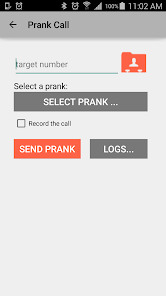
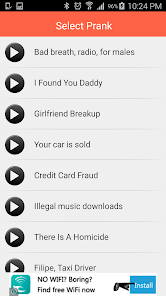
Screenshots

editor reviews
Prank Call is exactly what it sounds like - an app that lets you send fake but realistic-sounding phone calls to your friends or yourself. It's a prank app, available on both Google Play and the App Store, and you can download and install it for free. When you first launch it, the app immediately asks you to set up a few things like choosing a caller voice and typing the number you want to get a call from. I remember downloading it out of curiosity after a friend used it on me, and my first reaction was "wait, is this real?" because the incoming call interface looks almost identical to a real phone call. You don't need to register an account to use the core features, but there are optional in-app purchases and some ads that pop up between pranks. The install count seems solid on Android, though I haven't checked the exact number recently.
Once you start using it, the experience is pretty straightforward. You open the app, pick a contact or manually enter a phone number, choose a pre-recorded voice line (like "angry boss" or "telemarketer"), and then schedule the call for a specific time. When the call comes through, the recipient sees the fake caller ID you set, and when they pick up, they hear the voice acting out the prank. The interface is clean but a bit basic - the buttons are big and easy to tap, which helps when you're setting up a prank quickly. One thing I noticed is that the call scheduling can sometimes lag by a few seconds, but it's not a dealbreaker. A small tip: if you want the prank to feel more convincing, use a number the person actually knows, like a friend's number, rather than a random one.
After using Prank Call for a few weeks, I think it's fun for casual jokes among friends, but definitely not for anyone who's easily embarrassed or who pranks people who get genuinely upset. The app does exactly what it promises - it makes fake calls that look real - but after a while, the novelty wears off because the voice lines repeat and the pranks feel predictable. Compared to similar apps like Fake Call or Prank Dialer, Prank Call stands out for its realistic call interface and the variety of voice options, but it falls short on customization since you can't record your own voice lines without paying. I kept it installed for a month just to mess with my younger brother, but eventually uninstalled it because I ran out of ideas and the ads started feeling intrusive. If you're the type of person who enjoys a quick laugh and doesn't mind a bit of repetition, this app is worth a try; if not, you might get bored fast.
features
- 🎭 Realistic Call UI: The incoming call screen looks almost identical to a real phone call, including the caller's name and photo you set, which makes the prank feel genuine and catches people off guard.
- 🎭 Scheduled Pranks: You can schedule calls for specific times, so even if you forget, the prank goes off automatically - perfect for late-night jokes or when you're busy with something else.
- 🎭 Pre-Recorded Voices: There are several voice options like "angry mother" or "boss" that sound surprisingly natural, which saves you from having to record your own lines or act out the prank live.
pros
- 👍 No Account Needed: Unlike some prank apps that force you to sign up or log in before doing anything, Prank Call lets you jump straight into creating a call, which feels refreshingly simple.
- 👍 Cross-Platform Availability: It works on both Android and iOS without glitches, so you don't have to worry about your friends not being able to receive the prank if they have a different phone.
- 👍 Free Basic Features: The core functionality - sending fake calls - is completely free, whereas apps like Prank Dialer often lock basic options behind a paywall after a few uses.
cons
- 👎 Repetitive Voice Lines: After using the app a few times, you'll notice the same recordings repeating, which makes the pranks feel less creative compared to apps like Fake Call that let users upload custom audio.
- 👎 Limited Customization: You cannot record your own voice lines or add personal touches without paying, which feels restrictive when you want to tailor a prank to a specific person or situation.
- 👎 Ad Interruptions: Ads pop up frequently between setups, sometimes right when you're about to schedule a call, which breaks the flow and can be annoying if you're trying to prank someone quickly.
- 👎 Occasional Timing Glitches: The scheduled calls sometimes arrive a few seconds late or ring twice instead of once, which can make the prank feel less authentic if the person notices the delay.
Articles
![]()
Guide
How to Update Google Play Store on Android 2026
![]()
Guide
How to Download Older Versions of Android Apps
![]()
Guide
How to Download Apps Without Google Play Store
![]()
Guide
What Is an APK File for Android?
If you use an Android phone, you may have seen the term APK while searching for apps or games online. Some websites offer an APK download instead of a Google Play install button. Some users also mention APK files when talking about apps that are not available in their region, older app versions, or Android games downloaded outside the Play Store.
![]()
Guide
How to Install Games from Google Play for Beginners
Installing games on an Android phone is usually simple, but for beginners, the process can still feel confusing at first. You may not know where to search, which button to tap, whether the game is safe, or why Google Play sometimes asks for account settings, storage access, or payment information. If you are using an Android phone for the first time, learning how to install games from Google Play is one of the easiest ways to get started.
![]()
Guide
How Useful Gemini Is for Everyday Questions and Quick Tasks
emini feels different from many AI apps because it is not only trying to be a chatbot. After using it for everyday questions, quick writing, image understanding, and planning, I think its biggest strength is convenience.
![]()
Guide
What to Know Before Downloading APKs
For many Android users, downloading an APK is a common way to install apps and games. Sometimes an app is not available in a certain country.
![]()
Guide
ChatGPT Review: Is It Still the Best AI App in 2026?
![]()
Guide
Seedance 2.0 vs Sora: The Future of AI Video Generation
The AI video race has intensified dramatically over the past two years. Platforms like Sora from OpenAI and Luma Dream Machine pushed the boundaries of text-to-video realism. Yet, despite their impressive outputs, most tools still operate as probabilistic generators—you describe a scene, and the model interprets it. Control remains limited. With the February 2026 release of Seedance 2.0, developed by ByteDance, the paradigm shifted. Internally known as Jimeng 2.0, Seedance does not position itself as just another video model. It positions itself as an AI Director. Rather than guessing what you want, Seedance 2.0 allows you to direct what happens. This distinction defines everything that follows.









Recommended Apps
![]()
Home Design 3D
Anuman4.2
![]()
Truth or Dare Game - Party App
Chouic4.8
![]()
Photo Collage Maker
Scoompa4.7![]()
Learn to Draw Flower
Creative APPS4.2![]()
FIFA World Cup 2026™
FIFA2.8![]()
Mirror Plus: Mirror with Light
Digitalchemy, LLC4.4![]()
Meitu- Photo Editor & AI Art
Meitu (China) Limited4.5![]()
Perplexity - Ask Anything
PerplexityAI4.7![]()
GhostTube SLS Camera Alternate
GhostTube4![]()
Boom Chip Blast: 2-Player
Black Pyramid 3D Games Studio0![]()
Healthy Benefits+
Solutran, Inc.4.5![]()
Deepcheck AI Search Assistant
rohe.ai4![]()
Idol Prank Video Call & Chat
LightCode Solutions4![]()
Face Shape - Pretty Scale
GlintTec Apps3.9![]()
Plant App - Plant Identifier
ScaleUp4.6












































