
Time Warp Scan Cam&Face Filter

5M+
Installs
HDY Apps
Developer
-
Video Players & Editors
Category
-
Rated for 3+
Content Rating
-
apps@homedy.com
Developer Email
-
https://sites.google.com/view/privacytosfortimewarpscan/
Privacy Policy
Screenshots


editor reviews
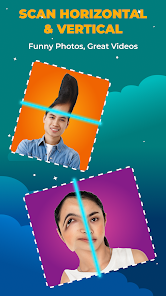
Time Warp Scan Cam&Face Filter is one of those photo filter apps that tries to ride the wave of viral video trends, particularly the "time warp" effect that makes your face or surroundings warp and stretch as you move. It's a specialized filter tool, not a full-featured camera or editing suite. You mainly use it to record short clips where you slowly move your face or hand across the frame, and the app freezes a line of pixels in place, creating a trippy, distorted snapshot effect. I downloaded it from Google Play out of curiosity after seeing similar effects on social media, and it had a decent number of installs. The first impression after launching was mixed—the interface is simple to the point of being barebones, with no login or registration required, which is nice. But it immediately hits you with a full-screen ad before you can even see the camera feed, which felt a bit aggressive for a free app.
After tapping through the ad, the hands-on experience is straightforward but slightly clunky. The main screen shows your camera feed with a single button to record the time warp effect. You press it, move your face slowly across the frame, and it captures that frozen line of pixels in real time. The interface has a few more options for face filters and basic color adjustments, but they are tucked away in small icons that are not very intuitive at first. I found myself fumbling to switch between the normal camera and the warp mode. The app works best when you take it slow—rushing the movement makes the effect look messy. One practical tip I figured out is to use good lighting, because the warp effect amplifies any grain or blur in darker settings. Onboarding is minimal; there is no tutorial, so you kind of have to guess the optimal speed and distance. It wasn't confusing once I got the hang of it, but the constant ad pop-ups between each recording attempt really broke the flow.
After using it for a while, I think this app has a very narrow audience. If you enjoy creating quirky, low-effort content for TikTok or Instagram Reels, it can be a fun toy to play around with for a few minutes. But if you are looking for a reliable camera tool or precise editing control, it will disappoint quickly. What sets it apart from similar effects in apps like CapCut or Instagram's built-in filters is that this app makes the time warp effect the sole focus, which means no distractions from other editing tools. However, that also makes it feel one-dimensional. I could see someone keeping it installed if they frequently make this specific kind of content, but the ad frequency and lack of features would probably lead me to uninstall it after a week. Compared to something like YouCam Perfect or Snapchat, it lacks polish and versatility. It's a niche tool that does one thing okay, but not great.
features
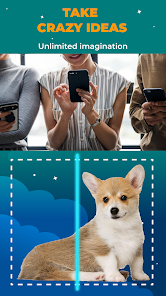
- 🎨 The standout feature is obviously the time warp scan effect itself, which lets you create those viral, grainy, dreamlike distortions by freezing a vertical or horizontal scan line on your video. Unlike Instagram, where you have to hunt for specific filters that may disappear, this app dedicates its entire interface to this one effect, so you can jump straight into recording.
- 📸 It offers a handful of face filters that overlay on top of the warp effect, like cartoonish glasses or animal ears. While these are basic compared to Snapchat's library, they layer surprisingly well with the distortion, giving your clips a more chaotic, personalized feel.
- 🔄 The app includes a reverse playback option after you record, which flips the warp effect backward. This is a simple addition, but it doubles the creative potential without needing external editing software. CapCut offers this too, but you have to export and re-import, which is slower.
- ⚙️ There are minor color tint sliders (contrast, brightness, saturation) built right into the recording screen. It's not extensive, but for a free, no-login app, having this control without jumping to another tool is a nice touch that apps like Snapchat don't offer within their time warp filters.
pros
- ✅ Completely free to download and use with no registration required. Unlike YouCam Perfect or FaceApp, which lock many effects behind a subscription, this app gives you the core time warp effect immediately and without any paywall.
- ✅ No account needed, so there's no risk of your face data being stored on a server for advertising profiles, which is a common concern with larger apps like Instagram or Snapchat.
- ✅ The app is very lightweight and runs smoothly even on older phones. Where apps like CapCut can lag or crash when applying heavy filters, this one keeps the performance consistent during recording.
- ✅ It's hyper-focused on one specific trend, so if you know exactly what you want, you can record and share in under a minute. More complex apps like PicsArt bury similar effects under menus and require multiple steps.
cons
- ❌ The ad frequency is overwhelming. A full-screen video ad plays before every recording attempt and sometimes after saving. In contrast, apps like CapCut only show ads when you export, and Snapchat has none at all for native features.
- ❌ The export quality is noticeably compressed. Even if you record in high resolution, the final video looks grainy and pixelated compared to saving directly from Instagram's camera or even TikTok's built-in editor.
- ❌ There is no undo button or edit history. If you mess up a recording, you have to delete it and start over from scratch. Apps like YouCam Perfect offer layers and editing history that let you tweak mistakes without redoing everything.
- ❌ The app lacks any preset guides or templates. For beginners, it is hard to know the ideal speed or distance to hold your face from the lens. Instagram's time warp filters come with clear visual cues and previews, which this app completely omits.
Articles
![]()
Guide
How to Update Google Play Store on Android 2026
![]()
Guide
How to Download Older Versions of Android Apps
![]()
Guide
How to Download Apps Without Google Play Store
![]()
Guide
What Is an APK File for Android?
If you use an Android phone, you may have seen the term APK while searching for apps or games online. Some websites offer an APK download instead of a Google Play install button. Some users also mention APK files when talking about apps that are not available in their region, older app versions, or Android games downloaded outside the Play Store.
![]()
Guide
How to Install Games from Google Play for Beginners
Installing games on an Android phone is usually simple, but for beginners, the process can still feel confusing at first. You may not know where to search, which button to tap, whether the game is safe, or why Google Play sometimes asks for account settings, storage access, or payment information. If you are using an Android phone for the first time, learning how to install games from Google Play is one of the easiest ways to get started.
![]()
Guide
How Useful Gemini Is for Everyday Questions and Quick Tasks
emini feels different from many AI apps because it is not only trying to be a chatbot. After using it for everyday questions, quick writing, image understanding, and planning, I think its biggest strength is convenience.
![]()
Guide
What to Know Before Downloading APKs
For many Android users, downloading an APK is a common way to install apps and games. Sometimes an app is not available in a certain country.
![]()
Guide
ChatGPT Review: Is It Still the Best AI App in 2026?
![]()
Guide
Seedance 2.0 vs Sora: The Future of AI Video Generation
The AI video race has intensified dramatically over the past two years. Platforms like Sora from OpenAI and Luma Dream Machine pushed the boundaries of text-to-video realism. Yet, despite their impressive outputs, most tools still operate as probabilistic generators—you describe a scene, and the model interprets it. Control remains limited. With the February 2026 release of Seedance 2.0, developed by ByteDance, the paradigm shifted. Internally known as Jimeng 2.0, Seedance does not position itself as just another video model. It positions itself as an AI Director. Rather than guessing what you want, Seedance 2.0 allows you to direct what happens. This distinction defines everything that follows.









Recommended Apps
![]()
Home Design 3D
Anuman4.2
![]()
Truth or Dare Game - Party App
Chouic4.8
![]()
Photo Collage Maker
Scoompa4.7![]()
Learn to Draw Flower
Creative APPS4.2![]()
FIFA World Cup 2026™
FIFA2.8![]()
Mirror Plus: Mirror with Light
Digitalchemy, LLC4.4![]()
Meitu- Photo Editor & AI Art
Meitu (China) Limited4.5![]()
Perplexity - Ask Anything
PerplexityAI4.7![]()
GhostTube SLS Camera Alternate
GhostTube4![]()
Boom Chip Blast: 2-Player
Black Pyramid 3D Games Studio0![]()
Healthy Benefits+
Solutran, Inc.4.5![]()
Deepcheck AI Search Assistant
rohe.ai4![]()
Idol Prank Video Call & Chat
LightCode Solutions4![]()
Face Shape - Pretty Scale
GlintTec Apps3.9![]()
Plant App - Plant Identifier
ScaleUp4.6












































