
Makerblox - Create Skins

10M+
Installs
White Platform Studio
Developer
-
Entertainment
Category
-
Everyone
Content Rating
-
Alinazakirova75@gmail.com
Developer Email
-
https://pandarobotstudio.wixsite.com/websiteplatfoms
Privacy Policy
Screenshots
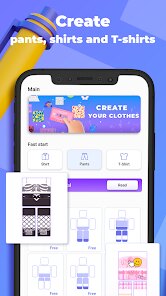
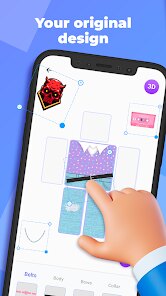
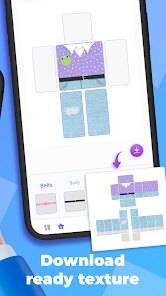
editor reviews
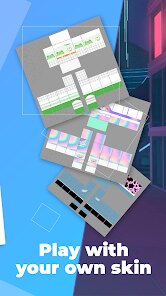
Makerblox falls squarely into the utility category for Minecraft fans, specifically those playing Bedrock Edition. Its entire purpose is letting people design custom character skins without needing to boot up the actual game or mess with clunky third-party image editors. From the Play Store page, it shows over a hundred thousand installs and is free to download, though it does have ads and offers in-app purchases for extra template packs. I grabbed it out of curiosity because creating skins in-game on a phone is a pain with those tiny touch controls. The first impression after launching was pretty clean for a free app — the interface feels modern and lays everything out clearly without bombarding you with pop-ups right away, which was a welcome surprise.
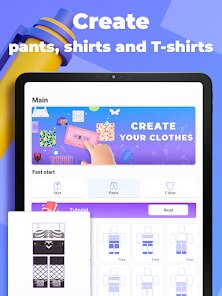
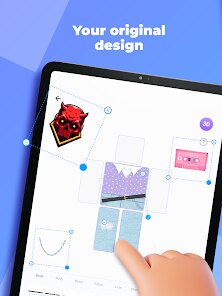
Getting into the nuts and bolts of using it, the experience is surprisingly smooth for mobile editing. After tapping "Create," you pick a blank template or one of the pre-made bases to start from. The main editor splits the screen between your skin model — which you can rotate and zoom — and a color palette plus brush settings below. Each limb and body section highlights separately, so you're not accidentally painting the arm when you meant to do the torso. Brushes range from single pixel for detailed work up to larger fills, and there's an eyedropper tool that saves time when matching colors. One thing I noticed is that the undo button sits right at the top, which saved me more than once when I messed up a shading attempt. Exporting is straightforward: you save the skin as a PNG file and then import it through Minecraft's settings. It took me maybe ten minutes to make something decent, though precision work on a phone screen still takes some patience.
After spending a few days hopping in and out of the editor, I think this app hits a sweet spot for casual players who want personalization without learning Photoshop. It's not for serious pixel artists — the limited color palettes in the free version and the small screen real estate hold it back compared to PC editors like NovaSkin. What makes Makerblox stand out is that it actually works reliably on a phone, which a lot of similar apps don't. The inclusion of ads between saves is a bit annoying, and the pro templates behind paywalls feel restrictive after a while. I'd likely keep it installed because it's one of those lightweight tools you pull out when you want to change up your Minecraft look quickly. Someone who only plays once a month probably wouldn't bother, but for regular players, it's a handy little companion app.
features
- 🎨 Layer-based editing is a standout feature — you can add multiple layers onto your skin, adjust opacity, and merge them down. In similar tools like Skinseed, layers are either absent or buried behind paid upgrades, but Makerblox keeps it accessible in the free version, making complex designs much easier to manage.
- 🖌️ The precision brush modes give you more control than most mobile editors. You can toggle between single-pixel mode for tiny details and larger fill brushes for base colors. NovaSkin on desktop still offers more tools, but for mobile, this level of control feels rare and genuinely useful for fixing small mistakes.
- 📁 Export quality stands out because it keeps the PNG resolution sharp with proper transparency, unlike some apps that compress the image or break the alpha channel during saving. This means your skin actually looks correct in-game without weird pixel artifacts or background colors bleeding through.
pros
- 📱 The touch interface feels genuinely polished — swiping to rotate the 3D model is responsive, and the highlight system for body parts prevents accidental edits. On the other hand, Skinseed has a more cluttered layout that can be confusing for first-timers.
- 🎯 Learning curve is very shallow compared to PC alternatives like Blockbench. Within minutes, you can figure out the basic workflow without tutorials. It respects your time if you just want a quick custom skin.
- 🧩 The free template library is decently sized for the base version. You get enough starting points to avoid staring at a blank canvas, which is more than what some other free apps offer without pushing premium packs immediately.
cons
- 📢 Ads appear after every export or save, which disrupts the flow when you're iterating on a design. Skinseed handles this better by letting you watch one ad to unlock ad-free for a session, but Makerblox forces you through full-screen ads each time.
- 🔒 The free color palette is pretty limited — only about 20 preset colors and no custom hex input without paying. Apps like Pixel Gun skin editors offer broader free palettes, so this feels unnecessarily restrictive.
- 📏 The canvas zoom feels capped compared to what you get in PC tools like NovaSkin. On a small screen, this makes fine detail work harder than it needs to be, especially for eyes or small patterns on limbs.
- 💾 Importing saved skins back for editing isn't straightforward — you can't open a previous project easily unless you saved it as a project file, not just an exported PNG. Novice users might lose their work if they aren't careful.
Articles
![]()
Guide
How to Update Google Play Store on Android 2026
![]()
Guide
How to Download Older Versions of Android Apps
![]()
Guide
How to Download Apps Without Google Play Store
![]()
Guide
What Is an APK File for Android?
If you use an Android phone, you may have seen the term APK while searching for apps or games online. Some websites offer an APK download instead of a Google Play install button. Some users also mention APK files when talking about apps that are not available in their region, older app versions, or Android games downloaded outside the Play Store.
![]()
Guide
How to Install Games from Google Play for Beginners
Installing games on an Android phone is usually simple, but for beginners, the process can still feel confusing at first. You may not know where to search, which button to tap, whether the game is safe, or why Google Play sometimes asks for account settings, storage access, or payment information. If you are using an Android phone for the first time, learning how to install games from Google Play is one of the easiest ways to get started.
![]()
Guide
How Useful Gemini Is for Everyday Questions and Quick Tasks
emini feels different from many AI apps because it is not only trying to be a chatbot. After using it for everyday questions, quick writing, image understanding, and planning, I think its biggest strength is convenience.
![]()
Guide
What to Know Before Downloading APKs
For many Android users, downloading an APK is a common way to install apps and games. Sometimes an app is not available in a certain country.
![]()
Guide
ChatGPT Review: Is It Still the Best AI App in 2026?
![]()
Guide
Seedance 2.0 vs Sora: The Future of AI Video Generation
The AI video race has intensified dramatically over the past two years. Platforms like Sora from OpenAI and Luma Dream Machine pushed the boundaries of text-to-video realism. Yet, despite their impressive outputs, most tools still operate as probabilistic generators—you describe a scene, and the model interprets it. Control remains limited. With the February 2026 release of Seedance 2.0, developed by ByteDance, the paradigm shifted. Internally known as Jimeng 2.0, Seedance does not position itself as just another video model. It positions itself as an AI Director. Rather than guessing what you want, Seedance 2.0 allows you to direct what happens. This distinction defines everything that follows.









Recommended Apps
![]()
Home Design 3D
Anuman4.2
![]()
Truth or Dare Game - Party App
Chouic4.8
![]()
Photo Collage Maker
Scoompa4.7![]()
Learn to Draw Flower
Creative APPS4.2![]()
FIFA World Cup 2026™
FIFA2.8![]()
Mirror Plus: Mirror with Light
Digitalchemy, LLC4.4![]()
Meitu- Photo Editor & AI Art
Meitu (China) Limited4.5![]()
Perplexity - Ask Anything
PerplexityAI4.7![]()
GhostTube SLS Camera Alternate
GhostTube4![]()
Boom Chip Blast: 2-Player
Black Pyramid 3D Games Studio0![]()
Healthy Benefits+
Solutran, Inc.4.5![]()
Deepcheck AI Search Assistant
rohe.ai4![]()
Idol Prank Video Call & Chat
LightCode Solutions4![]()
Face Shape - Pretty Scale
GlintTec Apps3.9![]()
Plant App - Plant Identifier
ScaleUp4.6











































