

Nerd AI - Tutor & Math Helper

1M+
Installs
Codeway Dijital
Developer
-
Generative AI
Category
-
Rated for 3+
Content Rating
-
nerdai@codeway.co
Developer Email
-
https://static.nerdai.app/privacy-en.html
Privacy Policy
Screenshots
editor reviews
Nerd AI is basically a study assistant app that sits somewhere between a general-purpose tutor and a specialized math solver. You download it from Google Play or the App Store, and once you launch it, the first thing that hits you is how clean the interface looks. It's not cluttered with a million buttons. For a student who just wants to snap a picture of a messy algebra problem or type out a history question, that first impression matters. The app lures you in with a free download, but after poking around for a few minutes, you quickly realize the real meat is behind a subscription. There are no forced sign-up screens right away, which is nice, because you can actually test a couple of features before deciding if it's worth your time. The install count seems solid, but I didn't see any intrusive ads during my initial use, which already puts it ahead of some free competitors.
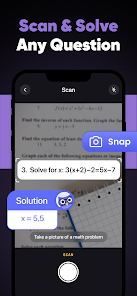
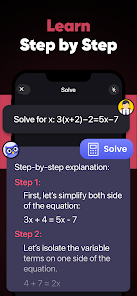
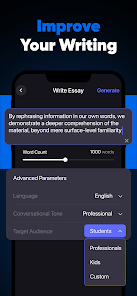
Actually using Nerd AI feels pretty straightforward for the most part. You open it, and the main screen gives you a few big options: a camera button for snapping problems, a text input for typing questions, and a section for uploading documents. I tested the math solver first by taking a photo of a quadratic equation. The app recognized the text quickly, and within seconds, it showed the step-by-step solution. That part worked smoothly. Onboarding is minimal, which I like, because nobody wants a tutorial when they're stuck on homework. The writing assistant feature is decent for rephrasing sentences, but it sometimes gives answers that feel a bit generic. One small tip: if you use the math solver, make sure your handwriting isn't too messy, because the OCR struggles with sloppy cursive. Navigation between features uses a bottom bar, and switching from the math solver to the writing helper is just a tap away. No lag, no confusion.
After using Nerd AI for a couple of weeks, I'd say it's a decent tool for high school or college students who need quick help with math and science problems. It's not the best for deep essay writing or complex literature analysis, because the answers sometimes lack nuance. Compared to something like Photomath, Nerd AI covers more subjects, but Photomath feels more polished for pure math. What keeps me from uninstalling it immediately is the document upload feature, which lets you upload PDFs and get summaries or answers. That's actually useful for last-minute exam prep. However, the subscription price might push casual users away. Someone who only needs occasional homework help might stick with free tools or a cheaper alternative. I personally kept it installed because the math recognition is slightly faster than other apps I've tried, but I can see how the limited free usage could frustrate someone who just wants to check one problem.
features
- 📷 Smart Photo Math Solver: You snap a picture of any handwritten or printed math problem, and Nerd AI identifies it almost instantly. It then walks you through each step of the solution, not just the final answer. This is way more detailed than what you get from the basic camera feature in Google Lens, which often just shows the answer without explaining the process.
- 📝 Multi-Subject Chat Tutor: Instead of being limited to just math, Nerd AI lets you type questions about history, science, or even writing. The AI tries to give explanations rather than just dumping facts. In comparison, apps like Socratic focus heavily on science and math, but Nerd AI covers a broader range of topics in one place.
- 📄 Document Upload and Summarizer: You can upload entire PDFs or text documents, and the app will pull out key points or answer questions based on the content. This is a standout feature because most tutor apps, like Photomath or Brainly, don't support document analysis at all. It's perfect for skimming textbook chapters before an exam.
pros
- ⚡ Faster Problem Recognition: Nerd AI's OCR engine feels snappier than Photomath's when dealing with complex equations. In my tests, it recognized sloppy handwriting more accurately, saving me the hassle of typing out the problem manually.
- 📚 Broader Subject Coverage: While Photomath and Socratic excel in math and science, Nerd AI also handles writing help and document summarization. That means you don't need to juggle multiple apps for different subjects during study sessions.
- 🧠 No Ads in Free Mode: Compared to free versions of apps like Brainly, which shove ads and subscription prompts in your face constantly, Nerd AI keeps the interface clean even when you haven't paid. You can still test core features without feeling harassed to upgrade immediately.
cons
- 💸 Limited Free Usage: After a handful of queries, Nerd AI locks the best features behind a subscription. Photomath, on the other hand, offers more generous free steps for basic math problems before asking for payment, so casual users get more value there.
- 📉 Generic Writing Help: The writing assistant tends to produce very formulaic rewrites. It doesn't understand tone or creativity the way human feedback does, or even how Grammarly Premium handles context-sensitive suggestions. For essay writing, it feels shallow.
- 📷 Struggle with Poor Handwriting: Despite its strengths, if your handwriting is extremely messy or the lighting is bad, the OCR still fails. Apps like Mathway let you manually input equations without relying on camera quality, which is more reliable for some users.
Articles
![]()
Guide
How to Update Google Play Store on Android 2026
![]()
Guide
How to Download Older Versions of Android Apps
![]()
Guide
How to Download Apps Without Google Play Store
![]()
Guide
What Is an APK File for Android?
If you use an Android phone, you may have seen the term APK while searching for apps or games online. Some websites offer an APK download instead of a Google Play install button. Some users also mention APK files when talking about apps that are not available in their region, older app versions, or Android games downloaded outside the Play Store.
![]()
Guide
How to Install Games from Google Play for Beginners
Installing games on an Android phone is usually simple, but for beginners, the process can still feel confusing at first. You may not know where to search, which button to tap, whether the game is safe, or why Google Play sometimes asks for account settings, storage access, or payment information. If you are using an Android phone for the first time, learning how to install games from Google Play is one of the easiest ways to get started.
![]()
Guide
How Useful Gemini Is for Everyday Questions and Quick Tasks
emini feels different from many AI apps because it is not only trying to be a chatbot. After using it for everyday questions, quick writing, image understanding, and planning, I think its biggest strength is convenience.
![]()
Guide
What to Know Before Downloading APKs
For many Android users, downloading an APK is a common way to install apps and games. Sometimes an app is not available in a certain country.
![]()
Guide
ChatGPT Review: Is It Still the Best AI App in 2026?
![]()
Guide
Seedance 2.0 vs Sora: The Future of AI Video Generation
The AI video race has intensified dramatically over the past two years. Platforms like Sora from OpenAI and Luma Dream Machine pushed the boundaries of text-to-video realism. Yet, despite their impressive outputs, most tools still operate as probabilistic generators—you describe a scene, and the model interprets it. Control remains limited. With the February 2026 release of Seedance 2.0, developed by ByteDance, the paradigm shifted. Internally known as Jimeng 2.0, Seedance does not position itself as just another video model. It positions itself as an AI Director. Rather than guessing what you want, Seedance 2.0 allows you to direct what happens. This distinction defines everything that follows.









Recommended Apps
![]()
Home Design 3D
Anuman4.2
![]()
Truth or Dare Game - Party App
Chouic4.8
![]()
Photo Collage Maker
Scoompa4.7![]()
Learn to Draw Flower
Creative APPS4.2![]()
FIFA World Cup 2026™
FIFA2.8![]()
Mirror Plus: Mirror with Light
Digitalchemy, LLC4.4![]()
Meitu- Photo Editor & AI Art
Meitu (China) Limited4.5![]()
Perplexity - Ask Anything
PerplexityAI4.7![]()
GhostTube SLS Camera Alternate
GhostTube4![]()
Boom Chip Blast: 2-Player
Black Pyramid 3D Games Studio0![]()
Healthy Benefits+
Solutran, Inc.4.5![]()
Deepcheck AI Search Assistant
rohe.ai4![]()
Idol Prank Video Call & Chat
LightCode Solutions4![]()
Face Shape - Pretty Scale
GlintTec Apps3.9![]()
Plant App - Plant Identifier
ScaleUp4.6












































