

Speak to Santa™ - Video Call

1M+
Installs
North Pole Command Centre Limited
Developer
-
Entertainment
Category
-
Rated for 3+
Content Rating
-
sean@northpolecommand.com
Developer Email
-
https://www.iubenda.com/privacy-policy/7948436
Privacy Policy
Screenshots
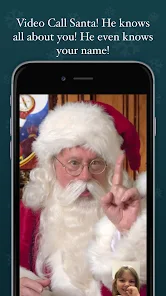
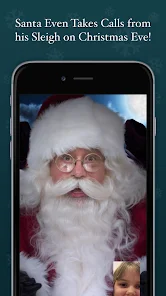
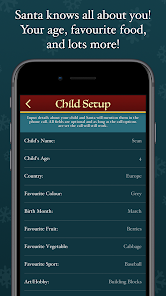
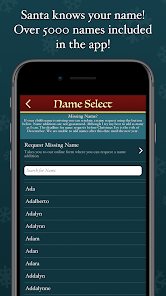
editor reviews
I first came across “Speak to Santa™ - Video Call” while scrolling through the App Store with my kids one evening. It's basically a holiday-themed simulation app where you can set up a video call with a virtual Santa Claus. The app claims to let you talk to Santa in real time, and honestly, the idea hooked me right away because my youngest still believes. After downloading it for free — it had a decent install count, though I don't recall the exact number — I launched it and was greeted by a cheery winter scene with falling snow. No registration was needed upfront, which was a relief, but I quickly noticed there were in-app purchases for extra features like longer calls or special outfits. The first impression was solid: the graphics are colorful and festive, and Santa's face appears friendly enough, though the voice lagged a bit during my initial test.
Once I started using it, the experience was mostly straightforward but had a few hiccups. The interface is simple: you tap a big “Call Santa” button, and he appears on screen, asking questions like “Have you been good this year?” The onboarding is quick, just a short tutorial bubbles that explain how to respond via preset replies or voice commands. During the call, I could choose from different activities like singing a carol or telling Santa your wish list. My kid loved tapping the screen to make snowflakes appear, but I found the voice recognition sometimes misheard simple words like “train” as “cane.” A practical tip: make sure you're in a quiet room to avoid confusion. The call lasts about two minutes for the free version, which felt short, but the paid upgrade stretched it to five. Navigating between the main screen and the settings was smooth, though a few times the app froze when I tried to switch activities mid-call.
After a week of letting my kids use it, I can say it's charming but not for everyone. Younger children, maybe ages 4 to 8, will get a genuine kick out of it, especially if they still believe in Santa. But older kids or adults will quickly see through the gimmick, since the responses are clearly canned phrases and the animation stays repetitive. Compared to similar apps like “Santa Video Call” or “Call Santa Claus,” this one stands out for its polished visuals and the variety of activities, but it falls short on realism because Santa's voice sounds robotic and his lip-sync is off. I kept it installed because my youngest grabs it every December, but I can see uninstalling it once the holiday season ends. It's a fun novelty, but not something you'll use all year.
features
- 🎅 The app's standout feature is the real-time video call with a virtual Santa, which uses facial animation to make him seem like he's talking directly to you. This feels more immersive than competitors like “Video Call Santa Live,” which relies on static images, but the lip-syncing can be a bit wonky sometimes.
- 🛷 You can choose from different scenarios like a cozy cabin or a snowy North Pole, and Santa reacts to your responses with simple gestures like waving or laughing. This adds a layer of interactivity that apps like “Santa's Call” don't offer, though the reactions are limited to a few preset animations.
- 🎄 The app includes a wish list recorder where kids can speak their Christmas wishes, and Santa repeats them back in a jolly voice. This personal touch makes it feel unique compared to generic alternatives, but the voice recognition accuracy varies depending on your device's microphone quality.
pros
- 👍 The visuals are colorful and child-friendly, with smooth animations that outshine “Santa Video Call 2024,” which uses cheaper, less detailed graphics. My kids were immediately drawn to the snowy landscapes and twinkling lights.
- 👍 Setup is quick with no registration required, unlike “Call Real Santa,” which demands an email and password. I could hand the phone to my kid within seconds of downloading, which saved my patience during the holiday rush.
- 👍 The app has a decent selection of free content, like a one-minute sample call, that lets you try before paying. This is more generous than “Santa Cam,” which locks everything behind a paywall from the start.
cons
- 👎 The free version's call length is too short at only two minutes, and the upgrade costs extra. For context, “Holiday Call Santa” offers full calls for free with just optional ads, making it a better budget pick.
- 👎 Voice recognition often stumbles with kids' high-pitched voices or background noise, leading to awkward pauses. Competing apps like “Santa Speak” handle this better with a manual text input option.
- 👎 The app's novelty wears off fast after a few uses, because Santa says the same phrases repeatedly. I noticed “Santa Live Chat” has a larger script library, keeping the experience fresher for longer.
- 👎 There are occasional ads after each call in the free tier, which disrupts the magic for younger users. “No-Ad Santa Call” avoids this entirely, though it charges a small upfront fee.
Articles
![]()
Guide
How to Update Google Play Store on Android 2026
![]()
Guide
How to Download Older Versions of Android Apps
![]()
Guide
How to Download Apps Without Google Play Store
![]()
Guide
What Is an APK File for Android?
If you use an Android phone, you may have seen the term APK while searching for apps or games online. Some websites offer an APK download instead of a Google Play install button. Some users also mention APK files when talking about apps that are not available in their region, older app versions, or Android games downloaded outside the Play Store.
![]()
Guide
How to Install Games from Google Play for Beginners
Installing games on an Android phone is usually simple, but for beginners, the process can still feel confusing at first. You may not know where to search, which button to tap, whether the game is safe, or why Google Play sometimes asks for account settings, storage access, or payment information. If you are using an Android phone for the first time, learning how to install games from Google Play is one of the easiest ways to get started.
![]()
Guide
How Useful Gemini Is for Everyday Questions and Quick Tasks
emini feels different from many AI apps because it is not only trying to be a chatbot. After using it for everyday questions, quick writing, image understanding, and planning, I think its biggest strength is convenience.
![]()
Guide
What to Know Before Downloading APKs
For many Android users, downloading an APK is a common way to install apps and games. Sometimes an app is not available in a certain country.
![]()
Guide
ChatGPT Review: Is It Still the Best AI App in 2026?
![]()
Guide
Seedance 2.0 vs Sora: The Future of AI Video Generation
The AI video race has intensified dramatically over the past two years. Platforms like Sora from OpenAI and Luma Dream Machine pushed the boundaries of text-to-video realism. Yet, despite their impressive outputs, most tools still operate as probabilistic generators—you describe a scene, and the model interprets it. Control remains limited. With the February 2026 release of Seedance 2.0, developed by ByteDance, the paradigm shifted. Internally known as Jimeng 2.0, Seedance does not position itself as just another video model. It positions itself as an AI Director. Rather than guessing what you want, Seedance 2.0 allows you to direct what happens. This distinction defines everything that follows.









Recommended Apps
![]()
Home Design 3D
Anuman4.2
![]()
Truth or Dare Game - Party App
Chouic4.8
![]()
Photo Collage Maker
Scoompa4.7![]()
Learn to Draw Flower
Creative APPS4.2![]()
FIFA World Cup 2026™
FIFA2.8![]()
Mirror Plus: Mirror with Light
Digitalchemy, LLC4.4![]()
Meitu- Photo Editor & AI Art
Meitu (China) Limited4.5![]()
Perplexity - Ask Anything
PerplexityAI4.7![]()
GhostTube SLS Camera Alternate
GhostTube4![]()
Boom Chip Blast: 2-Player
Black Pyramid 3D Games Studio0![]()
Healthy Benefits+
Solutran, Inc.4.5![]()
Deepcheck AI Search Assistant
rohe.ai4![]()
Idol Prank Video Call & Chat
LightCode Solutions4![]()
Face Shape - Pretty Scale
GlintTec Apps3.9![]()
Plant App - Plant Identifier
ScaleUp4.6











































