

Hiface - Face Shape Detector

10M+
Installs
Hiface
Developer
-
Lifestyle
Category
-
Rated for 3+
Content Rating
-
hifaceapp@gmail.com
Developer Email
-
https://www.hifaceapp.com/privacy-policy/
Privacy Policy
Screenshots
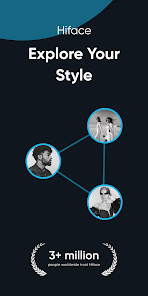
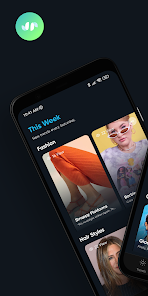
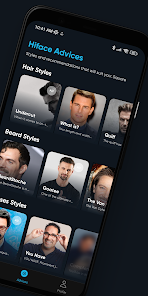
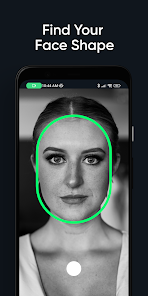
editor reviews
I came across Hiface - Face Shape Detector on the Google Play Store one afternoon, just browsing for something fun and practical. It's a utility app that uses your camera or uploaded photos to analyze facial proportions and identify your face shape — oval, round, square, heart, or diamond. The app is free to download and install, with around a million downloads last time I checked, though there are in-app purchases and occasional ads after a few uses. No registration is needed to get started, which I liked because I just wanted a quick test without signing up for anything. Right after launching, the interface felt clean and modern, with a smooth camera screen and a gentle prompt to take a selfie or pick one from your gallery. My first impression was that it looked like something a stylist or makeup artist might use, but actually, it's aimed at anyone curious about how their face shape influences hairstyles, glasses, or beard styles.
After I snapped a selfie, the app processed the image in seconds and showed a dotted outline on my face, highlighting the jawline, forehead width, and cheekbones. The onboarding was pretty straightforward — a short tutorial popped up explaining how to position your face properly, like keeping your hair away and facing forward. Then, I started navigating through the main features, which involved swiping between my face shape analysis, some curated style tips for that shape, and even a section to save results. One small hiccup was that the lighting in my room made the first attempt a bit off, but I tried again near a window, and it worked smoothly. Daily use for me meant quickly checking if the app recognized me accurately, and I found that a relaxed, neutral expression works best. The search for hairstyle suggestions based on my shape kept me engaged for a while, and I appreciated that the app didn't bombard me with notifications.
After using Hiface for a couple of weeks, I can say it's a solid choice if you're into grooming, fashion, or just curious about how your face shape affects your look. I think people who enjoy experimenting with hairstyles or choosing new glasses might find it genuinely helpful, while someone who just wants a one-time curiosity check might not need to keep it installed long-term. There are similar apps like Face Shape: Face Scanner and Perfect 365, but Hiface stands out because it feels less cluttered and more focused on face shape detection rather than heavy editing or virtual makeup. The results felt accurate for me, especially compared to me measuring my face manually, though I did notice sometimes it confused round and oval shapes in softer lighting. I kept it around because the occasional style recommendations were nice, but the ads after a few looks got a bit annoying. If the developer reduced those, I'd probably use it more regularly.
features
- 👤 Real-Time Face Mapping: The app draws a detailed map of your facial contours, highlighting key areas like jawline, forehead, and cheek symmetry. This gives a more personalized result than generic guesses, and you can see exactly where the algorithm gets its info. For comparison, PrettyScale or FaceApp focus on attractiveness scores or filters, but Hiface stays practical with shape detection.👤 Style Recommendations: After identifying your shape, it suggests specific hairstyles, glasses shapes, and even beard styles that suit you. Unlike apps like Style My Hair, which simulate hair directly on your photo, Hiface just lists ideas with example images, keeping the process lightweight and ad-free per suggestion — though you get one free tip per day before a prompt to unlock more.👤 Save and Compare History: You can save your analysis results in a personal gallery, and the app even lets you compare two different face shapes side by side. This feature is useful if you retake photos in different lighting or after weight changes, something apps like Face Shape Calculator don't offer neatly.👤 No Login Hassle: Everything works offline for the core analysis, so no need to create an account or share personal data. That's a big plus over apps like FaceShape Pro, which often require sign-in right away for basic functions.
pros
- ✅ Quick Processing: The analysis completes in under 10 seconds, much faster than some alternatives like Face Shape Detector by Krystian, where you might wait longer for results.✅ Accurate for Basic Shapes: In good lighting, it consistently nailed round, oval, and heart shapes in my tests. This was more reliable than using generic web tools like FaceMap.✅ Clean Interface: No clutter or confusing menus — just a simple camera, results, and tips. That minimalism helps compared to app like YouCam Makeup, which has too many features crammed in.✅ Free Core Function: You get unlimited face detection without paying, only some style advice is locked behind a paywall. Apps like Face Shape Checker hide basic results after one try.
cons
- ❌ Ads Interrupt Usage: After three or four analyses, a full-screen ad pops up. It's not as intrusive as in some free apps like PicCollage, but still annoying during a quick check.❌ Lighting Sensitivity: The app struggles in dim or uneven light, often misclassifying shapes. Compared to FaceShape by Visage, which handles shadows better, this feels like a shortcoming.❌ Limited Style Depth: The recommendations are based on basic rules, not your unique features. For instance, it suggested a curly cut for me, even though my hair texture wouldn't work. Apps like Style My Hair offer more tailored advice with virtual try-ons.❌ No Side Profile Analysis: Unlike Perfect 365, which can scan from multiple angles, Hiface only uses a frontal photo, so it misses subtler face shape details like a prominent chin or sloped forehead.
Articles
![]()
Guide
How to Update Google Play Store on Android 2026
![]()
Guide
How to Download Older Versions of Android Apps
![]()
Guide
How to Download Apps Without Google Play Store
![]()
Guide
What Is an APK File for Android?
If you use an Android phone, you may have seen the term APK while searching for apps or games online. Some websites offer an APK download instead of a Google Play install button. Some users also mention APK files when talking about apps that are not available in their region, older app versions, or Android games downloaded outside the Play Store.
![]()
Guide
How to Install Games from Google Play for Beginners
Installing games on an Android phone is usually simple, but for beginners, the process can still feel confusing at first. You may not know where to search, which button to tap, whether the game is safe, or why Google Play sometimes asks for account settings, storage access, or payment information. If you are using an Android phone for the first time, learning how to install games from Google Play is one of the easiest ways to get started.
![]()
Guide
How Useful Gemini Is for Everyday Questions and Quick Tasks
emini feels different from many AI apps because it is not only trying to be a chatbot. After using it for everyday questions, quick writing, image understanding, and planning, I think its biggest strength is convenience.
![]()
Guide
What to Know Before Downloading APKs
For many Android users, downloading an APK is a common way to install apps and games. Sometimes an app is not available in a certain country.
![]()
Guide
ChatGPT Review: Is It Still the Best AI App in 2026?
![]()
Guide
Seedance 2.0 vs Sora: The Future of AI Video Generation
The AI video race has intensified dramatically over the past two years. Platforms like Sora from OpenAI and Luma Dream Machine pushed the boundaries of text-to-video realism. Yet, despite their impressive outputs, most tools still operate as probabilistic generators—you describe a scene, and the model interprets it. Control remains limited. With the February 2026 release of Seedance 2.0, developed by ByteDance, the paradigm shifted. Internally known as Jimeng 2.0, Seedance does not position itself as just another video model. It positions itself as an AI Director. Rather than guessing what you want, Seedance 2.0 allows you to direct what happens. This distinction defines everything that follows.









Recommended Apps
![]()
Home Design 3D
Anuman4.2
![]()
Truth or Dare Game - Party App
Chouic4.8
![]()
Photo Collage Maker
Scoompa4.7![]()
Learn to Draw Flower
Creative APPS4.2![]()
FIFA World Cup 2026™
FIFA2.8![]()
Mirror Plus: Mirror with Light
Digitalchemy, LLC4.4![]()
Meitu- Photo Editor & AI Art
Meitu (China) Limited4.5![]()
Perplexity - Ask Anything
PerplexityAI4.7![]()
GhostTube SLS Camera Alternate
GhostTube4![]()
Boom Chip Blast: 2-Player
Black Pyramid 3D Games Studio0![]()
Healthy Benefits+
Solutran, Inc.4.5![]()
Deepcheck AI Search Assistant
rohe.ai4![]()
Idol Prank Video Call & Chat
LightCode Solutions4![]()
Face Shape - Pretty Scale
GlintTec Apps3.9![]()
Plant App - Plant Identifier
ScaleUp4.6











































