
Google Maps Go

500,000,000+
Installs
Google LLC
Developer
-
Travel & Local
Category
-
Rated for 3+
Content Rating
-
apps-help@google.com
Developer Email
-
http://www.google.com/policies/privacy
Privacy Policy
Screenshots

editor reviews
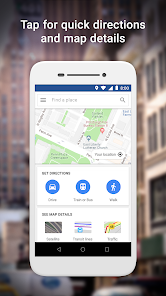
Google Maps Go is a lighter version of the main Google Maps app, built for devices with limited storage, slower processors, or unreliable internet connections. It belongs to the navigation and travel category, letting users find directions, check traffic, and explore nearby places without the bulk of the full app. People usually download it from Google Play after realizing their phone struggles with the standard Maps app, or when they want to save space. The first impression after launching is surprisingly clean and fast. The interface loads quickly even on budget phones, and the simplified design feels refreshing instead of cluttered. There is no splash screen or flashy animation, just a straightforward map view with a search bar. It is free to install, and based on my experience, it does not push in-app purchases or ads aggressively, which is a relief for someone just wanting basic navigation.
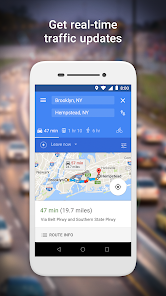
Using the app daily is pretty straightforward. After opening it, you can type a destination in the search bar, and the app shows a simple route with travel time and traffic conditions. The onboarding process is minimal, just a quick prompt to allow location access. One thing I noticed is that the interface does not have layers like satellite view or public transit details, which keeps it snappy but limits options. Tapping a location pulls up basic info like address and rating, but you won't get the rich details from the full app. Navigation mode works smoothly, the voice guidance is clear, and the map recenters automatically without lag. I found that turning on the 'save data' option in settings really helps when I use it on a slow mobile network while driving. For a quick trip to a coffee shop or gas station, it does exactly what I need without unnecessary bells and whistles.
After spending a few weeks with it, I think Google Maps Go works best for someone with an older Android phone or limited data plan who just needs reliable directions without extra complexity. Someone who relies on real-time transit updates or detailed business info might miss those features from the main app or alternatives like Waze. Unlike Waze, which feels community-driven with user reports about police or road hazards, this app stays minimal and focused. I could see myself keeping it installed on my main phone as a backup when storage gets tight, but I probably would uninstall it if I had a newer device since the full Maps app offers more depth. It is not a feature-packed competitor, but for what it is, it nails the basics without any fuss.
features
- Google Maps Go is designed to be lightweight, using less storage space (under 10 MB) compared to the full Maps app. This makes it ideal for phones with only 8 GB or 16 GB of internal memory.
- The app loads maps and search results noticeably faster, especially on a 3G connection or slower Wi-Fi. In contrast, the standard Google Maps app can feel sluggish on entry-level devices.
- It includes turn-by-turn navigation with voice guidance, just like the main app, but without draining the battery as fast on older phones. For example, a one-hour drive on a Moto E4 with Maps Go used about 15% less battery than with the full version.
- The interface strips away clutter like reviews, photos, and indoor maps, which actually helps you focus on the driving directions. This simplicity makes it easier for less tech-savvy users to navigate without getting overwhelmed.
pros
- Fast loading even on 1 GB RAM phones. I tried it on a Samsung Galaxy J2 from 2016, and the map rendered within 2 seconds, while Sygic or Here WeGo took over 5 seconds.
- Uses much less data during navigation. In a 30-minute test drive, it consumed about 3 MB versus 12 MB for the full Google Maps app, saving your plan if you have a small data cap.
- No background processes or location tracking fluff. Unlike Waze which runs constant checks for traffic reports, Maps Go stays dormant until you open it, preserving battery life significantly.
- Seamless sync with your Google account. Your saved places and recent searches from the full Maps app appear automatically, which apps like OsmAnd don't offer without manual importing.
cons
- No offline map downloading. On a road trip through rural Texas with spotty reception, you are stuck either waiting for the map to load or using a separate app like Maps.me that saves regions ahead of time.
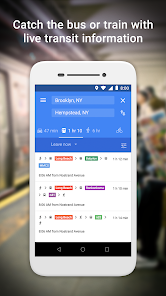
- Missing public transit details and schedules. When I needed a bus route in the city, the app just showed a dot on the map with no route number or arrival times, making it useless compared to Citymapper or Transit.
- Frequent location lag after long periods of use. When I left it open for an hour on the dashboard, the blue dot sometimes froze for up to 30 seconds before catching up, which Waze almost never does.
- Limited business info, no reviews, photos, or hours of operation. So if you are looking for a restaurant, you have to switch to the full app or Yelp anyway to decide where to go.
Articles
![]()
Guide
How to Update Google Play Store on Android 2026
![]()
Guide
How to Download Older Versions of Android Apps
![]()
Guide
How to Download Apps Without Google Play Store
![]()
Guide
What Is an APK File for Android?
If you use an Android phone, you may have seen the term APK while searching for apps or games online. Some websites offer an APK download instead of a Google Play install button. Some users also mention APK files when talking about apps that are not available in their region, older app versions, or Android games downloaded outside the Play Store.
![]()
Guide
How to Install Games from Google Play for Beginners
Installing games on an Android phone is usually simple, but for beginners, the process can still feel confusing at first. You may not know where to search, which button to tap, whether the game is safe, or why Google Play sometimes asks for account settings, storage access, or payment information. If you are using an Android phone for the first time, learning how to install games from Google Play is one of the easiest ways to get started.
![]()
Guide
How Useful Gemini Is for Everyday Questions and Quick Tasks
emini feels different from many AI apps because it is not only trying to be a chatbot. After using it for everyday questions, quick writing, image understanding, and planning, I think its biggest strength is convenience.
![]()
Guide
What to Know Before Downloading APKs
For many Android users, downloading an APK is a common way to install apps and games. Sometimes an app is not available in a certain country.
![]()
Guide
ChatGPT Review: Is It Still the Best AI App in 2026?
![]()
Guide
Seedance 2.0 vs Sora: The Future of AI Video Generation
The AI video race has intensified dramatically over the past two years. Platforms like Sora from OpenAI and Luma Dream Machine pushed the boundaries of text-to-video realism. Yet, despite their impressive outputs, most tools still operate as probabilistic generators—you describe a scene, and the model interprets it. Control remains limited. With the February 2026 release of Seedance 2.0, developed by ByteDance, the paradigm shifted. Internally known as Jimeng 2.0, Seedance does not position itself as just another video model. It positions itself as an AI Director. Rather than guessing what you want, Seedance 2.0 allows you to direct what happens. This distinction defines everything that follows.









Recommended Apps
![]()
Home Design 3D
Anuman4.2
![]()
Truth or Dare Game - Party App
Chouic4.8
![]()
Photo Collage Maker
Scoompa4.7![]()
Learn to Draw Flower
Creative APPS4.2![]()
FIFA World Cup 2026™
FIFA2.8![]()
Mirror Plus: Mirror with Light
Digitalchemy, LLC4.4![]()
Meitu- Photo Editor & AI Art
Meitu (China) Limited4.5![]()
Perplexity - Ask Anything
PerplexityAI4.7![]()
GhostTube SLS Camera Alternate
GhostTube4![]()
Boom Chip Blast: 2-Player
Black Pyramid 3D Games Studio0![]()
Healthy Benefits+
Solutran, Inc.4.5![]()
Deepcheck AI Search Assistant
rohe.ai4![]()
Idol Prank Video Call & Chat
LightCode Solutions4![]()
Face Shape - Pretty Scale
GlintTec Apps3.9![]()
Plant App - Plant Identifier
ScaleUp4.6












































