
AI Hug Video - Image to Video

10K+
Installs
M-AI Studio
Developer
-
Video Players & Editors
Category
-
Rated for 3+
Content Rating
-
Fifth District, No. 10 Courtyard
Developer Email
-
https://sites.google.com/view/aihug-privacy
Privacy Policy
Screenshots
editor reviews
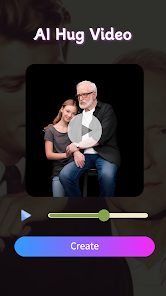
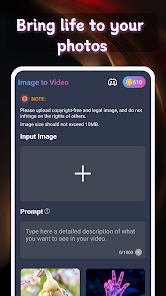
AI Hug Video - Image to Video is a utility app developed by M-AI Studio that turns static photos into short animated clips, specifically designed to create hugging-style videos. You upload a picture of a person or a couple, and the app attempts to simulate a gentle hug motion with a romantic atmosphere. It sits in the category of AI-powered photo animation tools, which have become quite popular lately. I came across it while browsing the Play Store, where it shows a fairly high install count alongside the optional in-app purchases and ads. There is no registration required to start using it, which is always nice for a quick test. After downloading and launching it, the first impression is rather mixed — the interface looks clean but basic, with big buttons and simple icons. The app tries to advertise its hugging effect immediately, so right away you begin to wonder how convincing that motion will actually be.
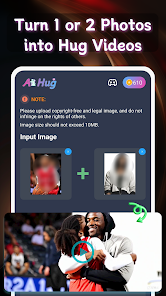
Once you start using the app, the process is pretty straightforward. You tap the main button to pick a photo from your gallery, and the app lets you crop it to a square aspect ratio. After that, it processes the image and generates a short video where the figure in the photo appears to be in a gentle embrace with a virtual silhouette. The animation takes about ten to fifteen seconds depending on your device, and during that time you see a loading bar. Some clips look fairly smooth and romantic, especially if the original photo has a clear frontal face and a plain background. However, I noticed that complicated group photos or side profiles often confuse the AI, leading to awkward arm movements or distorted faces. The app also offers a small selection of background music tracks, which you can switch on or off. A practical tip — try using a medium-resolution image rather than a very high one, because the app tends to process faster without losing much quality. On the whole, the interface is not confusing, but the limited editing options make the whole experience feel a bit shallow after a few tries.
After spending some time with AI Hug Video, I feel it is a fun novelty but not something that holds your attention for long. The app really appeals to someone who wants to create a cute, sentimental video for a partner or a friend, maybe for a birthday or anniversary. But if you are into more advanced AI video editing or professional animation tools, this will feel too basic and limited. Compared to apps like CapCut or Picsart, which offer far more creative control and animation features, AI Hug Video is extremely narrow in scope. What makes it stand out is its one-trick focus — it does one thing, and that thing is trying to create a hugging effect. Some people might keep it installed just to surprise someone once, but many will probably uninstall it after a week because there is not enough depth to explore. The advertisements and the paywall for removing watermarks also reduce the overall enjoyment. It is a decent first try for a very specific gimmick, but it is not a daily driver for most users.
features
- 🤗 Photo-to-hug animation: You upload a still image and the app uses AI to simulate a gentle hugging motion between the person in the photo and a virtual partner. It works reasonably well for clear frontal shots, but side profiles or group photos often produce unnatural arm movements.
- 🎵 Background music library: There are about a dozen royalty-free romantic tracks you can add to your video. It is a nice touch, but the selection is limited and you cannot upload your own music unless you pay for the premium version.
- 📹 Simple export and sharing: You can save the generated clip directly to your gallery or share it to social media platforms. The free version adds a watermark, which looks a bit cheap, and removing it requires an in-app purchase.
pros
- 🤗 Super easy to use: Unlike CapCut or Motionleap, this app requires zero learning. You just pick a photo and wait a few seconds. The lack of complex editing menus makes it approachable for anyone, even grandparents.
- 🎵 Quick results: The generation time is relatively fast on modern devices, usually under 20 seconds. You do not have to mess with layers or keyframes. It is a one-click experience compared to something like Kinemaster which demands more effort.
- 📹 Low device requirements: The app runs smoothly even on older phones with limited RAM. Some similar tools struggle on mid-range hardware, but this one handled fine on my 2019 device.
cons
- 🤗 Very repetitive output: After three or four different photos, the animation starts to feel the same. There is no variety in the hug style or the virtual partner's appearance. In contrast, Picsart's animation tools let you customize the effect much more.
- 🎵 Limited music options: You cannot add your own audio without paying. The built-in tracks are short loops that repeat, which becomes annoying quickly. CapCut lets you import any song for free.
- 📹 Watermark on free version: The exported video always has a small logo and watermark unless you pay. Competing apps often offer a branded-free export option after watching an ad, but here you have to spend real money.
Articles
![]()
Guide
How to Update Google Play Store on Android 2026
![]()
Guide
How to Download Older Versions of Android Apps
![]()
Guide
How to Download Apps Without Google Play Store
![]()
Guide
What Is an APK File for Android?
If you use an Android phone, you may have seen the term APK while searching for apps or games online. Some websites offer an APK download instead of a Google Play install button. Some users also mention APK files when talking about apps that are not available in their region, older app versions, or Android games downloaded outside the Play Store.
![]()
Guide
How to Install Games from Google Play for Beginners
Installing games on an Android phone is usually simple, but for beginners, the process can still feel confusing at first. You may not know where to search, which button to tap, whether the game is safe, or why Google Play sometimes asks for account settings, storage access, or payment information. If you are using an Android phone for the first time, learning how to install games from Google Play is one of the easiest ways to get started.
![]()
Guide
How Useful Gemini Is for Everyday Questions and Quick Tasks
emini feels different from many AI apps because it is not only trying to be a chatbot. After using it for everyday questions, quick writing, image understanding, and planning, I think its biggest strength is convenience.
![]()
Guide
What to Know Before Downloading APKs
For many Android users, downloading an APK is a common way to install apps and games. Sometimes an app is not available in a certain country.
![]()
Guide
ChatGPT Review: Is It Still the Best AI App in 2026?
![]()
Guide
Seedance 2.0 vs Sora: The Future of AI Video Generation
The AI video race has intensified dramatically over the past two years. Platforms like Sora from OpenAI and Luma Dream Machine pushed the boundaries of text-to-video realism. Yet, despite their impressive outputs, most tools still operate as probabilistic generators—you describe a scene, and the model interprets it. Control remains limited. With the February 2026 release of Seedance 2.0, developed by ByteDance, the paradigm shifted. Internally known as Jimeng 2.0, Seedance does not position itself as just another video model. It positions itself as an AI Director. Rather than guessing what you want, Seedance 2.0 allows you to direct what happens. This distinction defines everything that follows.









Recommended Apps
![]()
Home Design 3D
Anuman4.2
![]()
Truth or Dare Game - Party App
Chouic4.8
![]()
Photo Collage Maker
Scoompa4.7![]()
Learn to Draw Flower
Creative APPS4.2![]()
FIFA World Cup 2026™
FIFA2.8![]()
Mirror Plus: Mirror with Light
Digitalchemy, LLC4.4![]()
Meitu- Photo Editor & AI Art
Meitu (China) Limited4.5![]()
Perplexity - Ask Anything
PerplexityAI4.7![]()
GhostTube SLS Camera Alternate
GhostTube4![]()
Boom Chip Blast: 2-Player
Black Pyramid 3D Games Studio0![]()
Healthy Benefits+
Solutran, Inc.4.5![]()
Deepcheck AI Search Assistant
rohe.ai4![]()
Idol Prank Video Call & Chat
LightCode Solutions4![]()
Face Shape - Pretty Scale
GlintTec Apps3.9![]()
Plant App - Plant Identifier
ScaleUp4.6











































