

Glam AI: Video & Photo Editor

Installs
Glam Labs, Inc.
Developer
-
Generative AI
Category
-
Teen
Content Rating
-
+17538456734
Developer Email
-
https://getglam.app/privacy/
Privacy Policy
Screenshots

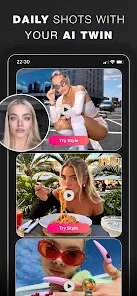
editor reviews
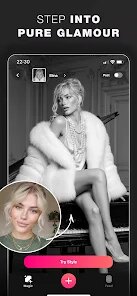
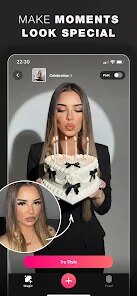
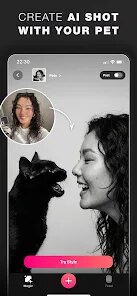
There are countless photo and video editing applications available on Google Play, each promising to transform your media with minimal effort. Glam AI: Video & Photo Editor, developed by Glam Labs, Inc., is one such tool that focuses specifically on applying aesthetic filters and beauty enhancements to both photos and short video clips. The app is free to download and install, though it does include advertisements and offers in-app purchases for unlocking the full range of effects and removing watermarks. Its main appeal lies in simplifying the editing process for users who want quick, visually pleasing results without needing to understand complex editing software.
The editing workflow is straightforward and surprisingly fast. After selecting an image or video from your gallery, you are presented with a range of category-driven transformations, including virtual makeup, hairstyle changes, body reshaping, and artistic filters. I found the face detection to be reliable, quickly mapping key facial points to apply effects seamlessly. Adjusting the intensity of a particular filter is as simple as sliding a bar, and the preview updates in real time, which is a nice touch. The app clearly prioritizes speed and simplicity, making it easy to produce a finished piece of content within a minute or two. However, the sheer number of options can feel a bit overwhelming initially, but the interface is logically organized once you spend a few minutes exploring it.
In comparison to more versatile editing apps like PicsArt or YouCam Perfect, Glam AI adopts a more focused approach. While those competitors function as comprehensive editing studios with layers, stickers, and drawing tools, Glam AI deliberately narrows its scope to automated beauty and stylistic filters. This makes it less flexible for general creative projects but more efficient for users whose primary goal is enhancing portraits or adding a trendy look. I found its virtual makeup tools, for example, to be more reliable and realistic than similar features in more general editors, which often produce artificial-looking results. This trade-off between versatility and execution in a specific niche gives Glam AI a clear identity, though it also limits its usefulness for broader editing tasks.
features
- The app's virtual makeup feature is one of its best. Unlike some editors that apply a flat color overlay, Glam AI intelligently adjusts the texture and opacity to look more natural, especially in different lighting conditions. I found this particularly effective for subtle everyday looks rather than heavy transformations.
- Its body reshaping tools, while controversial, function smoothly. The slimming and height adjustment features are gradual and avoid the drastic, warping effects seen in lesser apps. There is also an automatic background changer that works well for simple, solid backdrops but struggles slightly with complex, multi-textured backgrounds.
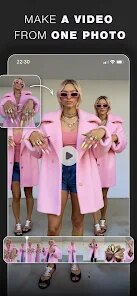
- The video editing capabilities are notably limited compared to photo editing. You can apply most filters and beauty effects to short clips, but there is no timeline or trimming tool, which means you must import pre-edited clips if you want control over duration. This feels like a missed opportunity for a more integrated experience.
- Compared to apps like Facetune, Glam AI offers a wider variety of free effects without immediately pushing for a subscription, which is a positive distinction. The ad frequency is moderate and never feels excessive, though the watermarks on exported media are a clear incentive to upgrade.
pros
- It saves significant time when you need a polished portrait quickly, avoiding the need to manually adjust brightness, contrast, and color tones.
- The consistency of results across different photos is high, which is helpful for maintaining a uniform look in a social media feed or album.
- It serves as a useful creative tool for experimenting with different hairstyles or makeup looks without any real commitment, allowing you to preview aesthetic changes before deciding on a direction.
cons
- The inability to edit video durations or combine clips is a notable limitation, as it forces users to rely on a separate video editor before importing.
- Some artistic filters can appear overly processed on high-resolution images, producing a slight digital artifact around edges that detracts from the natural feel.
- Free exports include a persistent watermark unless you subscribe, which might feel restrictive for regular users who do not want to pay a monthly fee.
Articles
![]()
Guide
How to Update Google Play Store on Android 2026
![]()
Guide
How to Download Older Versions of Android Apps
![]()
Guide
How to Download Apps Without Google Play Store
![]()
Guide
What Is an APK File for Android?
If you use an Android phone, you may have seen the term APK while searching for apps or games online. Some websites offer an APK download instead of a Google Play install button. Some users also mention APK files when talking about apps that are not available in their region, older app versions, or Android games downloaded outside the Play Store.
![]()
Guide
How to Install Games from Google Play for Beginners
Installing games on an Android phone is usually simple, but for beginners, the process can still feel confusing at first. You may not know where to search, which button to tap, whether the game is safe, or why Google Play sometimes asks for account settings, storage access, or payment information. If you are using an Android phone for the first time, learning how to install games from Google Play is one of the easiest ways to get started.
![]()
Guide
How Useful Gemini Is for Everyday Questions and Quick Tasks
emini feels different from many AI apps because it is not only trying to be a chatbot. After using it for everyday questions, quick writing, image understanding, and planning, I think its biggest strength is convenience.
![]()
Guide
What to Know Before Downloading APKs
For many Android users, downloading an APK is a common way to install apps and games. Sometimes an app is not available in a certain country.
![]()
Guide
ChatGPT Review: Is It Still the Best AI App in 2026?
![]()
Guide
Seedance 2.0 vs Sora: The Future of AI Video Generation
The AI video race has intensified dramatically over the past two years. Platforms like Sora from OpenAI and Luma Dream Machine pushed the boundaries of text-to-video realism. Yet, despite their impressive outputs, most tools still operate as probabilistic generators—you describe a scene, and the model interprets it. Control remains limited. With the February 2026 release of Seedance 2.0, developed by ByteDance, the paradigm shifted. Internally known as Jimeng 2.0, Seedance does not position itself as just another video model. It positions itself as an AI Director. Rather than guessing what you want, Seedance 2.0 allows you to direct what happens. This distinction defines everything that follows.









Recommended Apps
![]()
Home Design 3D
Anuman4.2
![]()
Truth or Dare Game - Party App
Chouic4.8
![]()
Photo Collage Maker
Scoompa4.7![]()
Learn to Draw Flower
Creative APPS4.2![]()
FIFA World Cup 2026™
FIFA2.8![]()
Mirror Plus: Mirror with Light
Digitalchemy, LLC4.4![]()
Meitu- Photo Editor & AI Art
Meitu (China) Limited4.5![]()
Perplexity - Ask Anything
PerplexityAI4.7![]()
GhostTube SLS Camera Alternate
GhostTube4![]()
Boom Chip Blast: 2-Player
Black Pyramid 3D Games Studio0![]()
Healthy Benefits+
Solutran, Inc.4.5![]()
Deepcheck AI Search Assistant
rohe.ai4![]()
Idol Prank Video Call & Chat
LightCode Solutions4![]()
Face Shape - Pretty Scale
GlintTec Apps3.9![]()
Plant App - Plant Identifier
ScaleUp4.6












































