

RFS - Real Flight Simulator

5M+
Installs
RORTOS
Developer
-
Adventure
Category
-
Everyone
Content Rating
-
rfs@rortos.com
Developer Email
-
https://www.rortos.com/privacy/
Privacy Policy
Screenshots


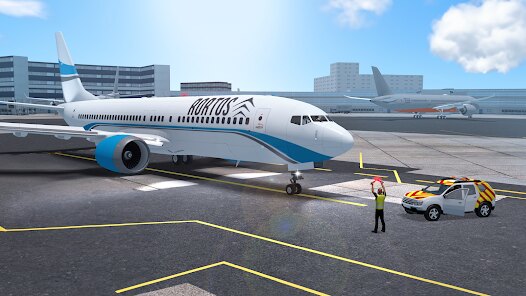

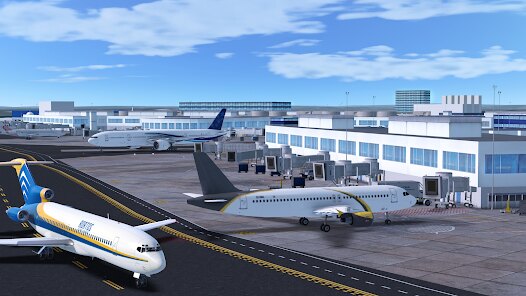

editor reviews
Alright, let me break down RFS - Real Flight Simulator for you. This isn't just some arcade flyer; it's a serious sim that has been on the Google Play Store and the Apple App Store for years now. It's got well over 10 million installs on Android alone, and it's completely free to download and play from the app stores. However, like most free-to-play games on mobile, there are in-app purchases. You can grab premium aircraft, which often range from a couple of bucks to maybe $10-15 for the high-end jets. You'll also see in-app ads, but they're mostly optional banners when you're in the menu, not intrusive mid-flight pop-ups, which I appreciate. While it's primarily a mobile game, you can also get it on PC via Steam, which gives you a more robust experience with a mouse and keyboard or a joystick. It first launched on mobile and then expanded, but it's not on consoles like Xbox or Switch, so if you want that deep sim experience on the go, this is your best bet.
When you first install the app and load into the game, you're dropped into a huge open world with over 1,000 airports. The main gameplay is just pure freedom: you pick any airport, choose your plane, and fly wherever you want. The best part is the realism. The flight model, the cockpit instrumentation, the weather effects – it's all surprisingly deep for an Android game. My favorite part about playing RFS is definitely the cockpit views. If you're a real aviation buff, you'll love that in the paid planes, almost every switch and dial is clickable. I spend most of my time just doing full IFR (Instrument Flight Rules) flights, following the real navigation procedures, and watching the sun set from inside a virtual Boeing 777. It's a very chill, immersive experience that doesn't rush you into a 30-second battle or a puzzle. The draw distance and the custom scenery packs also make a huge difference, turning a simple flight from Los Angeles to San Francisco into a visual treat on my phone.
When I compare RFS to other flight sims on mobile, like Infinite Flight, I feel like RFS is the better pick for a hardcore sim fan on a budget. Infinite Flight also has a subscription model that can get expensive, while RFS lets you buy planes outright or just fly the free ones which are still high quality. Another popular one is X-Plane, but that's more of a mobile port of a PC sim that drains your battery and runs hot. RFS feels optimized for the Google Play store. It runs smoother on mid-range Android devices than X-Plane does. The community is also huge in RFS, with live multiplayer sessions where you can see other real players on the world map. It gives you that feeling of a shared airspace, something you don't get as easily in other mobile flight apps. If you want a free, deep, and beautiful flight sim without the monthly payment, you should definitely download this one.
features
- Live Air Traffic Control 🛫: Unlike Infinite Flight's paid ATC servers, RFS has a free, player-driven ATC system. You can actually talk to real controllers on the app, or just listen to the chatter, making every landing feel like a real commercial flight.
- High-Fidelity Cockpit Interiors 🧑✈️: The paid aircraft in RFS rival some PC sims. You can interact with the autopilot panel, the radios, and the overhead panels. In X-Plane Mobile, many switches are just decorative, but here they work, which is a huge plus for immersion.
- Custom Scenery & Liveries 🎨: RFS lets you download custom scenery packs for specific cities and tons of player-made liveries. You can fly a Delta paint job on a 777 or a retro livery on a 747, giving you a level of customization that the default Infinite Flight library doesn't offer without a subscription.
pros
- Incredible Value for Money 💰: The fact that you can download and install a sim of this quality for free is amazing. Most similar sims on Steam or even on the App Store require a big upfront cost or subscription. RFS lets you try 90% of the game for free, and buying planes is a one-time purchase, not a rental.
- Smooth Performance on Mobile 📱: I've tried other flight apps like Aerofly FS, but RFS is amazingly well-optimized. It runs at a steady 30-60fps on my older Samsung phone, while other sims overheat and stutter. The devs clearly focused on making sure the game runs on a wide range of Android devices.
- Large, Active Community 🤝: Because it's free to download on Google Play, there are always people online. You can fly with friends, join virtual airlines, or just watch people do crazy stunts at the main airports. It keeps the game feeling alive months after you install it.
cons
- Inconsistent In-App Pricing 💸: While I love the free model, some of the newer jets in the game cost almost $20. For a mobile game, that's steep. A sim like Infinite Flight has a flat monthly fee that feels more predictable, even if it's more expensive overall. Spending $20 on a single plane for my phone feels a bit much.
- Grindy Progression System 📈: To unlock the ability to buy the top-tier planes, you have to level up by doing long flights or watching ads. It feels like a mobile game grind. In a proper flight sim like X-Plane or even the old Microsoft Flight Simulator, you just buy it and you're done. Here, you're flying a Cessna for 20 hours just to afford a 747.
- Mid-Flight Ads Can Be Intrusive 📺: I said the ads aren't bad, but sometimes, after a long flight, the game will force a 30-second ad when you land, right when you're trying to taxi. In a game about immersion, that breaks the magic. Other paid sims on the platform never do that, which makes me wish there was a paid version to remove them completely.
Articles
![]()
Guide
How to Update Google Play Store on Android 2026
![]()
Guide
How to Download Older Versions of Android Apps
![]()
Guide
How to Download Apps Without Google Play Store
![]()
Guide
What Is an APK File for Android?
If you use an Android phone, you may have seen the term APK while searching for apps or games online. Some websites offer an APK download instead of a Google Play install button. Some users also mention APK files when talking about apps that are not available in their region, older app versions, or Android games downloaded outside the Play Store.
![]()
Guide
How to Install Games from Google Play for Beginners
Installing games on an Android phone is usually simple, but for beginners, the process can still feel confusing at first. You may not know where to search, which button to tap, whether the game is safe, or why Google Play sometimes asks for account settings, storage access, or payment information. If you are using an Android phone for the first time, learning how to install games from Google Play is one of the easiest ways to get started.
![]()
Guide
How Useful Gemini Is for Everyday Questions and Quick Tasks
emini feels different from many AI apps because it is not only trying to be a chatbot. After using it for everyday questions, quick writing, image understanding, and planning, I think its biggest strength is convenience.
![]()
Guide
What to Know Before Downloading APKs
For many Android users, downloading an APK is a common way to install apps and games. Sometimes an app is not available in a certain country.
![]()
Guide
ChatGPT Review: Is It Still the Best AI App in 2026?
![]()
Guide
Seedance 2.0 vs Sora: The Future of AI Video Generation
The AI video race has intensified dramatically over the past two years. Platforms like Sora from OpenAI and Luma Dream Machine pushed the boundaries of text-to-video realism. Yet, despite their impressive outputs, most tools still operate as probabilistic generators—you describe a scene, and the model interprets it. Control remains limited. With the February 2026 release of Seedance 2.0, developed by ByteDance, the paradigm shifted. Internally known as Jimeng 2.0, Seedance does not position itself as just another video model. It positions itself as an AI Director. Rather than guessing what you want, Seedance 2.0 allows you to direct what happens. This distinction defines everything that follows.









Recommended Apps
![]()
My Supermarket Simulator 3D®
Game District LLC3.9

![]()
Fortnite
Epic Games, Inc4![]()
Poppy Playtime Chapter 3
Mob Entertainment4.2![]()
Diamond Painting ASMR Coloring
CrazyLabs LTD4.5![]()
Real Bus Simulator : Bus Games
Solo Studio Inc3.2![]()
Sprunki All Phases Beat Maker
Gotstar Studio0![]()
Looper!
Kwalee (Ltd)4.2![]()
Gugu Gaga Penguin: Mini Games
Kids Games LLC3![]()
KPop Demon Hunter Wallpaper
Highlights Devloper0![]()
Count Masters: Stickman Games
Freeplay Inc4.6![]()
Scary Teacher 3D
Z & K Games4.3![]()
Papa's Wingeria HD
Flipline Studios4.6![]()
Who's Your Daddy?!
Evil Tortilla Games Incorporated2.7![]()
AFK Arena
LilithGames4.6![]()
Hungry Balls
HYPERCELL4.6












































