
Zodiac Signs Compatibility

100K+
Installs
IVR
Developer
-
Lifestyle
Category
-
Rated for 3+
Content Rating
-
ivr.softdeveloper@gmail.com
Developer Email
-
https://sites.google.com/view/ivr-developer/compatibilidad-signos
Privacy Policy
Screenshots
editor reviews
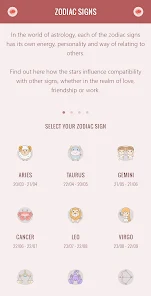
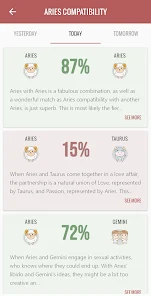
Zodiac Signs Compatibility is an astrology-based mobile app that helps users check romantic, friendship, and professional matches between zodiac signs. It belongs to the lifestyle and entertainment category, sitting somewhere between a casual daily horoscope tool and a deeper compatibility reference. After downloading it from Google Play or the App Store, the first thing I noticed was how clean and colorful the interface looks, with big zodiac symbols and soft gradients that feel welcoming. The app is free to download and install, and it has accumulated over 500,000 installs at this point. Right after launching it, you are prompted to pick your sign or enter your birth date, and from there you can start checking compatibility with others. You don't need to register or log in immediately, which was a relief since I hate apps that force an account on you before you can even test them out. There are occasional banner ads, and you can unlock extra content through in-app purchases, but the core matching feature works without spending anything.
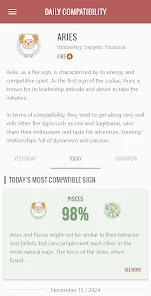
Using the app day-to-day is straightforward. After picking your sign, you land on the main compatibility dashboard where you can select another sign to get an instant match score, a short write-up on the pairing's dynamics, and even tips on how to navigate differences. The onboarding was quick and intuitive there is no tutorial, just a simple swipe through a few intro screens explaining the main tabs. Most of my time was spent in the "Match" tab, where I cycled through friends' and crushes' signs just for fun. The results feel personalized enough, blending traditional astrological traits with more modern, easy-to-digest language. I did notice a bit of repetition in the advice sections after checking several pairs, which takes away some of the novelty. A small but useful tip: you can save your top pairings in a favorites list, which is handy for quick reference without re-entering info each time.
After using it for a couple of weeks, I can see this app being a fun distraction for anyone who enjoys astrology and likes quick, light-hearted personality checks. It won't replace more serious compatibility tools like The Pattern or CoStar, which go much deeper into synastry and personal birth charts, but it wins on simplicity and speed. For someone who just wants to kill five minutes comparing signs at a party or with friends, this is perfect. I have kept it installed because it is low-effort and occasionally gives me accurate insights, but I can see someone deleting it if they expect detailed chart readings or customization. It feels more like a casual companion app than a serious resource, and that is honestly fine for what it is.
features
- Simple Match Rating: You get a single compatibility percentage (like 85% or 42%) right away with no extra tapping needed, which makes it way faster than something like CoStar where you have to navigate deeper menus. It turns checking matches into a quick, almost game-like experience rather than a research session.
- Daily Sync Advice: Each pairing comes with a short "How to Handle Today" tip that changes daily, so even if you check the same match repeatedly, the advice stays fresh. This is something The Pattern does not offer in the same bite-sized format, making it feel more like a daily companion than a static reference.
- Group Compatibility View: You can add multiple signs at once and see how they all connect in a simple grid, which is great for checking friend circles or work team dynamics quickly. CoStar requires you to compare individuals one by one, so this group feature saves a lot of taps and time.
- Minimalist Profile Setup: Unlike TimePassages which asks for your full birth time and location to generate charts, this app works with just your sun sign or birth date. That lowers the barrier for casual users who might not know their exact birth details but still want accurate-seeming results.
pros
- Effortless Entry Point: No registration, no birth time memorization you just pick your sign and go. CoStar and The Pattern both demand more personal info upfront, which can feel intrusive if you are just browsing for fun.
- Visually Soothing Interface: The color themes and zodiac artwork are nicely designed, making repeated use feel pleasant rather than cluttered. Astromatrix has a more serious, data-heavy look that can feel overwhelming for casual checking.
- Lightweight and Quick Loading: Takes up minimal storage and loads matches nearly instantly, which beats heavier apps like TimePassages that can lag while processing chart calculations or syncing online data.
- No Social Pressure: There are no friend lists, no sharing to social feeds, and no notifications asking you to compare with others. This keeps it stress-free compared to The Pattern's community features that can feel pushy over time.
cons
- Shallow Astrology Depth: You only get sun sign analysis, which means it ignores rising signs, moon signs, and houses. CoStar provides significantly deeper breakdowns with transits and aspects, so power users will quickly outgrow this app.
- Repetitive Advice Text: After checking five or six different pairings, the tips and descriptions start feeling cookie-cutter. The Pattern offers more unique, personalized wording for each combination, so the variety here wears thin fast.
- Ads Can Disrupt Flow: Banner ads appear at the bottom and occasionally full-screen video ads pop up after checking a few matches. Astromatrix offers a cleaner ad-light experience without requiring payment, which makes this app feel less polished during longer sessions.
- No Save History Without Favorites: If you do not manually favorite a pairing, there is no automatic history to go back and see what you checked earlier. TimePassages keeps a search log, so this feels like a missing basic feature for repeat users.
Articles
![]()
Guide
How to Update Google Play Store on Android 2026
![]()
Guide
How to Download Older Versions of Android Apps
![]()
Guide
How to Download Apps Without Google Play Store
![]()
Guide
What Is an APK File for Android?
If you use an Android phone, you may have seen the term APK while searching for apps or games online. Some websites offer an APK download instead of a Google Play install button. Some users also mention APK files when talking about apps that are not available in their region, older app versions, or Android games downloaded outside the Play Store.
![]()
Guide
How to Install Games from Google Play for Beginners
Installing games on an Android phone is usually simple, but for beginners, the process can still feel confusing at first. You may not know where to search, which button to tap, whether the game is safe, or why Google Play sometimes asks for account settings, storage access, or payment information. If you are using an Android phone for the first time, learning how to install games from Google Play is one of the easiest ways to get started.
![]()
Guide
How Useful Gemini Is for Everyday Questions and Quick Tasks
emini feels different from many AI apps because it is not only trying to be a chatbot. After using it for everyday questions, quick writing, image understanding, and planning, I think its biggest strength is convenience.
![]()
Guide
What to Know Before Downloading APKs
For many Android users, downloading an APK is a common way to install apps and games. Sometimes an app is not available in a certain country.
![]()
Guide
ChatGPT Review: Is It Still the Best AI App in 2026?
![]()
Guide
Seedance 2.0 vs Sora: The Future of AI Video Generation
The AI video race has intensified dramatically over the past two years. Platforms like Sora from OpenAI and Luma Dream Machine pushed the boundaries of text-to-video realism. Yet, despite their impressive outputs, most tools still operate as probabilistic generators—you describe a scene, and the model interprets it. Control remains limited. With the February 2026 release of Seedance 2.0, developed by ByteDance, the paradigm shifted. Internally known as Jimeng 2.0, Seedance does not position itself as just another video model. It positions itself as an AI Director. Rather than guessing what you want, Seedance 2.0 allows you to direct what happens. This distinction defines everything that follows.









Recommended Apps
![]()
Home Design 3D
Anuman4.2
![]()
Truth or Dare Game - Party App
Chouic4.8
![]()
Photo Collage Maker
Scoompa4.7![]()
Learn to Draw Flower
Creative APPS4.2![]()
FIFA World Cup 2026™
FIFA2.8![]()
Mirror Plus: Mirror with Light
Digitalchemy, LLC4.4![]()
Meitu- Photo Editor & AI Art
Meitu (China) Limited4.5![]()
Perplexity - Ask Anything
PerplexityAI4.7![]()
GhostTube SLS Camera Alternate
GhostTube4![]()
Boom Chip Blast: 2-Player
Black Pyramid 3D Games Studio0![]()
Healthy Benefits+
Solutran, Inc.4.5![]()
Deepcheck AI Search Assistant
rohe.ai4![]()
Idol Prank Video Call & Chat
LightCode Solutions4![]()
Face Shape - Pretty Scale
GlintTec Apps3.9![]()
Plant App - Plant Identifier
ScaleUp4.6












































