
DIY Battery: 3D Charge & Emoji

500K+
Installs
Braly JSC
Developer
-
Productivity
Category
-
Everyone
Content Rating
-
feedback.pirates@bralyvn.com
Developer Email
-
https://bralyvn.com/privacy-policy.php
Privacy Policy
Screenshots
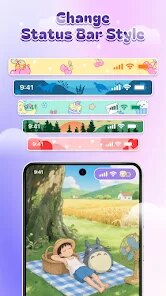
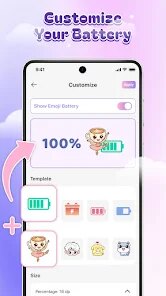
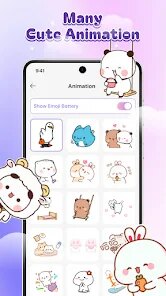
editor reviews
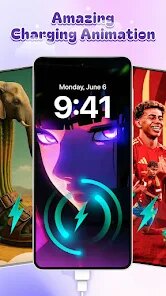
DIY Battery: 3D Charge & Emoji is a customization tool that lets you replace your phone's boring stock battery indicator with something that actually has personality. It falls squarely into the personalization genre, sitting alongside icon pack apps and widget makers. If you download it from Google Play or the App Store, you're getting an app that swaps the plain battery bar for 3D animated designs, emoji-filled charge meters, and even interactive elements. A lot of people grab this because they're tired of the same old look, and the first impression after launching is honestly pretty fun. The interface is colorful and a bit playful, and it's free to download, though there are in-app purchases if you want the cooler premium styles. It also shows ads sometimes, which is expected for a free tool.
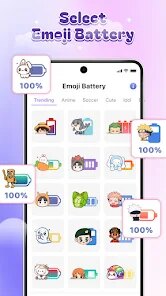
Once you start using it, the hands-on experience is mostly straightforward. Right after install, you go through a quick onboarding that explains how to enable the overlay permissions and battery monitoring, which is a bit technical but the app guides you through it. After that, you land on a screen where you can pick from a bunch of battery styles, like a neon ring that changes color as the charge drops, or a row of laughing emojis that dance when you plug in the cable. A common usage step is just choosing a design and applying it, then watching it show up on your home screen or even the lock screen. It's smooth most of the time, but I found a few confusing moments when switching styles because the preview didn't always match what appeared on the screen. A small practical tip is to turn off battery optimization for this app in your phone settings, otherwise it might stop updating correctly after a while.
After using DIY Battery for a few weeks, I have a mixed take. If you're someone who loves tweaking every little visual detail on your phone, like customizing widgets or applying theme packs, this app will probably stay on your device for a long time. It's genuinely different from something like BatteryGuru or AccuBattery, which focus more on health stats and lifespan. DIY Battery is all about aesthetics and fun, not data. What makes it stand out is the sheer variety and the 3D animations that actually feel polished. But if you just want a simple battery percentage or don't care about looks, you might uninstall it after a week because the novelty wears off and the ads can get a bit annoying. I'd say it's worth a try for the creative crowd, but don't expect it to improve your battery life in any way.
features
- 😊 The style library is huge. You get everything from futuristic 3D rings to classic emoji faces, so you can match your battery indicator to your mood or wallpaper. This beats the limited options in most stock Android skins.
- ⚡ Real-time charge animation is actually satisfying. When you plug in, the emojis start dancing or the ring pulses, which makes charging feel a little more alive compared to apps like Battery Guru that just show a static number.
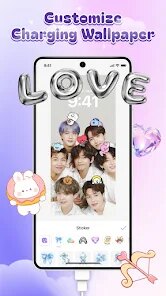
- 🎨 Customization depth is solid. Beyond just picking a design, you can adjust colors, transparency, and even position on the screen. That's more than what you get from simple overlay apps that lock you into one preset look.
- 🚀 Performance impact is surprisingly low. Even with a 3D meter running, I didn't notice any lag or extra drain, which is impressive compared to some widget apps that eat up resources in the background.
pros
- 🎯 Battery Guru only gives you health stats and graphs, but DIY Battery actually makes the indicator look good. It's a pure customization layer, which stands out because most battery apps treat style as an afterthought.
- 🖼️ Energy Ring is the closest competitor, but DIY Battery offers more variety. Energy Ring sticks to a thin circular design, while DIY Battery gives you emojis, 3D objects, and animated text, so you're not stuck with just one shape.
- 📱 AccuBattery feels clinical and data-heavy. If you want your phone to feel unique, DIY Battery wins because it prioritizes visual fun over boring percentages and charts.
cons
- 📛 Permissions can be a pain. The app needs overlay permission and battery monitoring access, and if your phone kills background processes, the indicator freezes. Battery Guru doesn't have this issue because it works in a simpler way.
- 📢 Ads are intrusive. After a few days, you get full-screen ads that interrupt the customization process. Energy Ring is almost ad-free in comparison, making DIY Battery feel a little cheap.
- 🔄 The design preview sometimes lies. What looks good in the gallery doesn't always render correctly on your home screen, so you have to test multiple styles before finding one that actually fits your screen size.
- 💡 Premium styles are locked behind a paywall. The free options are decent, but the really cool 3D animations require purchase, which can be disappointing if you're trying to avoid spending money.
Articles
![]()
Guide
How to Update Google Play Store on Android 2026
![]()
Guide
How to Download Older Versions of Android Apps
![]()
Guide
How to Download Apps Without Google Play Store
![]()
Guide
What Is an APK File for Android?
If you use an Android phone, you may have seen the term APK while searching for apps or games online. Some websites offer an APK download instead of a Google Play install button. Some users also mention APK files when talking about apps that are not available in their region, older app versions, or Android games downloaded outside the Play Store.
![]()
Guide
How to Install Games from Google Play for Beginners
Installing games on an Android phone is usually simple, but for beginners, the process can still feel confusing at first. You may not know where to search, which button to tap, whether the game is safe, or why Google Play sometimes asks for account settings, storage access, or payment information. If you are using an Android phone for the first time, learning how to install games from Google Play is one of the easiest ways to get started.
![]()
Guide
How Useful Gemini Is for Everyday Questions and Quick Tasks
emini feels different from many AI apps because it is not only trying to be a chatbot. After using it for everyday questions, quick writing, image understanding, and planning, I think its biggest strength is convenience.
![]()
Guide
What to Know Before Downloading APKs
For many Android users, downloading an APK is a common way to install apps and games. Sometimes an app is not available in a certain country.
![]()
Guide
ChatGPT Review: Is It Still the Best AI App in 2026?
![]()
Guide
Seedance 2.0 vs Sora: The Future of AI Video Generation
The AI video race has intensified dramatically over the past two years. Platforms like Sora from OpenAI and Luma Dream Machine pushed the boundaries of text-to-video realism. Yet, despite their impressive outputs, most tools still operate as probabilistic generators—you describe a scene, and the model interprets it. Control remains limited. With the February 2026 release of Seedance 2.0, developed by ByteDance, the paradigm shifted. Internally known as Jimeng 2.0, Seedance does not position itself as just another video model. It positions itself as an AI Director. Rather than guessing what you want, Seedance 2.0 allows you to direct what happens. This distinction defines everything that follows.









Recommended Apps
![]()
Home Design 3D
Anuman4.2
![]()
Truth or Dare Game - Party App
Chouic4.8
![]()
Photo Collage Maker
Scoompa4.7![]()
Learn to Draw Flower
Creative APPS4.2![]()
FIFA World Cup 2026™
FIFA2.8![]()
Mirror Plus: Mirror with Light
Digitalchemy, LLC4.4![]()
Meitu- Photo Editor & AI Art
Meitu (China) Limited4.5![]()
Perplexity - Ask Anything
PerplexityAI4.7![]()
GhostTube SLS Camera Alternate
GhostTube4![]()
Boom Chip Blast: 2-Player
Black Pyramid 3D Games Studio0![]()
Healthy Benefits+
Solutran, Inc.4.5![]()
Deepcheck AI Search Assistant
rohe.ai4![]()
Idol Prank Video Call & Chat
LightCode Solutions4![]()
Face Shape - Pretty Scale
GlintTec Apps3.9![]()
Plant App - Plant Identifier
ScaleUp4.6












































