

Rythmix: AI Music & Song Maker

1M+
Installs
PROMINENT FORTUNE PTE. LTD.
Developer
-
Generative AI
Category
-
Everyone
Content Rating
-
rythmix_support@aisongcreate.com
Developer Email
-
https://rc.vllresource.com/web/h5template/81038942-45d0-46d2-aa61-22c671dc2ad2-language=en/dist/index.html
Privacy Policy
Screenshots

editor reviews
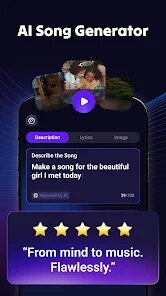
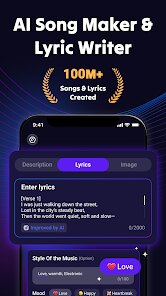
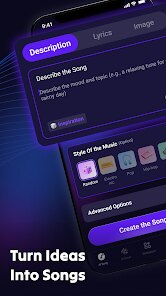
Rythmix is an AI-powered music and song creation tool, available on both Google Play and the App Store, that lets you turn text prompts or melody ideas into full tracks. I stumbled across it while looking for something to mess around with during a lazy weekend, and the install count is decent for a niche app like this. It's free to download, though you can register for extras, and the first launch hits you with a colorful, tutorial-heavy splash screen that feels a bit eager but not overwhelming. Right away, you get why someone would grab it: it promises to shrink the gap between having a tune in your head and actually making it, no music theory required. The initial impression is positive, like a friendly nudge to start creating, even if the array of menus nudges you to slow down.
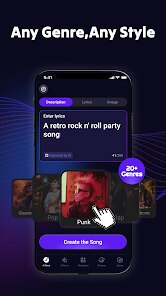
After a few sessions, the hands-on experience is where Rythmix really shows its personality. The interface is clean but packed, with a main screen that throws you into a timeline view for layering sounds. You start by picking a genre—like lo-fi, pop, or dance—then type a mood or visual, say "sunset drive" or "rainy alley." The AI spits out a base loop, and from there, you can tweak instruments like piano or drums, adjust tempo, and bounce between reverb effects. I found the onboarding decent: a quick walkthrough of the mixing panel and preset swaps, but the first time I built a track, I got lost hunting for the export button (it's tucked in the top-right menu). A smooth moment came when I layered a vocal line over a bass beat and the AI synced them automatically, though sometimes the loops felt random and needed manual trimming. A practical tip is to use the "mute track" button early to isolate messy parts; it saves you from restarts. Daily use feels like a mix of guided discovery and puzzle-solving, with occasional friction from loading times when applying heavy effects.
After sticking with it for a couple of weeks, my personal take is that Rythmix is a solid pick for casual creators or hobbyists who want quick results without learning a DAW. Someone deep into production might find it too restrictive compared to something like BandLab or GarageBand, which offer deeper manual control and community sharing. What stands out here is the AI directness—you can go from thought to MP3 in minutes, which BandLab often buries under features. I kept it installed for lazy evenings when I just want to vibe-test ideas, but I uninstalled it after realizing the exported tracks sometimes lack crispness for serious projects. It's fun, but not a replacement for the real tools if you're picky.
features
- 🎵 Text-to-music generation: Unlike Soundtrap's sample-based workflow, Rythmix lets you type a phrase like "foggy morning" and get a complete base loop instantly, skipping tedious sample hunting. The AI interprets mood and genre from just a few words, which feels almost magical for quick inspiration bursts.
- 🔊 Loop layering with auto-sync: While GarageBand requires manual timing alignment, Rythmix automatically syncs new instrument layers to your existing beat, cutting down on setup time. I tossed a guitar loop over drums, and it locked in without that awkward offbeat delay that often kills momentum.
- 🎛️ Genre-specific presets: The app bundles presets like lofi, ambient, and trap, each tuned with distinct reverb and compression settings, so you don't have to dial in effects from scratch like in FL Studio Mobile. This makes it beginner-friendly but limits tweakers who want raw control.
- 💾 Quick export to MP3: Compared to BandLab's multi-step share process, Rythmix offers a one-tap export to your device's audio folder, saving time for casual sharing or backup. It's clutch for capturing an idea before you lose it, though the 30-second limit on free tracks feels stingy.
pros
- 💡 Instant creative spark: The biggest strength is how it lowers the barrier to entry—you can generate a full skeleton of a song in under a minute, perfect for when writer's block hits. BandLab often requires poking around sample libraries first, which dampens spontaneity.
- 💡 Lightweight and quick startup: It launches faster than most similar apps, like Music Maker JAM, which tends to lag with larger projects. On my mid-range phone, Rythmix loads tracks in seconds, making it ideal for on-the-go noodling during commutes or breaks.
- 💡 Intuitive mood matching: The AI's ability to translate vague prompts into coherent audio feels like a genuine edge over tools like Splice Beatmaker, which rely on static loops. This dynamic approach often yields unexpected but fitting results that keep me experimenting.
cons
- ❌ Limited audio quality for exports: The tracks often sound flat or compressed when played on good speakers, falling short of what BandLab's master effects can achieve. For a polished final product, I'd still reach for a desktop DAW after using Rythmix as a sketchpad.
- ❌ No community or sharing hub: Unlike Soundtrap or BandLab, Rythmix lacks a built-in social feed for collaborating or browsing other users' work, which makes it feel isolating for those who enjoy feedback loops or remix inspiration.
- ❌ Short free track length: The free version caps songs at 30 seconds, which is restrictive compared to Music Maker JAM's multitrack edits. Paying unlocks longer sessions, but the subscription price feels steep for what you get, especially with no one-time purchase option.
- ❌ Occasional AI unpredictability: Sometimes the generated loops don't match the prompt's vibe—a “chill jazz” prompt once gave me heavy metal drums. This randomness can ruin the flow, whereas BandLab's manual control avoids such mismatch surprises entirely.
Articles
![]()
Guide
How to Update Google Play Store on Android 2026
![]()
Guide
How to Download Older Versions of Android Apps
![]()
Guide
How to Download Apps Without Google Play Store
![]()
Guide
What Is an APK File for Android?
If you use an Android phone, you may have seen the term APK while searching for apps or games online. Some websites offer an APK download instead of a Google Play install button. Some users also mention APK files when talking about apps that are not available in their region, older app versions, or Android games downloaded outside the Play Store.
![]()
Guide
How to Install Games from Google Play for Beginners
Installing games on an Android phone is usually simple, but for beginners, the process can still feel confusing at first. You may not know where to search, which button to tap, whether the game is safe, or why Google Play sometimes asks for account settings, storage access, or payment information. If you are using an Android phone for the first time, learning how to install games from Google Play is one of the easiest ways to get started.
![]()
Guide
How Useful Gemini Is for Everyday Questions and Quick Tasks
emini feels different from many AI apps because it is not only trying to be a chatbot. After using it for everyday questions, quick writing, image understanding, and planning, I think its biggest strength is convenience.
![]()
Guide
What to Know Before Downloading APKs
For many Android users, downloading an APK is a common way to install apps and games. Sometimes an app is not available in a certain country.
![]()
Guide
ChatGPT Review: Is It Still the Best AI App in 2026?
![]()
Guide
Seedance 2.0 vs Sora: The Future of AI Video Generation
The AI video race has intensified dramatically over the past two years. Platforms like Sora from OpenAI and Luma Dream Machine pushed the boundaries of text-to-video realism. Yet, despite their impressive outputs, most tools still operate as probabilistic generators—you describe a scene, and the model interprets it. Control remains limited. With the February 2026 release of Seedance 2.0, developed by ByteDance, the paradigm shifted. Internally known as Jimeng 2.0, Seedance does not position itself as just another video model. It positions itself as an AI Director. Rather than guessing what you want, Seedance 2.0 allows you to direct what happens. This distinction defines everything that follows.









Recommended Apps
![]()
Home Design 3D
Anuman4.2
![]()
Truth or Dare Game - Party App
Chouic4.8
![]()
Photo Collage Maker
Scoompa4.7![]()
Learn to Draw Flower
Creative APPS4.2![]()
FIFA World Cup 2026™
FIFA2.8![]()
Mirror Plus: Mirror with Light
Digitalchemy, LLC4.4![]()
Meitu- Photo Editor & AI Art
Meitu (China) Limited4.5![]()
Perplexity - Ask Anything
PerplexityAI4.7![]()
GhostTube SLS Camera Alternate
GhostTube4![]()
Boom Chip Blast: 2-Player
Black Pyramid 3D Games Studio0![]()
Healthy Benefits+
Solutran, Inc.4.5![]()
Deepcheck AI Search Assistant
rohe.ai4![]()
Idol Prank Video Call & Chat
LightCode Solutions4![]()
Face Shape - Pretty Scale
GlintTec Apps3.9![]()
Plant App - Plant Identifier
ScaleUp4.6











































