
Calorie Control & Diet Tracker

100K+
Installs
Willson Studio
Developer
-
Health & Fitness
Category
-
Everyone
Content Rating
-
Duytvdh@gmail.com
Developer Email
-
https://willson-studio.netlify.app/privacy
Privacy Policy
Screenshots
editor reviews
For those keeping an eye on their daily intake, Calorie Control & Diet Tracker from Willson Studio offers a straightforward way to log meals and monitor nutritional goals. It is available for free on Google Play, with optional in-app purchases to unlock advanced features, and has seen a steady number of installations. The app is designed to be a practical companion rather than a flashy health platform, focusing on the core tasks of recording and reviewing what you eat.
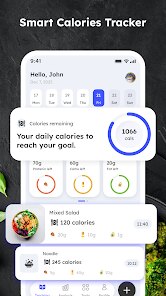
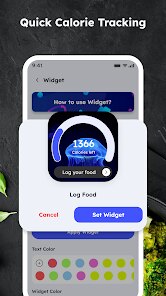
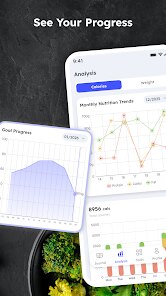
Getting started involves setting up a personal profile with your weight and activity level, after which the app provides a daily calorie target. Logging a meal is a matter of searching for a food item in its database or scanning a barcode, with portion sizes adjustable to match your plate. While the interface is functional, I found the food search responsive and the process quick enough to use without disrupting a meal. The day's progress is then displayed across a simple bar chart, letting you see at a glance how much of your allowance remains.
In terms of competition, this app is more straightforward than comprehensive trackers like MyFitnessPal, which include social features and extensive analytics. Its strength lies in its simplicity, making it less intimidating for someone new to monitoring their food. At the same time, it lacks the macro-focused detail that apps like Cronometer provide, so it occupies a middle ground that prioritizes ease of use over deep data. For that reason, it feels like a sensible choice for those who want basic accountability without the extra clutter.
features
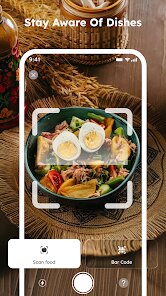
- The barcode scanner stands out as a time-saver. Pointing it at a packaged product pulls up the nutritional information almost instantly, which removes the need to type entries manually. I have used it with several branded items and found the database to be surprisingly accurate for common grocery store finds.
- A notable feature is the calorie projection graph, which estimates your weight trend based on your logging history. Rather than just showing numbers, this visual adds a motivational element, as you can see where you might be heading if you stay on track. It is a neat touch that adds a layer of thoughtfulness without being overbearing.
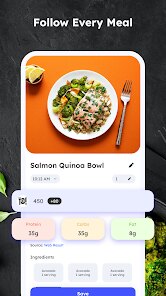
- The meal-specific logging, broken into breakfast, lunch, dinner, and snacks, keeps the data organized. Unlike some general calorie counters I have tried, this structure helps in reviewing where most of your calories come from, making it easier to adjust evening portions if you tend to overeat then.
pros
- It gives a clear daily target based on your personal data, which removes the guesswork about how much to eat.
- Logging takes under a minute, so you are more likely to keep it up daily rather than abandon it after a week.
- The offline functionality means your entries are saved even without a signal, which has been handy during commutes or in areas with poor connectivity.
cons
- Custom food entries are a bit clunky to input, as you must fill out every field for macros, which slows down the process for home-cooked meals.
- Advertisements appear occasionally, and while they are not intrusive, they can briefly interrupt the flow of logging a meal.
- The database sometimes lacks regional or less common foods, forcing you to rely on generic listings that are not always a close match.
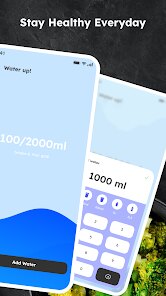
- There is no option to set reminders to drink water, which feels like a missed opportunity for a more holistic approach.
Articles
![]()
Guide
How to Update Google Play Store on Android 2026
![]()
Guide
How to Download Older Versions of Android Apps
![]()
Guide
How to Download Apps Without Google Play Store
![]()
Guide
What Is an APK File for Android?
If you use an Android phone, you may have seen the term APK while searching for apps or games online. Some websites offer an APK download instead of a Google Play install button. Some users also mention APK files when talking about apps that are not available in their region, older app versions, or Android games downloaded outside the Play Store.
![]()
Guide
How to Install Games from Google Play for Beginners
Installing games on an Android phone is usually simple, but for beginners, the process can still feel confusing at first. You may not know where to search, which button to tap, whether the game is safe, or why Google Play sometimes asks for account settings, storage access, or payment information. If you are using an Android phone for the first time, learning how to install games from Google Play is one of the easiest ways to get started.
![]()
Guide
How Useful Gemini Is for Everyday Questions and Quick Tasks
emini feels different from many AI apps because it is not only trying to be a chatbot. After using it for everyday questions, quick writing, image understanding, and planning, I think its biggest strength is convenience.
![]()
Guide
What to Know Before Downloading APKs
For many Android users, downloading an APK is a common way to install apps and games. Sometimes an app is not available in a certain country.
![]()
Guide
ChatGPT Review: Is It Still the Best AI App in 2026?
![]()
Guide
Seedance 2.0 vs Sora: The Future of AI Video Generation
The AI video race has intensified dramatically over the past two years. Platforms like Sora from OpenAI and Luma Dream Machine pushed the boundaries of text-to-video realism. Yet, despite their impressive outputs, most tools still operate as probabilistic generators—you describe a scene, and the model interprets it. Control remains limited. With the February 2026 release of Seedance 2.0, developed by ByteDance, the paradigm shifted. Internally known as Jimeng 2.0, Seedance does not position itself as just another video model. It positions itself as an AI Director. Rather than guessing what you want, Seedance 2.0 allows you to direct what happens. This distinction defines everything that follows.









Recommended Apps
![]()
Home Design 3D
Anuman4.2
![]()
Truth or Dare Game - Party App
Chouic4.8
![]()
Photo Collage Maker
Scoompa4.7![]()
Learn to Draw Flower
Creative APPS4.2![]()
FIFA World Cup 2026™
FIFA2.8![]()
Mirror Plus: Mirror with Light
Digitalchemy, LLC4.4![]()
Meitu- Photo Editor & AI Art
Meitu (China) Limited4.5![]()
Perplexity - Ask Anything
PerplexityAI4.7![]()
GhostTube SLS Camera Alternate
GhostTube4![]()
Boom Chip Blast: 2-Player
Black Pyramid 3D Games Studio0![]()
Healthy Benefits+
Solutran, Inc.4.5![]()
Deepcheck AI Search Assistant
rohe.ai4![]()
Idol Prank Video Call & Chat
LightCode Solutions4![]()
Face Shape - Pretty Scale
GlintTec Apps3.9![]()
Plant App - Plant Identifier
ScaleUp4.6











































