

Messenger

5,000,000,000+
Installs
Meta Platforms, Inc.
Developer
-
Social
Category
-
Rated for 12+
Content Rating
-
android-support@fb.com
Developer Email
-
https://m.facebook.com/policy.php
Privacy Policy
Screenshots
editor reviews
Messenger is Meta's dedicated messaging app that pulled away from the main Facebook platform a while back, so you need a separate install to chat unless you are using the main app. It lives in that weird space between SMS, iMessage, and WhatsApp, offering texts, voice and video calls, plus those flashy chat features like stickers and reactions. Most people download it because they already have Facebook friends or contacts they want to keep in touch with, but the first impression after launching can be a bit overwhelming with all the stories, active now indicators, and suggested contacts cluttering the top half of the screen. Registering is a no-brainer since a Facebook account is required, though you can technically sign up with just a phone number now. It is a free download on both Google Play and App Store, clocking over a billion installs easily, but you will bump into ads in the chat list and constant prompts to try their games or send money through Meta Pay, which feels a bit pushy from the get-go.
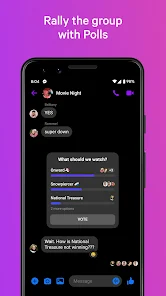
Once you actually start using it, the interface is smooth but dense. The main chat list sits below a bar full of stories that auto-play as you scroll, which can be distracting if you just want to see who messaged you. Opening a conversation shows a clean text field with shortcut icons for photos, voice messages, and quick reactions, but the real action happens when you tap the plus button to reveal hidden features like games, polls, or location sharing without leaving the chat. A small tip I picked up is that long-pressing a message gives you quick access to reply or forward without hunting for menus. Still, sometimes the app slows down when loading media-heavy chats, especially group threads with dozens of GIFs or videos, and the notification settings are buried deep in the settings menu, so expect a few accidental late-night pings before you tame them.
After a few weeks of using Messenger regularly, it feels like a necessary evil for anyone who has a wide Facebook friend circle, but I can see why some ditch it for simpler apps like Telegram or Signal. The biggest draw is the sheer integration with Facebook events, Marketplace, and Pages, which makes arranging plans or buying stuff from strangers seamless. However, the constant ads and suggestions to try new features get old fast, and the app feels bloated compared to something like iMessage or WhatsApp. I ended up keeping it installed because nearly everyone I know is already on it, but if your contacts are split across platforms, you might uninstall it and rely on a single alternative. It is fine for casual banter and quick calls, but heavy-duty group chats or privacy-focused users will likely look elsewhere.
features
- 💬 Messenger keeps all your conversations synced across desktop and mobile without any extra setup, so you can start a chat on your phone and finish it on a laptop without missing a beat. A similar app like WhatsApp does this too, but Messenger's Facebook login makes the transition feel instant if you are already logged into the social network.
- 🎮 The built-in games and mini-apps inside chats are a standout because you can play chess or card games without leaving the app, which Telegram or Signal do not offer natively. It is a silly but fun way to kill time while waiting for a reply.
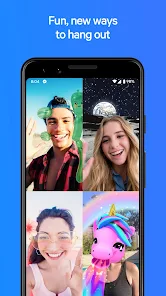
- 📸 Messenger's camera and AR effects rival Snapchat's quality, allowing you to send a quick photo with a filter or text overlay directly in a message thread. Instagram's built-in messaging has similar tricks, but Messenger keeps them separate from a cluttered feed.
pros
- 🐢 The app is surprisingly resource-heavy, draining battery faster than WhatsApp or Telegram when running in the background, especially on older phones.
- 🔔 Notifications are a mess because the app often marks messages as read on one device but not the other, leading to missed pings or phantom alerts.
- 🚫 Privacy concerns linger since it is tied to Facebook's ecosystem, and unlike Signal, there is no default end-to-end encryption for all chats unless you enable secret conversations manually.
cons
- ⚡ Compared to Telegram, Messenger's file sharing is clunky because it limits attachments to 25MB and does not support large videos or documents without compressing them first.
- 🕒 The interface feels cluttered with stories and ad suggestions, whereas apps like iMessage keep the focus purely on chats, making Messenger harder to navigate for minimalist users.
- 🌍 Group video calls cap at 8 participants, while Google Meet or Zoom offer higher limits for free, so it is not ideal for larger family catch-ups or team meetings.
Articles
![]()
Guide
How to Update Google Play Store on Android 2026
![]()
Guide
How to Download Older Versions of Android Apps
![]()
Guide
How to Download Apps Without Google Play Store
![]()
Guide
What Is an APK File for Android?
If you use an Android phone, you may have seen the term APK while searching for apps or games online. Some websites offer an APK download instead of a Google Play install button. Some users also mention APK files when talking about apps that are not available in their region, older app versions, or Android games downloaded outside the Play Store.
![]()
Guide
How to Install Games from Google Play for Beginners
Installing games on an Android phone is usually simple, but for beginners, the process can still feel confusing at first. You may not know where to search, which button to tap, whether the game is safe, or why Google Play sometimes asks for account settings, storage access, or payment information. If you are using an Android phone for the first time, learning how to install games from Google Play is one of the easiest ways to get started.
![]()
Guide
How Useful Gemini Is for Everyday Questions and Quick Tasks
emini feels different from many AI apps because it is not only trying to be a chatbot. After using it for everyday questions, quick writing, image understanding, and planning, I think its biggest strength is convenience.
![]()
Guide
What to Know Before Downloading APKs
For many Android users, downloading an APK is a common way to install apps and games. Sometimes an app is not available in a certain country.
![]()
Guide
ChatGPT Review: Is It Still the Best AI App in 2026?
![]()
Guide
Seedance 2.0 vs Sora: The Future of AI Video Generation
The AI video race has intensified dramatically over the past two years. Platforms like Sora from OpenAI and Luma Dream Machine pushed the boundaries of text-to-video realism. Yet, despite their impressive outputs, most tools still operate as probabilistic generators—you describe a scene, and the model interprets it. Control remains limited. With the February 2026 release of Seedance 2.0, developed by ByteDance, the paradigm shifted. Internally known as Jimeng 2.0, Seedance does not position itself as just another video model. It positions itself as an AI Director. Rather than guessing what you want, Seedance 2.0 allows you to direct what happens. This distinction defines everything that follows.









Recommended Apps
![]()
Home Design 3D
Anuman4.2
![]()
Truth or Dare Game - Party App
Chouic4.8
![]()
Photo Collage Maker
Scoompa4.7![]()
Learn to Draw Flower
Creative APPS4.2![]()
FIFA World Cup 2026™
FIFA2.8![]()
Mirror Plus: Mirror with Light
Digitalchemy, LLC4.4![]()
Meitu- Photo Editor & AI Art
Meitu (China) Limited4.5![]()
Perplexity - Ask Anything
PerplexityAI4.7![]()
GhostTube SLS Camera Alternate
GhostTube4![]()
Boom Chip Blast: 2-Player
Black Pyramid 3D Games Studio0![]()
Healthy Benefits+
Solutran, Inc.4.5![]()
Deepcheck AI Search Assistant
rohe.ai4![]()
Idol Prank Video Call & Chat
LightCode Solutions4![]()
Face Shape - Pretty Scale
GlintTec Apps3.9![]()
Plant App - Plant Identifier
ScaleUp4.6












































