

Google Meet (original)

500,000,000+
Installs
Google LLC
Developer
-
Business
Category
-
Rated for 3+
Content Rating
-
apps-help@google.com
Developer Email
-
http://www.google.com/policies/privacy
Privacy Policy
Screenshots


editor reviews
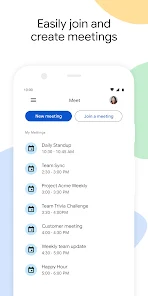
Google Meet is Google's take on video conferencing, and it's basically built right into your Google account. You can use it for one-on-one calls, team meetings, or even webinars, all through a web browser or the mobile app. Most people end up downloading it because they get a link from work or school, and since it's free to install and comes pre-installed on many Android phones, the first impression is just how simple the whole thing is. There's no long sign-up process — you just tap the link and you're in. The clean, minimal interface doesn't overwhelm you with options right away, which feels refreshing compared to some other apps that throw a dozen buttons at you from the start.
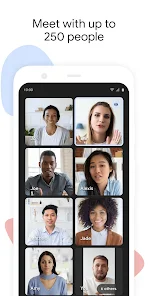
Once you're in a call, the actual experience is pretty straightforward. The interface keeps your video and controls at the bottom, with a big mute button front and center. You can share your screen in a couple of taps, and the chat panel slides in from the side without covering everyone's faces. During longer meetings, I've noticed the app handles background noise fairly well, and the automatic captions are surprisingly accurate for a free tool. One small trick I picked up is using the “tile view” to see more participants at once, which helps when you're trying to read reactions during a presentation. The only slightly annoying part is that some controls, like changing your background, are buried behind a few taps, but once you learn where everything is, it moves quickly.
After using Google Meet for a few weeks, I think it's best suited for people who already live inside Google's ecosystem — Gmail users, Google Workspace subscribers, and anyone who needs a no-fuss video call solution without installing extra software. It's not the app for advanced features like breakout rooms or virtual whiteboards, which is why I still keep Zoom installed for workshops. But for quick check-ins or client meetings where I just need reliable video and audio, Meet is my first choice. The free version gives you unlimited one-on-one calls, but group calls cap out at 60 minutes, which can be a letdown if your meeting runs long. Compared to Microsoft Teams, Meet feels lighter and faster to launch, but it loses points for having fewer integrations outside Google services.
features
- 🎥 Google Meet shines with its Live Captions feature, which automatically transcribes speech in real time. Zoom offers closed captions too, but only if the host types them or connects a third-party service. Meet's captions just work out of the box, and they support multiple languages, making meetings more accessible without any extra setup.
- 🎥 Tight integration with Google Calendar is another standout. When you create a Calendar event, a Meet link is generated automatically. You can even join calls directly from the Calendar screen. Zoom needs a separate plugin or manual link insertion, which adds friction for daily schedulers.
- 🎥 Noise cancellation in Google Meet is surprisingly effective for a free tier app. While Zoom Premium users can get similar audio filtering, Meet's built-in version handles background chatter and keyboard clatter well without needing a paid upgrade. For remote workers in noisy homes, this alone makes a difference.
pros
- 👍 It's completely free to use for one-on-one calls with no time limit. Zoom restricts free 1-on-1 calls to 40 minutes, so Meet wins easily for long coffee chats or deep work sessions.
- 👍 No software download is required for participants — they can join through any browser. Teams and Zoom often push you to install their apps, but Meet just opens a tab. This lowers the barrier for guests who just want to hop in.
- 👍 The mobile app is lightweight and works well on slower networks. I've had fewer dropped calls on Meet compared to Skype or FaceTime when I'm on spotty Wi-Fi.
cons
- 👎 Group calls on the free plan are limited to 60 minutes. Zoom's free tier also has a limit, but many users find the cut-off frustrating right in the middle of brainstorming. Teams offers longer free calls with more participants.
- 👎 Meeting controls can feel hidden. Changing your microphone or speaker, starting a poll, or raising your hand requires digging into menus. Zoom puts those actions front and center, which feels more intuitive.
- 👎 There's no virtual whiteboard or advanced collaboration tools. If you need to brainstorm visually, you'll have to juggle a separate app like Jamboard or Miro. Teams includes a built-in whiteboard that works much smoother for real-time drawing.
Articles
![]()
Guide
How to Update Google Play Store on Android 2026
![]()
Guide
How to Download Older Versions of Android Apps
![]()
Guide
How to Download Apps Without Google Play Store
![]()
Guide
What Is an APK File for Android?
If you use an Android phone, you may have seen the term APK while searching for apps or games online. Some websites offer an APK download instead of a Google Play install button. Some users also mention APK files when talking about apps that are not available in their region, older app versions, or Android games downloaded outside the Play Store.
![]()
Guide
How to Install Games from Google Play for Beginners
Installing games on an Android phone is usually simple, but for beginners, the process can still feel confusing at first. You may not know where to search, which button to tap, whether the game is safe, or why Google Play sometimes asks for account settings, storage access, or payment information. If you are using an Android phone for the first time, learning how to install games from Google Play is one of the easiest ways to get started.
![]()
Guide
How Useful Gemini Is for Everyday Questions and Quick Tasks
emini feels different from many AI apps because it is not only trying to be a chatbot. After using it for everyday questions, quick writing, image understanding, and planning, I think its biggest strength is convenience.
![]()
Guide
What to Know Before Downloading APKs
For many Android users, downloading an APK is a common way to install apps and games. Sometimes an app is not available in a certain country.
![]()
Guide
ChatGPT Review: Is It Still the Best AI App in 2026?
![]()
Guide
Seedance 2.0 vs Sora: The Future of AI Video Generation
The AI video race has intensified dramatically over the past two years. Platforms like Sora from OpenAI and Luma Dream Machine pushed the boundaries of text-to-video realism. Yet, despite their impressive outputs, most tools still operate as probabilistic generators—you describe a scene, and the model interprets it. Control remains limited. With the February 2026 release of Seedance 2.0, developed by ByteDance, the paradigm shifted. Internally known as Jimeng 2.0, Seedance does not position itself as just another video model. It positions itself as an AI Director. Rather than guessing what you want, Seedance 2.0 allows you to direct what happens. This distinction defines everything that follows.









Recommended Apps
![]()
Home Design 3D
Anuman4.2
![]()
Truth or Dare Game - Party App
Chouic4.8
![]()
Photo Collage Maker
Scoompa4.7![]()
Learn to Draw Flower
Creative APPS4.2![]()
FIFA World Cup 2026™
FIFA2.8![]()
Mirror Plus: Mirror with Light
Digitalchemy, LLC4.4![]()
Meitu- Photo Editor & AI Art
Meitu (China) Limited4.5![]()
Perplexity - Ask Anything
PerplexityAI4.7![]()
GhostTube SLS Camera Alternate
GhostTube4![]()
Boom Chip Blast: 2-Player
Black Pyramid 3D Games Studio0![]()
Healthy Benefits+
Solutran, Inc.4.5![]()
Deepcheck AI Search Assistant
rohe.ai4![]()
Idol Prank Video Call & Chat
LightCode Solutions4![]()
Face Shape - Pretty Scale
GlintTec Apps3.9![]()
Plant App - Plant Identifier
ScaleUp4.6












































