

Yahoo Mail – Organized Email

100,000,000+
Installs
Yahoo
Developer
-
Social
Category
-
Rated for 3+
Content Rating
-
mail.android.feedback@yahooinc.com
Developer Email
-
https://policies.yahoo.com/xw/en/yahoo/privacy/directory/international/index.htm
Privacy Policy
Screenshots
editor reviews
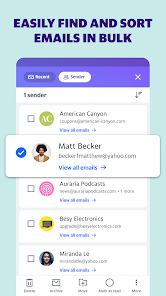
Yahoo Mail is a free email app available on Google Play and the App Store, with over 100 million downloads. It's designed for managing personal and work messages, but it also bundles calendar and file storage features. A lot of people might download it because they already have a Yahoo account for news or fantasy sports, or they just want an alternative to Gmail without fussing with settings. The first thing you notice after launching the app is a clean, somewhat vintage interface that leans heavily into folders like Inbox, Archive, Spam, and Trash. It doesn't feel as modern as some competitors, but it doesn't feel broken either. Registration is just logging into your existing Yahoo account, and there are in-app purchases for ad removal, though the free version is perfectly usable with occasional banners.
Using Yahoo Mail day-to-day is pretty straightforward. The onboarding walks you through syncing contacts and linking external email accounts like Outlook or Gmail, which is a nice touch. After that, composing an email is just a tap on the pencil icon at the bottom. The swipe gestures work well—left to archive, right to delete. I found the search function decent but not lightning fast, especially when digging through old newsletters. One practical tip is to use the filters tab at the top of the inbox to jump straight to unread or flagged messages, which saves time. The calendar feature is tucked away in the side menu, and while it's not as polished as Google Calendar, it syncs well with your events. There were moments where the app felt a bit sluggish, like when loading a full email thread with lots of images, but nothing that ruined the experience.
After a few weeks of daily use, I think Yahoo Mail suits people who have multiple email addresses and want a single hub, or those who are already invested in Yahoo's ecosystem. It's not the app for someone who wants cutting-edge AI features or super fast performance—something like Spark or Outlook does that better. What stands out here is how easy it is to switch between accounts and how the spam filter actually catches more garbage than I expected. I almost uninstalled it because the interface feels a little dated, but the reliable search and unified inbox made me keep it as a secondary client. For a free app, it gets the job done without nagging you to upgrade too often, which is refreshing.
features
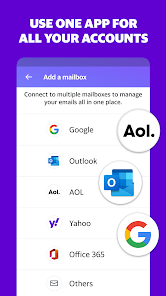
- 📂 Yahoo Mail lets you connect multiple accounts from different providers (Gmail, Outlook, AOL) into one unified inbox. You don't have to flip between apps just to check work and personal emails, which is cleaner than ProtonMail's fragmented approach.
- 📂 The built-in calendar syncs with your Yahoo account and supports event reminders, sharing, and multiple views. Gmail has Google Calendar baked in too, but Yahoo's version feels less cluttered for basic planning.
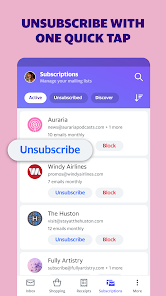
- 📂 One-click unsubscribe for newsletters is consistently reliable. You tap a button at the top of any marketing email, and it removes you from the list without leaving the app. Apple Mail doesn't have this at all, and Gmail buries it in a menu.
- 📂 The spam filter is aggressive but smart. I haven't seen a phishing email slip through in months, while Outlook for Android sometimes lets obvious junk into the main inbox.
pros
- 🔒 Yahoo Mail offers a disposable email address feature called "Mailhide" that lets you create a temporary alias for signups. You get fewer spam emails in your main inbox compared to using your real address. Gmail's plus addressing works but is less private.
- 🔒 You can set a separate app password for each linked account, which adds a layer of security if you share your device. Not many free email apps let you do this without a third-party manager.
- 🔒 The app's dark mode is properly implemented, with true black backgrounds that save battery on OLED screens. Outlook's dark mode can feel washed out in comparison.
cons
- 🔴 Push notifications are unreliable on Android. Sometimes emails arrive hours late, even if you've turned off battery optimization. Gmail and Outlook deliver them almost instantly in my experience.
- 🔴 The attachment viewer struggles with PDFs and Word docs. You often have to download the file to read it properly, while Gmail's built-in preview handles these formats smoothly.
- 🔴 There's no "undo send" feature after hitting send. In Gmail, you have 30 seconds to recall a message. Yahoo Mail just sends it, and you can't take it back if you spot a typo.
- 🔴 The folder-based organization feels dated compared to labels or tags. If you archive an email in Yahoo Mail, it's gone from the inbox but also harder to find later unless you manually sort it into a folder.
Articles
![]()
Guide
How to Update Google Play Store on Android 2026
![]()
Guide
How to Download Older Versions of Android Apps
![]()
Guide
How to Download Apps Without Google Play Store
![]()
Guide
What Is an APK File for Android?
If you use an Android phone, you may have seen the term APK while searching for apps or games online. Some websites offer an APK download instead of a Google Play install button. Some users also mention APK files when talking about apps that are not available in their region, older app versions, or Android games downloaded outside the Play Store.
![]()
Guide
How to Install Games from Google Play for Beginners
Installing games on an Android phone is usually simple, but for beginners, the process can still feel confusing at first. You may not know where to search, which button to tap, whether the game is safe, or why Google Play sometimes asks for account settings, storage access, or payment information. If you are using an Android phone for the first time, learning how to install games from Google Play is one of the easiest ways to get started.
![]()
Guide
How Useful Gemini Is for Everyday Questions and Quick Tasks
emini feels different from many AI apps because it is not only trying to be a chatbot. After using it for everyday questions, quick writing, image understanding, and planning, I think its biggest strength is convenience.
![]()
Guide
What to Know Before Downloading APKs
For many Android users, downloading an APK is a common way to install apps and games. Sometimes an app is not available in a certain country.
![]()
Guide
ChatGPT Review: Is It Still the Best AI App in 2026?
![]()
Guide
Seedance 2.0 vs Sora: The Future of AI Video Generation
The AI video race has intensified dramatically over the past two years. Platforms like Sora from OpenAI and Luma Dream Machine pushed the boundaries of text-to-video realism. Yet, despite their impressive outputs, most tools still operate as probabilistic generators—you describe a scene, and the model interprets it. Control remains limited. With the February 2026 release of Seedance 2.0, developed by ByteDance, the paradigm shifted. Internally known as Jimeng 2.0, Seedance does not position itself as just another video model. It positions itself as an AI Director. Rather than guessing what you want, Seedance 2.0 allows you to direct what happens. This distinction defines everything that follows.









Recommended Apps
![]()
Home Design 3D
Anuman4.2
![]()
Truth or Dare Game - Party App
Chouic4.8
![]()
Photo Collage Maker
Scoompa4.7![]()
Learn to Draw Flower
Creative APPS4.2![]()
FIFA World Cup 2026™
FIFA2.8![]()
Mirror Plus: Mirror with Light
Digitalchemy, LLC4.4![]()
Meitu- Photo Editor & AI Art
Meitu (China) Limited4.5![]()
Perplexity - Ask Anything
PerplexityAI4.7![]()
GhostTube SLS Camera Alternate
GhostTube4![]()
Boom Chip Blast: 2-Player
Black Pyramid 3D Games Studio0![]()
Healthy Benefits+
Solutran, Inc.4.5![]()
Deepcheck AI Search Assistant
rohe.ai4![]()
Idol Prank Video Call & Chat
LightCode Solutions4![]()
Face Shape - Pretty Scale
GlintTec Apps3.9![]()
Plant App - Plant Identifier
ScaleUp4.6












































