
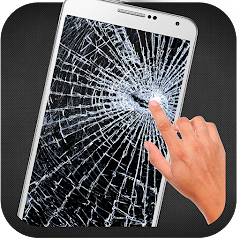
Broken Screen Prank

50M+
Installs
HappySpark
Developer
-
Entertainment
Category
-
Rated for 3+
Content Rating
-
smartmobdevapp@gmail.com
Developer Email
-
https://www.happysparktech.com/privacy.html
Privacy Policy
Screenshots
editor reviews
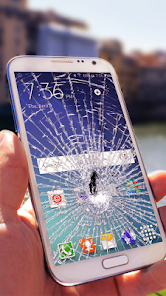
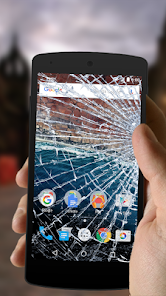
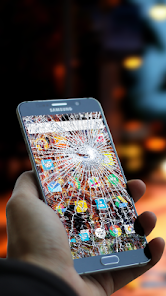
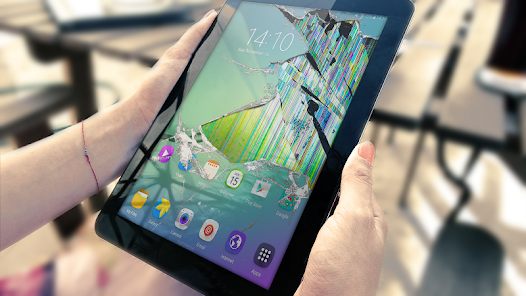
Broken Screen Prank is exactly what it sounds like – a joke app from HappySpark designed to make it look like your phone's display is shattered. You might download this from Google Play or the App Store if you want to mess with a friend or family member. After installing and launching it, the first thing you see is a realistic-looking crack pattern laid over your home screen, complete with a few fake spiderweb lines. It's free to download, though there are some ads that pop up now and then. You don't need to register or sign up for anything, which makes it feel pretty straightforward for a prank tool.
When you actually start using it, the experience is mostly about setting up the joke and then waiting for someone else to react. You open the app, pick a crack pattern from a small gallery of options, and tap “Apply.” It then overlays the broken glass effect on your screen, and you can turn off the prank by either tapping a hidden button or shaking the phone. The interface is simple enough – a few buttons and preview images – but it can feel a bit clunky if you're in a hurry. A small tip: make sure you remember how to disable it before handing your phone to someone, or you'll just look confused trying to figure it out yourself.
After using it for a while, I think this app is mainly for people who enjoy quick, harmless pranks in person. It's not something you'd keep on your phone for daily use, unless you really like scaring your friends. What sets it apart from similar jokes like the old “glass crack” wallpaper tricks is that it actually covers your touchscreen and requires a specific gesture to turn off, so the victim really thinks the screen is broken. However, the ads can be a bit annoying, and the effect doesn't look as convincing on OLED screens compared to LCD ones. You might keep it installed for a few laughs, but once the novelty wears off, it's probably getting deleted.
features
- 🕹️ The prank overlay covers your actual home screen and apps, so tapping on fake cracks does nothing, which sells the joke well. In contrast, apps like “Fake Crack Screen” just show a static image that you can easily swipe away.
- 📱 You can choose from several crack patterns, including different levels of damage and color tints, making each prank look slightly different. This beats the single, generic pattern you'd find in “Screen Broken Prank.”
- 🔇 The app includes a secret disable method – either a hidden button or shake gesture – so the victim can't just back out of it. Other apps often leave the user with a visible exit button, which ruins the surprise.
pros
- 😂 It's very easy to set up, which gives it an edge over the more complicated “Prank Calls” games that need fake call schedules or recordings. No setup time, just pick and apply.
- 👻 The visual quality of the cracked glass is surprisingly sharp, especially on higher resolution displays. That's something you don't get from generic apps like “Broken Screen Simulator,” where cracks look blocky or out of place.
- 📉 It doesn't drain your battery while the prank is active, since it's just a static overlay. Some similar apps keep running animation loops that kill your phone's battery faster.
cons
- 📢 The app shows ads frequently, even when you're just browsing the pattern selection. Apps like “Prank King” at least let you test the effect without an ad interrupting every time.
- 🔋 It doesn't work well with some third-party launchers, causing the overlay to glitch or overlap weirdly. Competitors like “Fake Screen Broken” handle this better by forcing a temporary launcher change.
- 🚫 The prank effect disappears if you accidentally lock the phone, which kills the joke instantly. Other apps, like “Screen Shatter Pro,” keep the overlay visible even after waking the screen.
- 🔄 There's no option to schedule the prank to activate later, so you have to do it manually every time. Some similar apps offer a timer feature, which would be really handy for planning a prank.
Articles
![]()
Guide
How to Update Google Play Store on Android 2026
![]()
Guide
How to Download Older Versions of Android Apps
![]()
Guide
How to Download Apps Without Google Play Store
![]()
Guide
What Is an APK File for Android?
If you use an Android phone, you may have seen the term APK while searching for apps or games online. Some websites offer an APK download instead of a Google Play install button. Some users also mention APK files when talking about apps that are not available in their region, older app versions, or Android games downloaded outside the Play Store.
![]()
Guide
How to Install Games from Google Play for Beginners
Installing games on an Android phone is usually simple, but for beginners, the process can still feel confusing at first. You may not know where to search, which button to tap, whether the game is safe, or why Google Play sometimes asks for account settings, storage access, or payment information. If you are using an Android phone for the first time, learning how to install games from Google Play is one of the easiest ways to get started.
![]()
Guide
How Useful Gemini Is for Everyday Questions and Quick Tasks
emini feels different from many AI apps because it is not only trying to be a chatbot. After using it for everyday questions, quick writing, image understanding, and planning, I think its biggest strength is convenience.
![]()
Guide
What to Know Before Downloading APKs
For many Android users, downloading an APK is a common way to install apps and games. Sometimes an app is not available in a certain country.
![]()
Guide
ChatGPT Review: Is It Still the Best AI App in 2026?
![]()
Guide
Seedance 2.0 vs Sora: The Future of AI Video Generation
The AI video race has intensified dramatically over the past two years. Platforms like Sora from OpenAI and Luma Dream Machine pushed the boundaries of text-to-video realism. Yet, despite their impressive outputs, most tools still operate as probabilistic generators—you describe a scene, and the model interprets it. Control remains limited. With the February 2026 release of Seedance 2.0, developed by ByteDance, the paradigm shifted. Internally known as Jimeng 2.0, Seedance does not position itself as just another video model. It positions itself as an AI Director. Rather than guessing what you want, Seedance 2.0 allows you to direct what happens. This distinction defines everything that follows.









Recommended Apps
![]()
Home Design 3D
Anuman4.2
![]()
Truth or Dare Game - Party App
Chouic4.8
![]()
Photo Collage Maker
Scoompa4.7![]()
Learn to Draw Flower
Creative APPS4.2![]()
FIFA World Cup 2026™
FIFA2.8![]()
Mirror Plus: Mirror with Light
Digitalchemy, LLC4.4![]()
Meitu- Photo Editor & AI Art
Meitu (China) Limited4.5![]()
Perplexity - Ask Anything
PerplexityAI4.7![]()
GhostTube SLS Camera Alternate
GhostTube4![]()
Boom Chip Blast: 2-Player
Black Pyramid 3D Games Studio0![]()
Healthy Benefits+
Solutran, Inc.4.5![]()
Deepcheck AI Search Assistant
rohe.ai4![]()
Idol Prank Video Call & Chat
LightCode Solutions4![]()
Face Shape - Pretty Scale
GlintTec Apps3.9![]()
Plant App - Plant Identifier
ScaleUp4.6












































