
ToonMe - cartoons from photos

50M+
Installs
Linerock Investments LTD
Developer
-
Video Players & Editors
Category
-
Rated for 3+
Content Rating
-
support@pho.to
Developer Email
-
https://pho.to/privacy
Privacy Policy
Screenshots

editor reviews
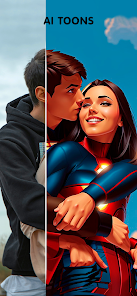
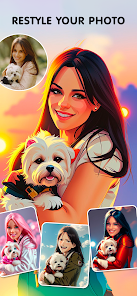
I came across ToonMe on the App Store while looking for something fun to mess around with. It's a photo editing app, specifically one that turns your regular pictures into cartoon-style portraits. The main idea is simple: you upload a selfie or any photo of a person, and the app applies an artistic filter that makes it look like a hand-drawn cartoon or digital illustration. A lot of people download this kind of app when they want to update their social media profile pictures or just send something silly to friends. Right now, ToonMe has over ten million downloads on Google Play, and it's free to download on both platforms, though there are in-app purchases for unlocking extra styles and removing watermarks. The first time I opened it, I was honestly surprised by how clean the interface looked. No clutter, no random pop-ups begging for a subscription right away. Just a big “Upload Photo” button and a short, cute tutorial showing you what to do. That kind of first impression matters a lot to me, because so many apps shove a paywall in your face before you've even tried anything.
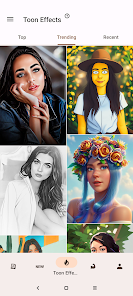
Once I uploaded a photo, the app got to work quickly. It took maybe five to ten seconds to process the image, which felt fast for something that's essentially running a mini neural network on my phone. The result came out as a cartoon version of my face, with smooth skin and exaggerated features, kind of like a character from an animated movie. You can swipe between different artistic styles, like comic book, anime, or classic Disney. Each style changes the colors and line thickness a bit. There's also a manual editing mode where you can adjust the intensity of the effect or fix areas that look weird, like a hand that got blurred or glasses that shifted. I had a slight issue with one photo where my friend's hair turned into a solid blob, but smoothing out the edges with the brush tool fixed it. The app doesn't store your originals unless you save them, which is a small privacy comfort. If you just want a quick cartoon for your WhatsApp profile, the whole process takes under a minute. I'd suggest using well-lit frontal photos for the best outcome, because side profiles or dark shots tend to lose detail.
After using ToonMe for a couple of weeks, I can see why people enjoy it. It's straightforward and delivers exactly what it promises, which is rare for a free app. The generated cartoons look polished enough to use as a professional avatar, but still noticeably “cartoony” so it doesn't feel weirdly realistic. I think it's great for people who like changing their online presence often, or for anyone who wants a non-photo profile picture on social media. On the other hand, if you're looking for a full photo editing suite with layers, masks, or serious retouching, this isn't it. Compared to apps like Prisma or PicsArt, ToonMe is far more limited, but that's not necessarily a flaw because it's focused on one specific thing. I've kept it installed because it takes up little space and I use it every couple of weeks when I want a fresh avatar. The only reason I'd uninstall it is if the ads become too aggressive, but so far they've been skippable and not too annoying.
features
- 🎨 ToonMe uses AI to convert photos into cartoon styles, while a similar app like Prisma transforms photos into paintings using broader artistic filters. The key difference is that ToonMe specifically targets a cartoon look with cleaner facial features, making it feel more like an avatar creator than a general art filter app.
- 🖌️ The app offers over 50 unique styles, including comic, anime, Disney, and vintage cartoon. What stands out here is that each style is custom-trained to maintain your face's identity, so the result still looks like you, not a random character. In comparison, apps like PicsArt rely on generic overlays that often distort faces badly.
- ⚡ Processing speed is one of ToonMe's outstanding features. Most effects apply within 10 seconds, even on older phones. That's noticeably faster than Adobe Photoshop Camera, which sometimes takes over 30 seconds for similar tasks and drains battery faster.
- 🚫 Another hidden plus is the privacy policy. ToonMe states that uploaded photos are not stored on their servers after processing, which is a big deal compared to some free cartoon apps that secretly save your images for training their AI models.
pros
- 😊 The user interface is extremely simple. Even someone who never edits photos can launch the app and get a cartoon in under 30 seconds. That's a lot more welcoming than FaceApp, which hides its cartoon features behind multiple menus and prompts.
- 🎭 ToonMe handles diverse skin tones and facial features well. Unlike some cartoon filters that whitewash or flatten certain ethnic features, this app keeps the original character intact, which is something apps like Snapchat's cartoon filter often fails at.
- 🆓 The free version gives you real value. You can try all styles with a small watermark, and only need to pay for removing it. That's more generous than PicsArt's free plan, which locks most cartoon effects behind a paywall after one use.
cons
- 😞 The app does not handle group photos or photos with multiple people. If you upload an image with two faces, it will only edit the main one and ignore the rest. That's a clear limitation compared to PicsArt, which allows batch editing of multiple people in one picture.
- 🛑 Background handling is weak. While similar apps like Prisma keep the background intact as part of the artistic effect, ToonMe often blurs or distorts the background, making the final image look disjointed. For solo portraits this isn't a big issue, but for full-body shots it ruins the composition.
- 📵 There's no offline mode at all. You need an internet connection every time you process a photo, which is inconvenient if you're traveling or have limited data. In contrast, apps like Cartoonify can run some basic filters offline without needing connectivity.
- 💰 Removing the watermark costs a one-time fee that varies by region, but it's not clearly explained in the app. Users sometimes pay and still see watermarks on certain premium styles, which leads to frustration and negative reviews that similar free apps like Toongineer don't suffer from.
Articles
![]()
Guide
How to Update Google Play Store on Android 2026
![]()
Guide
How to Download Older Versions of Android Apps
![]()
Guide
How to Download Apps Without Google Play Store
![]()
Guide
What Is an APK File for Android?
If you use an Android phone, you may have seen the term APK while searching for apps or games online. Some websites offer an APK download instead of a Google Play install button. Some users also mention APK files when talking about apps that are not available in their region, older app versions, or Android games downloaded outside the Play Store.
![]()
Guide
How to Install Games from Google Play for Beginners
Installing games on an Android phone is usually simple, but for beginners, the process can still feel confusing at first. You may not know where to search, which button to tap, whether the game is safe, or why Google Play sometimes asks for account settings, storage access, or payment information. If you are using an Android phone for the first time, learning how to install games from Google Play is one of the easiest ways to get started.
![]()
Guide
How Useful Gemini Is for Everyday Questions and Quick Tasks
emini feels different from many AI apps because it is not only trying to be a chatbot. After using it for everyday questions, quick writing, image understanding, and planning, I think its biggest strength is convenience.
![]()
Guide
What to Know Before Downloading APKs
For many Android users, downloading an APK is a common way to install apps and games. Sometimes an app is not available in a certain country.
![]()
Guide
ChatGPT Review: Is It Still the Best AI App in 2026?
![]()
Guide
Seedance 2.0 vs Sora: The Future of AI Video Generation
The AI video race has intensified dramatically over the past two years. Platforms like Sora from OpenAI and Luma Dream Machine pushed the boundaries of text-to-video realism. Yet, despite their impressive outputs, most tools still operate as probabilistic generators—you describe a scene, and the model interprets it. Control remains limited. With the February 2026 release of Seedance 2.0, developed by ByteDance, the paradigm shifted. Internally known as Jimeng 2.0, Seedance does not position itself as just another video model. It positions itself as an AI Director. Rather than guessing what you want, Seedance 2.0 allows you to direct what happens. This distinction defines everything that follows.









Recommended Apps
![]()
Home Design 3D
Anuman4.2
![]()
Truth or Dare Game - Party App
Chouic4.8
![]()
Photo Collage Maker
Scoompa4.7![]()
Learn to Draw Flower
Creative APPS4.2![]()
FIFA World Cup 2026™
FIFA2.8![]()
Mirror Plus: Mirror with Light
Digitalchemy, LLC4.4![]()
Meitu- Photo Editor & AI Art
Meitu (China) Limited4.5![]()
Perplexity - Ask Anything
PerplexityAI4.7![]()
GhostTube SLS Camera Alternate
GhostTube4![]()
Boom Chip Blast: 2-Player
Black Pyramid 3D Games Studio0![]()
Healthy Benefits+
Solutran, Inc.4.5![]()
Deepcheck AI Search Assistant
rohe.ai4![]()
Idol Prank Video Call & Chat
LightCode Solutions4![]()
Face Shape - Pretty Scale
GlintTec Apps3.9![]()
Plant App - Plant Identifier
ScaleUp4.6











































