
Mirror App: Magic Photo Editor

50M+
Installs
Lyrebird Studio
Developer
-
Video Players & Editors
Category
-
Rated for 3+
Content Rating
-
lyrebirdstudio@gmail.com
Developer Email
-
https://lyrebirdstudio.net/privacy_policy.htm
Privacy Policy
Screenshots
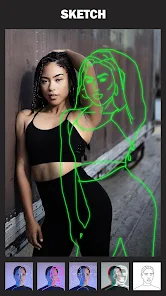
editor reviews
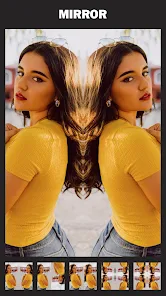
Mirror App from Lyrebird Studio is a photo editing tool that focuses specifically on creating symmetrical and mirrored effects. It's not a general-purpose editor like Snapseed or Lightroom; instead, it carves out a niche for turning regular photos into kaleidoscopic or reflection-based images. You'd download it from Google Play or the App Store if you're bored with standard filters and want to play with doubling or flipping your shots in creative ways. The app has a decent number of installs and is free to download, though there are in-app purchases for extra effects and no forced registration when you first open it. My first impression was actually a bit underwhelming because the interface looks simple almost to the point of being plain, but that minimalism makes sense once you start using it.
After launching the app, you pick a photo from your gallery, and the main editing screen shows a simple mirror preview. The core action is choosing a mirror style like horizontal flip, vertical flip, or a 4-way kaleidoscope pattern. You adjust the center point or the angle by dragging your finger on the screen, which feels intuitive after a few tries. I did get confused at first because the app doesn't have a classic filter gallery; instead, it overlays effects directly onto the mirrored canvas. There's a small learning curve for getting the symmetry line exactly where you want it, especially on complex images. A practical tip is to use photos with clear subjects and empty backgrounds to get the most striking results. The app runs smoothly without lag, but the free version shows a banner ad at the bottom, which is a mild distraction.
After using Mirror App for a couple of weeks, I think it's a tool for specific projects rather than daily editing. If you're into creating abstract art, surreal portraits, or social media thumbnails that stand out, this app is a fun playground. On the other hand, if you just want quick filters or basic adjustments, you'll uninstall it quickly. Compared to apps like Mirror Lab or KineMaster's mirror feature, Mirror App is more focused but less polished. Its standout point is the real-time preview that lets you adjust symmetry while seeing the result instantly, which some competitors lack. I kept it installed because I occasionally make album covers, but I can see most casual users deleting it after a week.
features
- ✨ The magic mirror tool is the core feature, allowing you to choose from 8 different symmetry patterns like horizontal, vertical, and kaleidoscope, which is far more varied than what apps like Snapchat offer for simple face mirroring.
- 🎨 The layering system lets you stack multiple mirror effects on a single image, plus adjust opacity and blend modes, giving you creative control that apps like Canva don't provide for mirrored edits.
- 🖌️ The precision adjustment sliders for center point, rotation, and zoom are excellent, letting you fine-tune the symmetry down to the pixel, which is more detailed than similar feature in Adobe Photoshop Express.
- 🔄 The real-time preview when adjusting parameters is smooth and responsive, making the editing process feel like playing a visual instrument, unlike some competitors that require rendering after each change.
pros
- ✅ The app is extremely lightweight at under 30MB and runs smoothly even on older phones, whereas apps like PicsArt can be slow and bloated with unnecessary features for simple tasks.
- ✅ No registration is required to start editing, which is a refreshing change from apps like YouCam Perfect that force you to create an account before using basic functions.
- ✅ The undo/redo history is unlimited, which is generous compared to apps like MirrorLab that limit your history or offer it as a premium feature.
- ✅ Export options include high-resolution PNG with transparent background, perfect for graphic designers, while many similar apps only export as JPEG.
cons
- ❌ The free version has a persistent banner ad and watermarks on exported images unless you pay, which is more aggressive than apps like Mirror Lab that only show ads occasionally.
- ❌ The app crashes occasionally when handling very large photos (over 4000px), a stability issue that's less common in more established editors like Snapseed.
- ❌ There's no batch editing feature, so you have to save and re-apply effects for each photo individually, which is tedious compared to apps like Photo Editor Pro that support batch processing.
- ❌ The interface lacks a proper tutorial or onboarding guide, so new users might feel lost, unlike apps like Canva that provide clear walkthroughs for each tool.
Articles
![]()
Guide
How to Update Google Play Store on Android 2026
![]()
Guide
How to Download Older Versions of Android Apps
![]()
Guide
How to Download Apps Without Google Play Store
![]()
Guide
What Is an APK File for Android?
If you use an Android phone, you may have seen the term APK while searching for apps or games online. Some websites offer an APK download instead of a Google Play install button. Some users also mention APK files when talking about apps that are not available in their region, older app versions, or Android games downloaded outside the Play Store.
![]()
Guide
How to Install Games from Google Play for Beginners
Installing games on an Android phone is usually simple, but for beginners, the process can still feel confusing at first. You may not know where to search, which button to tap, whether the game is safe, or why Google Play sometimes asks for account settings, storage access, or payment information. If you are using an Android phone for the first time, learning how to install games from Google Play is one of the easiest ways to get started.
![]()
Guide
How Useful Gemini Is for Everyday Questions and Quick Tasks
emini feels different from many AI apps because it is not only trying to be a chatbot. After using it for everyday questions, quick writing, image understanding, and planning, I think its biggest strength is convenience.
![]()
Guide
What to Know Before Downloading APKs
For many Android users, downloading an APK is a common way to install apps and games. Sometimes an app is not available in a certain country.
![]()
Guide
ChatGPT Review: Is It Still the Best AI App in 2026?
![]()
Guide
Seedance 2.0 vs Sora: The Future of AI Video Generation
The AI video race has intensified dramatically over the past two years. Platforms like Sora from OpenAI and Luma Dream Machine pushed the boundaries of text-to-video realism. Yet, despite their impressive outputs, most tools still operate as probabilistic generators—you describe a scene, and the model interprets it. Control remains limited. With the February 2026 release of Seedance 2.0, developed by ByteDance, the paradigm shifted. Internally known as Jimeng 2.0, Seedance does not position itself as just another video model. It positions itself as an AI Director. Rather than guessing what you want, Seedance 2.0 allows you to direct what happens. This distinction defines everything that follows.









Recommended Apps
![]()
Home Design 3D
Anuman4.2
![]()
Truth or Dare Game - Party App
Chouic4.8
![]()
Photo Collage Maker
Scoompa4.7![]()
Learn to Draw Flower
Creative APPS4.2![]()
FIFA World Cup 2026™
FIFA2.8![]()
Mirror Plus: Mirror with Light
Digitalchemy, LLC4.4![]()
Meitu- Photo Editor & AI Art
Meitu (China) Limited4.5![]()
Perplexity - Ask Anything
PerplexityAI4.7![]()
GhostTube SLS Camera Alternate
GhostTube4![]()
Boom Chip Blast: 2-Player
Black Pyramid 3D Games Studio0![]()
Healthy Benefits+
Solutran, Inc.4.5![]()
Deepcheck AI Search Assistant
rohe.ai4![]()
Idol Prank Video Call & Chat
LightCode Solutions4![]()
Face Shape - Pretty Scale
GlintTec Apps3.9![]()
Plant App - Plant Identifier
ScaleUp4.6











































