

Planner 5D: Home Design, Decor

10M+
Installs
Planner 5D
Developer
-
Lifestyle
Category
-
Everyone
Content Rating
-
support@planner5d.com
Developer Email
-
https://planner5d.com/pages/privacy/
Privacy Policy
Screenshots


editor reviews
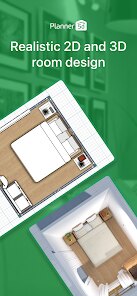
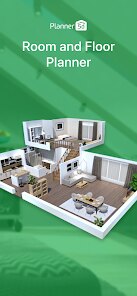
You know that moment when you buy a place or decide to finally redo your living room, and your head is full of ideas but your hands just can't draw a straight line? That's exactly where Planner 5D comes in. It's a home design app, essentially a simplified CAD tool that lets you create 2D floor plans and then instantly switch to a 3D walkthrough of your space. You can place furniture, change wall colors, and basically play interior decorator without lifting a paintbrush. I grabbed it from the Google Play store; it's free to download, though you quickly realize the really nice furniture packs and features require an in-app purchase. First impression after launching? The interface felt a bit overwhelming at first, honestly. There's a lot of clutter on the screen, and for a newbie, that first blank floor plan can be intimidating.
After fiddling with it for a while, the actual experience improves quite a bit. The onboarding walks you through building a simple room, but the real fun starts when you use the room scanner feature. You just point your phone's camera around your actual room, and the app creates a rough 3D model of your space's dimensions. That is a game-changer for getting the scale right. Once you have a plan, you drag and drop furniture from their catalog, though it takes some getting used to. I kept accidentally moving a wall when I meant to grab the couch. A practical tip: always keep your finger slightly off the screen when tapping objects, or you'll trigger the wrong menu. Navigating the 3D view is smooth on my older phone, which surprised me, but the sheer number of menu options for things like textures and lighting can make a quick job feel like a long project.
After a few weeks of using it for a couple of room designs, I can see who this is for. If you're someone who loves planning, wants to see if that huge sectional actually fits before buying, or enjoys visualizing renovations, you'll get a kick out of it. But if you just need a quick inspiration board, you might find it overkill. Compared to apps like HomeByMe, Planner 5D feels more playful and less technical, but it lacks the polished, subscription-free feel of something like Houzz's visual tool. The constant pressure to buy premium credits for decent furniture models is annoying. I kept it installed because the room scan feature is genuinely useful for making sure my new bed would fit without knocking over my nightstand, but I wouldn't pay for the full version.
features
- 🏠 The strongest feature is definitely the real-time 3D walkthrough. Other apps like HomeStyler let you design, but the way Planner 5D lets you "walk" through your space and see lighting change as you move feels incredibly immersive, almost like a video game.
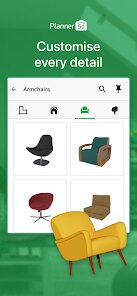
- 🛋️ The catalog size is massive, but it's a double-edged sword. Unlike MagicPlan which focuses on measurements, Planner 5D has thousands of items, from sofas to saunas. You can spend hours trying every single carpet.
- 🎨 The undo button actually works well. In apps like SketchUp, one wrong click can ruin ten minutes of work. Here, the history log lets you jump back step-by-step without panic.
- 📐 The automatic dimensioning is a lifesaver. When you draw walls, the app instantly shows you the exact length, which is way better than guessing like in Room Planner.
pros
- 🖼️ The room scanner is a huge strength. It's far more accurate than the manual measurement tools in Live Home 3D, saving me from measuring my oddly-shaped alcove three times.
- 🌍 Cross-platform sync works perfectly. I start a kitchen design on my phone during my commute and finish it on my tablet at home. This seamless experience is something HomeByMe struggles with.
- 💰 The free tier is actually generous for basic room shapes. You can do full 2D plans without paying a dime, which is more than you get from most premium-heavy apps like Floorplanner.
cons
- 💸 The credit system feels greedy. Want to place a decent sofa? That's 5 credits. A lamp? 3 credits. It quickly becomes a microtransaction nightmare compared to HomeByMe's one-time payment model.
- 👎 The interface is cluttered and unintuitive. Even after a week, I was still hunting for the paint tool. MagicPlan's minimal design is way easier for beginners to pick up.
- 📚 Furniture search is terrible. Typing "modern coffee table" gives you random garden gnomes and weird lamps. The filtering in Houzz Pro is much more precise and helpful.
- 💾 Exporting high-resolution images costs premium credits. Other apps like Roomstyler let you export screenshots for free, which feels like a basic right, not a luxury.
Articles
![]()
Guide
How to Update Google Play Store on Android 2026
![]()
Guide
How to Download Older Versions of Android Apps
![]()
Guide
How to Download Apps Without Google Play Store
![]()
Guide
What Is an APK File for Android?
If you use an Android phone, you may have seen the term APK while searching for apps or games online. Some websites offer an APK download instead of a Google Play install button. Some users also mention APK files when talking about apps that are not available in their region, older app versions, or Android games downloaded outside the Play Store.
![]()
Guide
How to Install Games from Google Play for Beginners
Installing games on an Android phone is usually simple, but for beginners, the process can still feel confusing at first. You may not know where to search, which button to tap, whether the game is safe, or why Google Play sometimes asks for account settings, storage access, or payment information. If you are using an Android phone for the first time, learning how to install games from Google Play is one of the easiest ways to get started.
![]()
Guide
How Useful Gemini Is for Everyday Questions and Quick Tasks
emini feels different from many AI apps because it is not only trying to be a chatbot. After using it for everyday questions, quick writing, image understanding, and planning, I think its biggest strength is convenience.
![]()
Guide
What to Know Before Downloading APKs
For many Android users, downloading an APK is a common way to install apps and games. Sometimes an app is not available in a certain country.
![]()
Guide
ChatGPT Review: Is It Still the Best AI App in 2026?
![]()
Guide
Seedance 2.0 vs Sora: The Future of AI Video Generation
The AI video race has intensified dramatically over the past two years. Platforms like Sora from OpenAI and Luma Dream Machine pushed the boundaries of text-to-video realism. Yet, despite their impressive outputs, most tools still operate as probabilistic generators—you describe a scene, and the model interprets it. Control remains limited. With the February 2026 release of Seedance 2.0, developed by ByteDance, the paradigm shifted. Internally known as Jimeng 2.0, Seedance does not position itself as just another video model. It positions itself as an AI Director. Rather than guessing what you want, Seedance 2.0 allows you to direct what happens. This distinction defines everything that follows.









Recommended Apps
![]()
Home Design 3D
Anuman4.2
![]()
Truth or Dare Game - Party App
Chouic4.8
![]()
Photo Collage Maker
Scoompa4.7![]()
Learn to Draw Flower
Creative APPS4.2![]()
FIFA World Cup 2026™
FIFA2.8![]()
Mirror Plus: Mirror with Light
Digitalchemy, LLC4.4![]()
Meitu- Photo Editor & AI Art
Meitu (China) Limited4.5![]()
Perplexity - Ask Anything
PerplexityAI4.7![]()
GhostTube SLS Camera Alternate
GhostTube4![]()
Boom Chip Blast: 2-Player
Black Pyramid 3D Games Studio0![]()
Healthy Benefits+
Solutran, Inc.4.5![]()
Deepcheck AI Search Assistant
rohe.ai4![]()
Idol Prank Video Call & Chat
LightCode Solutions4![]()
Face Shape - Pretty Scale
GlintTec Apps3.9![]()
Plant App - Plant Identifier
ScaleUp4.6











































