

Fulldive VR - Virtual Reality

10M+
Installs
Browser by Fulldive Co.
Developer
-
Entertainment
Category
-
Rated for 3+
Content Rating
-
support@fulldive.com
Developer Email
-
https://fulldive.com/privacy-policy.html
Privacy Policy
Screenshots
editor reviews
Fulldive VR is a virtual reality browser app that essentially turns your smartphone into a portal for exploring 360-degree content. It's not a full gaming platform, but more of a media viewer and web browser designed for VR headsets like Google Cardboard or any cheap plastic viewer you might have lying around. A normal user would download it from the Google Play Store for free, since it doesn't cost anything upfront, but there are in-app purchases and occasional ads. When you first launch it, you're immediately thrown into a clean, floating interface that hovers in a dark space, which feels surprisingly polished for a free app. The first impression is that it actually works without needing a high-end phone, which is refreshing for anyone who's tried other VR apps that demand the latest hardware and then fail to load.
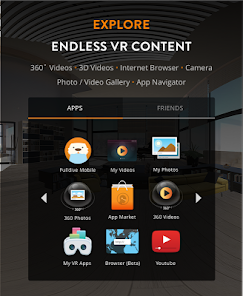
The actual hands-on experience starts with putting your phone into a VR headset. The app's onboarding is minimal; you're basically just told to look around and tap the screen to select things. The main interface is a ring of icons floating around you, like a carousel of videos, websites, and 360 photos. Navigating feels intuitive once you get the hang of it, but there's a learning curve with the gaze-based controls. You have to stare at a button for a second or two to click it, which can feel slow at first. The most common usage steps are searching for videos on YouTube VR, browsing the built-in 360 photo gallery, or just surfing the web in a floating browser window. A small practical tip is to use a Bluetooth controller if you have one, because it makes clicking through menus much faster than head-tracking alone. Smooth moments happen when you're watching a 360 video and the world just wraps around you; confusing moments happen when you accidentally click a stray ad or a link that opens in a flat browser tab, breaking the immersion.
After using Fulldive VR for a while, my personal judgment is mixed but mostly positive for casual users. People who enjoy quick VR experiences, like showing off 360 photos to friends or watching immersive travel videos without dropping money on a real VR headset, will get a kick out of it. But if you're looking for a serious VR ecosystem with social features or heavy gaming, this isn't the app for you. What makes it different from other VR browsers, like Samsung Internet VR or Oculus Browser, is that it doesn't require a specific brand of phone; it's a catch-all for any Android device with a gyroscope. That openness is its biggest strength, but also its weakness, because performance varies a lot depending on your hardware. I'd keep it installed for the occasional novelty use, but uninstall it if storage gets tight, since it can be bulky with cached content and ads do pop up more often than I'd like.
features
- 🌐 Universal VR browser: Fulldive works with any Cardboard-compatible viewer, unlike Samsung Internet VR which is locked to Galaxy phones. You can browse the web, watch YouTube, and view 360 photos all in one app.
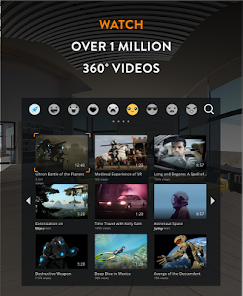
- 📺 360 video streaming: It pulls videos from YouTube VR and other sources, letting you watch immersive content without needing a separate app. It's smoother than using the standard YouTube app in VR mode.
- 🖱️ Gaze-based navigation: You control everything by looking and tapping, which is standard for VR browsers, but Fulldive's interface is cleaner than apps like Google Cardboard's own browser. No controller needed.
- 📷 Built-in media gallery: The app includes a curated collection of 360 photos and videos, so you don't have to search for content right away. It's a small but handy feature that apps like Firefox Reality lack.
pros
- 🌟 No device lock-in: Unlike Oculus Browser or Samsung Internet VR, Fulldive works on almost any Android phone with a gyroscope. This makes it accessible to people without a specific brand or expensive device.
- ⚡ Low performance requirements: It runs decently on mid-range phones where other VR apps might stutter or crash. Apps like VR Browser often require newer chipsets.
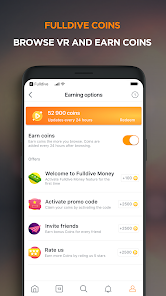
- 🆓 Free entry point: The app is free to download and use, with optional purchases. Competitors like Pico's browser or standalone headsets require a significant upfront cost.
cons
- 🔋 High battery drain: Using Fulldive VR for 20 minutes can eat up 30% of battery on some phones, which is worse than similar apps like Google Cardboard's basic viewer.
- 📱 Limited social features: Compared to apps like AltspaceVR or VRChat, Fulldive has no social spaces to hang out in. It's purely a solitary browsing experience.
- 📲 Occasional ad interruptions: Free users see ads between videos, which breaks immersion more than the ad-free VR browsers from manufacturers like Samsung or HTC.
- 🔄 Stale content library: The curated media section hasn't been updated in months, making it feel abandoned compared to the ever-growing catalogs on YouTube VR or Jaunt VR.
Articles
![]()
Guide
How to Update Google Play Store on Android 2026
![]()
Guide
How to Download Older Versions of Android Apps
![]()
Guide
How to Download Apps Without Google Play Store
![]()
Guide
What Is an APK File for Android?
If you use an Android phone, you may have seen the term APK while searching for apps or games online. Some websites offer an APK download instead of a Google Play install button. Some users also mention APK files when talking about apps that are not available in their region, older app versions, or Android games downloaded outside the Play Store.
![]()
Guide
How to Install Games from Google Play for Beginners
Installing games on an Android phone is usually simple, but for beginners, the process can still feel confusing at first. You may not know where to search, which button to tap, whether the game is safe, or why Google Play sometimes asks for account settings, storage access, or payment information. If you are using an Android phone for the first time, learning how to install games from Google Play is one of the easiest ways to get started.
![]()
Guide
How Useful Gemini Is for Everyday Questions and Quick Tasks
emini feels different from many AI apps because it is not only trying to be a chatbot. After using it for everyday questions, quick writing, image understanding, and planning, I think its biggest strength is convenience.
![]()
Guide
What to Know Before Downloading APKs
For many Android users, downloading an APK is a common way to install apps and games. Sometimes an app is not available in a certain country.
![]()
Guide
ChatGPT Review: Is It Still the Best AI App in 2026?
![]()
Guide
Seedance 2.0 vs Sora: The Future of AI Video Generation
The AI video race has intensified dramatically over the past two years. Platforms like Sora from OpenAI and Luma Dream Machine pushed the boundaries of text-to-video realism. Yet, despite their impressive outputs, most tools still operate as probabilistic generators—you describe a scene, and the model interprets it. Control remains limited. With the February 2026 release of Seedance 2.0, developed by ByteDance, the paradigm shifted. Internally known as Jimeng 2.0, Seedance does not position itself as just another video model. It positions itself as an AI Director. Rather than guessing what you want, Seedance 2.0 allows you to direct what happens. This distinction defines everything that follows.









Recommended Apps
![]()
Home Design 3D
Anuman4.2
![]()
Truth or Dare Game - Party App
Chouic4.8
![]()
Photo Collage Maker
Scoompa4.7![]()
Learn to Draw Flower
Creative APPS4.2![]()
FIFA World Cup 2026™
FIFA2.8![]()
Mirror Plus: Mirror with Light
Digitalchemy, LLC4.4![]()
Meitu- Photo Editor & AI Art
Meitu (China) Limited4.5![]()
Perplexity - Ask Anything
PerplexityAI4.7![]()
GhostTube SLS Camera Alternate
GhostTube4![]()
Boom Chip Blast: 2-Player
Black Pyramid 3D Games Studio0![]()
Healthy Benefits+
Solutran, Inc.4.5![]()
Deepcheck AI Search Assistant
rohe.ai4![]()
Idol Prank Video Call & Chat
LightCode Solutions4![]()
Face Shape - Pretty Scale
GlintTec Apps3.9![]()
Plant App - Plant Identifier
ScaleUp4.6












































