

MomentCam Cartoons & Stickers

50M+
Installs
Battery Stats Saver
Developer
-
Video Players & Editors
Category
-
Rated for 3+
Content Rating
-
support.momentcamcartoons@repairbatterylife.com
Developer Email
-
https://mojipop.com/mcprivacypolicy.html
Privacy Policy
Screenshots
editor reviews
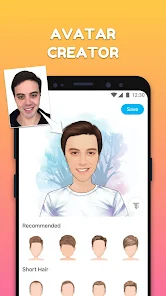
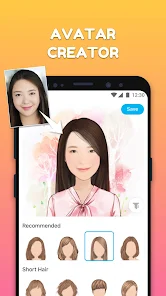
MomentCam is a photo editing app that specifically turns your regular selfies into cartoon avatars, comic-style portraits, and sticker packs. It belongs to the broader category of entertainment and photo manipulation tools, but its whole identity is built around generating those quirky, exaggerated cartoon versions of people. You might download it from Google Play or the App Store simply because you want a fresh profile picture or a fun way to send stickers to friends on messaging apps. The first impression after launching is actually pretty straightforward: a clean camera interface with a clear “turn me into a cartoon” button front and center. There's no real sign-up gatekeeping, which is refreshing, though you quickly notice the free download does come with ads after a few creations, and there's a premium subscription that unlocks more styles and removes watermarks. For a freebie app, the install count is high, and it feels polished for what it is.
When you actually start using it, the experience is mostly smooth but has some quirks. You snap a selfie or upload one, and the app takes maybe three to five seconds to process it. The interface then shows you multiple cartoon versions — some look like anime characters, others like comic book sketches, and a few resemble the classic “bitmoji” style. You can tap each one to preview it, and there's a slider to adjust how cartoonish or realistic you want the output to be. That slider is a small detail that makes a big difference because it lets you keep recognizable features while still looking like a cartoon. The onboarding is quick: just one “allow camera access” prompt and you're in. Where it gets a bit confusing is the sticker creation part — it's not instantly obvious how to save stickers for WhatsApp or iMessage. You have to tap a small share icon and then choose the app, which took me a second to find. A practical tip: take your selfie in good lighting and straight on; side profiles result in wonky cartoon faces every time.
After a few weeks of occasional use, I'd say MomentCam is fun but not essential. People who love using unique avatars on social media or who spend a lot of time on messaging apps will genuinely enjoy making custom sticker packs for their friends. It's definitely more playful than something like Facetune, and way less serious than photo retouching apps. Compared to Snapchat's bitmoji, MomentCam gives you way more control over the final look and doesn't lock you into a specific platform. But if you are someone who just needs a quick profile picture and doesn't care about stickers or multiple styles, you will probably uninstall it after a week. The ads get a bit annoying between creations, and the subscription cost feels steep for what is essentially a novelty app. I kept it installed mainly because my niece loves sending the stickers in our family group chat, so it serves a very specific social purpose rather than a daily utility one.
features
- 😄 The automatic face mapping feature is impressively accurate. You don't need to manually tag eyes or mouth position. Just point and shoot, and it recognizes facial landmarks quickly, even with glasses or hats. Compare this with apps like FaceApp, where manual adjustments are sometimes needed for accessories. MomentCam just handles it automatically, which saves time and frustration.
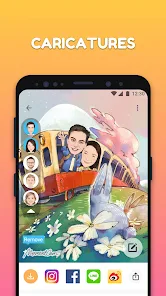
- 🎨 The style variety is genuinely wide. You get over 20 different cartoon filters, including oil painting, comic book, watercolor, and anime. Some other popular apps, like ToonMe, offer maybe half that variety and often lock premium styles behind a paywall. MomentCam keeps a solid free selection available before pushing you toward a subscription.
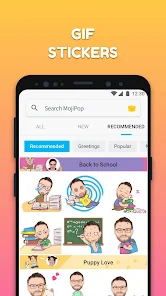
- 📦 The integrated sticker pack system is what sets it apart. Once you create a cartoon avatar, you can generate a whole set of stickers with different expressions and poses, then export them directly to WhatsApp, Telegram, or iMessage. Apps like Bitmoji require you to manually design each expression, but MomentCam generates them automatically based on your photo, so you get a complete pack in seconds.
pros
- 🌙 The ability to set a transparent background for stickers. Most similar apps, like PhotoDirector, force a white box around exported images. MomentCam gives you the option to remove the background completely, which makes stickers look way more natural in chat bubbles. That small detail makes a big difference.
- 🛠️ The offline processing works without internet connection after the initial download. Unlike many competitor apps that require constant server access for face mapping, MomentCam can run most of its core features offline. This is a huge plus if you are traveling or have a limited data plan.
- 🎞️ The batch export feature. You can select multiple cartoon versions at once and save them all to your camera roll in one go. Apps like PicsArt make you save each image individually, which becomes tedious if you want a whole collection of your friends' cartoon versions for a group project or a shared album.
cons
- ⏳ The free version watermark is placed in the worst spot — right over the face area. Apps like Prisma put their watermarks in a corner, but MomentCam plasters it across the middle of the cartoon. You have to pay the subscription to remove it, and that feels a bit aggressive for a free app trying to show off its output quality.
- 📱 The app sometimes crashes when processing high-resolution images from modern phone cameras. I experienced this on a Pixel 7 and an iPhone 14. It works fine with lower-resolution selfies, but if you want to use a professional portrait shot, you are better off resizing it first. Other apps like Remini handle high-res inputs without hiccups.
- 💸 The subscription is expensive for what it offers. At about $3.99 per month or $29.99 per year, it competes with full-featured editing suites like Enlight. MomentCam only does cartoons and stickers, so the value proposition feels weak for anyone who won't use it daily. A one-time purchase option would be much more reasonable.
Articles
![]()
Guide
How to Update Google Play Store on Android 2026
![]()
Guide
How to Download Older Versions of Android Apps
![]()
Guide
How to Download Apps Without Google Play Store
![]()
Guide
What Is an APK File for Android?
If you use an Android phone, you may have seen the term APK while searching for apps or games online. Some websites offer an APK download instead of a Google Play install button. Some users also mention APK files when talking about apps that are not available in their region, older app versions, or Android games downloaded outside the Play Store.
![]()
Guide
How to Install Games from Google Play for Beginners
Installing games on an Android phone is usually simple, but for beginners, the process can still feel confusing at first. You may not know where to search, which button to tap, whether the game is safe, or why Google Play sometimes asks for account settings, storage access, or payment information. If you are using an Android phone for the first time, learning how to install games from Google Play is one of the easiest ways to get started.
![]()
Guide
How Useful Gemini Is for Everyday Questions and Quick Tasks
emini feels different from many AI apps because it is not only trying to be a chatbot. After using it for everyday questions, quick writing, image understanding, and planning, I think its biggest strength is convenience.
![]()
Guide
What to Know Before Downloading APKs
For many Android users, downloading an APK is a common way to install apps and games. Sometimes an app is not available in a certain country.
![]()
Guide
ChatGPT Review: Is It Still the Best AI App in 2026?
![]()
Guide
Seedance 2.0 vs Sora: The Future of AI Video Generation
The AI video race has intensified dramatically over the past two years. Platforms like Sora from OpenAI and Luma Dream Machine pushed the boundaries of text-to-video realism. Yet, despite their impressive outputs, most tools still operate as probabilistic generators—you describe a scene, and the model interprets it. Control remains limited. With the February 2026 release of Seedance 2.0, developed by ByteDance, the paradigm shifted. Internally known as Jimeng 2.0, Seedance does not position itself as just another video model. It positions itself as an AI Director. Rather than guessing what you want, Seedance 2.0 allows you to direct what happens. This distinction defines everything that follows.









Recommended Apps
![]()
Home Design 3D
Anuman4.2
![]()
Truth or Dare Game - Party App
Chouic4.8
![]()
Photo Collage Maker
Scoompa4.7![]()
Learn to Draw Flower
Creative APPS4.2![]()
FIFA World Cup 2026™
FIFA2.8![]()
Mirror Plus: Mirror with Light
Digitalchemy, LLC4.4![]()
Meitu- Photo Editor & AI Art
Meitu (China) Limited4.5![]()
Perplexity - Ask Anything
PerplexityAI4.7![]()
GhostTube SLS Camera Alternate
GhostTube4![]()
Boom Chip Blast: 2-Player
Black Pyramid 3D Games Studio0![]()
Healthy Benefits+
Solutran, Inc.4.5![]()
Deepcheck AI Search Assistant
rohe.ai4![]()
Idol Prank Video Call & Chat
LightCode Solutions4![]()
Face Shape - Pretty Scale
GlintTec Apps3.9![]()
Plant App - Plant Identifier
ScaleUp4.6











































