

TIME WARP SCAN: Face Scanner

10M+
Installs
ZipoApps
Developer
-
Video Players & Editors
Category
-
Rated for 3+
Content Rating
-
support.twarp@zipoapps.com
Developer Email
-
https://zipoapps.com/twarp/privacy
Privacy Policy
Screenshots
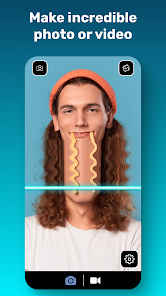
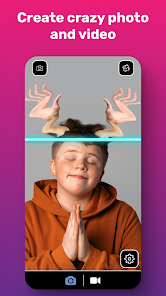
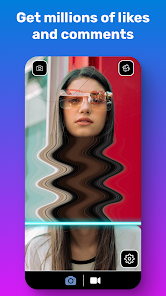

editor reviews
Time Warp Scan is a pretty weird and fun little app from ZipoApps that basically lets you age or de-age your face in photos. You snap a selfie, and then slide a bar to see what you might look like as a kid, a teenager, or way into your golden years. I came across it on Google Play and it had around 10 million downloads, which seemed like a lot of people were curious enough to check it out. Right after I installed it and opened it up, the first impression was straightforward — no account sign-up, no weird permissions, just a clean camera view with a slider at the bottom. The app is free to download, but there are ads after each transformation, which is expected for something like this. You can also remove ads with a small in-app purchase, but I didn't bother at first.
Using the app is pretty much a one-trick pony, but it does that trick well enough. You pick a photo from your gallery or take a new one, then drag the slider left to make yourself younger, right to make yourself older. The morphing effect is surprisingly smooth — it takes your facial structure and adds wrinkles, changes skin tone, or rounds out features for the younger look. There were a few moments where the app got confused by glasses or a weird angle, and the result looked more like a caricature than a realistic prediction. But for a quick laugh with friends, it does the job. I found that using a front-facing photo with good lighting gave the best results. There is no tutorial or guide, but honestly, you don't need one — you just slide and see what happens. The whole process takes maybe 30 seconds from launch to saving the image.
After playing around with it for a while, I think Time Warp Scan is more of a party trick than a serious tool. It's great if you want to send a funny picture to your group chat or show your parents what they might look like in 20 years. But it won't replace something like FaceApp, which offers more filters and editing options. The main difference is that FaceApp has a lot more features and better accuracy, while this app is laser-focused on just the aging effect. I can see someone keeping it installed if they enjoy showing it to new people, but I can also see uninstalling it after a week because once you've seen yourself old, the novelty wears off fast. It's free and harmless, so no real loss either way.
features
- 😀 FaceApp is the obvious comparison here, but Time Warp Scan strips everything down to just one effect — aging and de-aging — which makes it much simpler to use if you don't want to mess around with dozens of filters.
- 😀 The slider-based interface is incredibly intuitive. You just drag left or right in real time and see your face morph instantly, whereas FaceApp requires you to select a specific filter and wait for it to process before you see results.
- 😀 Despite being a smaller app, the morphing algorithm handles different ages quite smoothly. It doesn't just slap on wrinkles — it actually changes the shape of your jaw, eyes, and cheeks, which feels more natural than some other aging apps that just add gray hair and call it a day.
- 😀 There is zero learning curve. No tutorials, no hidden menus, no subscription upsells. You open the app, take a photo, and start sliding. It's hard to beat that for quick entertainment.
pros
- 👍 The app is completely free to use for the basic transformation, with ads that are not too intrusive. FaceApp, on the other hand, locks many of its best filters behind a paid subscription, which can feel frustrating if you just want to try something once.
- 👍 It saves photos directly to your gallery without adding a watermark, which is a nice touch. A lot of free apps like this will slap a logo on your image unless you pay up.
- 👍 The app works offline after the initial download, so you don't need a constant internet connection to use it. That's handy if you want to show it off to friends while commuting or traveling.
cons
- 👎 The app only does one thing — age and de-age faces. If you want any other editing features like retouching, makeup, or hair color changes, you will be disappointed. FaceApp is much more versatile for serious photo editing.
- 👎 Accuracy can be hit or miss. If your photo has bad lighting, an odd angle, or accessories like hats or glasses, the morphing result can look distorted or cartoonish. It's not reliable enough to use for anything serious.
- 👎 Once you have used it a few times, the novelty wears off quickly. There is no replay value, no new filters or updates, so many users will probably uninstall it within a week.
- 👎 The app shows an ad every single time you generate a new transformation, which adds up fast if you are trying out multiple photos in a row. You can pay to remove them, but some users might find that annoying.
Articles
![]()
Guide
How to Update Google Play Store on Android 2026
![]()
Guide
How to Download Older Versions of Android Apps
![]()
Guide
How to Download Apps Without Google Play Store
![]()
Guide
What Is an APK File for Android?
If you use an Android phone, you may have seen the term APK while searching for apps or games online. Some websites offer an APK download instead of a Google Play install button. Some users also mention APK files when talking about apps that are not available in their region, older app versions, or Android games downloaded outside the Play Store.
![]()
Guide
How to Install Games from Google Play for Beginners
Installing games on an Android phone is usually simple, but for beginners, the process can still feel confusing at first. You may not know where to search, which button to tap, whether the game is safe, or why Google Play sometimes asks for account settings, storage access, or payment information. If you are using an Android phone for the first time, learning how to install games from Google Play is one of the easiest ways to get started.
![]()
Guide
How Useful Gemini Is for Everyday Questions and Quick Tasks
emini feels different from many AI apps because it is not only trying to be a chatbot. After using it for everyday questions, quick writing, image understanding, and planning, I think its biggest strength is convenience.
![]()
Guide
What to Know Before Downloading APKs
For many Android users, downloading an APK is a common way to install apps and games. Sometimes an app is not available in a certain country.
![]()
Guide
ChatGPT Review: Is It Still the Best AI App in 2026?
![]()
Guide
Seedance 2.0 vs Sora: The Future of AI Video Generation
The AI video race has intensified dramatically over the past two years. Platforms like Sora from OpenAI and Luma Dream Machine pushed the boundaries of text-to-video realism. Yet, despite their impressive outputs, most tools still operate as probabilistic generators—you describe a scene, and the model interprets it. Control remains limited. With the February 2026 release of Seedance 2.0, developed by ByteDance, the paradigm shifted. Internally known as Jimeng 2.0, Seedance does not position itself as just another video model. It positions itself as an AI Director. Rather than guessing what you want, Seedance 2.0 allows you to direct what happens. This distinction defines everything that follows.









Recommended Apps
![]()
Home Design 3D
Anuman4.2
![]()
Truth or Dare Game - Party App
Chouic4.8
![]()
Photo Collage Maker
Scoompa4.7![]()
Learn to Draw Flower
Creative APPS4.2![]()
FIFA World Cup 2026™
FIFA2.8![]()
Mirror Plus: Mirror with Light
Digitalchemy, LLC4.4![]()
Meitu- Photo Editor & AI Art
Meitu (China) Limited4.5![]()
Perplexity - Ask Anything
PerplexityAI4.7![]()
GhostTube SLS Camera Alternate
GhostTube4![]()
Boom Chip Blast: 2-Player
Black Pyramid 3D Games Studio0![]()
Healthy Benefits+
Solutran, Inc.4.5![]()
Deepcheck AI Search Assistant
rohe.ai4![]()
Idol Prank Video Call & Chat
LightCode Solutions4![]()
Face Shape - Pretty Scale
GlintTec Apps3.9![]()
Plant App - Plant Identifier
ScaleUp4.6











































