

Tuya- Smart Life, Smart Living

10M+
Installs
Tuya Smart Inc.
Developer
-
Lifestyle
Category
-
Everyone
Content Rating
-
support@tuya.com
Developer Email
-
https://developerapp.tuyaus.com/protocol/1a81698945002037?lang=en
Privacy Policy
Screenshots
editor reviews
Smart home control is gaining traction, and Tuya- Smart Life, Smart Living serves as a universal platform designed for this exact purpose. It is the official app developed by Tuya Smart Inc., one of the larger IoT platforms, and it acts as a central hub for controlling a wide array of compatible smart devices. The app is available for download on Google Play, and it is free to install. It does offer in-app purchases for certain premium features or third-party services, and like most free apps, it includes some advertisements, though they are not overly intrusive during standard operation. The overall install base is substantial, reflecting the broad ecosystem it supports.
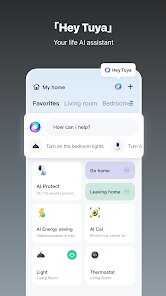
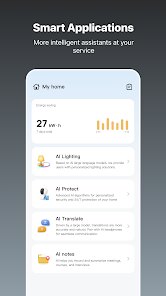
Once downloaded and installed, the setup process is fairly straightforward. You create an account, and then the app guides you through adding devices, typically by scanning a QR code or putting the device into a pairing mode. The main interface is a dashboard where you can group your smart bulbs, plugs, sensors, and other gadgets by room or function. Tapping on a device opens its dedicated control panel, which ranges from simple on/off toggles to more complex settings like color temperature or scheduling. I found the initial pairing to be reliable for most brands, though occasionally a device required a couple of tries to sync.
In terms of how it stacks up against similar platforms, the most direct comparison would be with other ecosystem-agnostic apps like Smart Life (which is actually built on the same backend) or Google Home. The Tuya app has a more comprehensive device management interface than Google Home, offering deeper customization for individual gadgets. However, it does not integrate as seamlessly with voice assistants out of the box; you often need to link accounts within the assistant's own app first. Overall, it feels more like a tool for enthusiasts who want detailed control rather than a simple all-in-one solution for casual users.
features
- The app supports an impressively wide range of brands. I've used it to control generic Wi-Fi plugs, a name-brand air purifier, and some budget LED strips, all without issue. This compatibility is a major strength compared to apps that only work with a single manufacturer's products.
- Automation features are quite capable. You can set scenes like "Good Night" to turn off all lights and lock the door, or create conditional triggers based on time, sensor readings, or device status. This feels more flexible than the simpler routines found in some competing apps.
- One minor frustration is the layout of the device list. After adding many gadgets, the list can become cluttered. While you can group them by room, the app does not offer a truly customizable grid view, which some other smart home apps like Home Assistant provide.
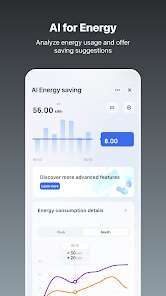
- The energy monitoring feature on compatible smart plugs is a nice addition. It provides real-time wattage and historical usage data, which is useful for tracking power consumption of appliances, though the interface for this data could be slightly more intuitive.
pros
- It saves time by letting me control multiple devices from a single interface, rather than switching between several brand-specific apps.
- The scheduling feature has been practical for automating my morning routine, like having the coffee maker start and the lights gradually brighten.
- I've found the remote access very reliable; I can check if I left a light on at home while I'm at work and turn it off from my phone.
cons
- Occasionally, syncing with third-party voice assistants like Alexa or Google Assistant requires a manual refresh in the app to recognize new devices.
- The advertisements within the app for partner products can be a bit distracting when you are simply trying to navigate your device list.
- Some advanced features, like detailed energy reports, are locked behind a subscription, which feels unnecessary for a device that already supports the hardware function.
Articles
![]()
Guide
How to Update Google Play Store on Android 2026
![]()
Guide
How to Download Older Versions of Android Apps
![]()
Guide
How to Download Apps Without Google Play Store
![]()
Guide
What Is an APK File for Android?
If you use an Android phone, you may have seen the term APK while searching for apps or games online. Some websites offer an APK download instead of a Google Play install button. Some users also mention APK files when talking about apps that are not available in their region, older app versions, or Android games downloaded outside the Play Store.
![]()
Guide
How to Install Games from Google Play for Beginners
Installing games on an Android phone is usually simple, but for beginners, the process can still feel confusing at first. You may not know where to search, which button to tap, whether the game is safe, or why Google Play sometimes asks for account settings, storage access, or payment information. If you are using an Android phone for the first time, learning how to install games from Google Play is one of the easiest ways to get started.
![]()
Guide
How Useful Gemini Is for Everyday Questions and Quick Tasks
emini feels different from many AI apps because it is not only trying to be a chatbot. After using it for everyday questions, quick writing, image understanding, and planning, I think its biggest strength is convenience.
![]()
Guide
What to Know Before Downloading APKs
For many Android users, downloading an APK is a common way to install apps and games. Sometimes an app is not available in a certain country.
![]()
Guide
ChatGPT Review: Is It Still the Best AI App in 2026?
![]()
Guide
Seedance 2.0 vs Sora: The Future of AI Video Generation
The AI video race has intensified dramatically over the past two years. Platforms like Sora from OpenAI and Luma Dream Machine pushed the boundaries of text-to-video realism. Yet, despite their impressive outputs, most tools still operate as probabilistic generators—you describe a scene, and the model interprets it. Control remains limited. With the February 2026 release of Seedance 2.0, developed by ByteDance, the paradigm shifted. Internally known as Jimeng 2.0, Seedance does not position itself as just another video model. It positions itself as an AI Director. Rather than guessing what you want, Seedance 2.0 allows you to direct what happens. This distinction defines everything that follows.









Recommended Apps
![]()
Home Design 3D
Anuman4.2
![]()
Truth or Dare Game - Party App
Chouic4.8
![]()
Photo Collage Maker
Scoompa4.7![]()
Learn to Draw Flower
Creative APPS4.2![]()
FIFA World Cup 2026™
FIFA2.8![]()
Mirror Plus: Mirror with Light
Digitalchemy, LLC4.4![]()
Meitu- Photo Editor & AI Art
Meitu (China) Limited4.5![]()
Perplexity - Ask Anything
PerplexityAI4.7![]()
GhostTube SLS Camera Alternate
GhostTube4![]()
Boom Chip Blast: 2-Player
Black Pyramid 3D Games Studio0![]()
Healthy Benefits+
Solutran, Inc.4.5![]()
Deepcheck AI Search Assistant
rohe.ai4![]()
Idol Prank Video Call & Chat
LightCode Solutions4![]()
Face Shape - Pretty Scale
GlintTec Apps3.9![]()
Plant App - Plant Identifier
ScaleUp4.6












































