
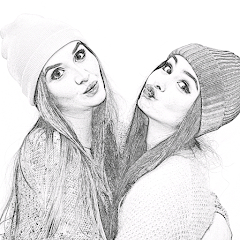
Pencil Photo Sketch : Drawing

50M+
Installs
Minerva Studios Private Limited
Developer
-
Video Players & Editors
Category
-
Rated for 3+
Content Rating
-
hqgames1080@gmail.com
Developer Email
-
https://www.iubenda.com/privacy-policy/57988305
Privacy Policy
Screenshots
editor reviews
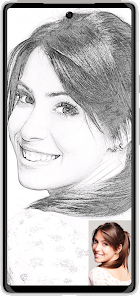
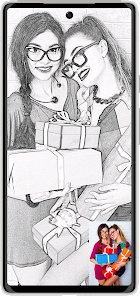
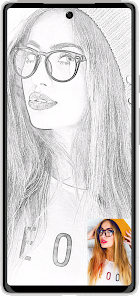
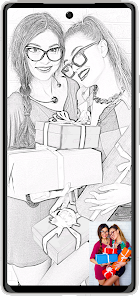
Ever stumbled upon a photo and wished you could turn it into a sketch without actually learning how to draw? That's exactly what Pencil Photo Sketch: Drawing does. It's a photo-to-sketch converter, sitting squarely in the image editing and effects category on Google Play. You download it, install it (it's free, by the way, with over 10 million downloads last I checked), and the first thing that hits you after launch is how straightforward it looks. No overwhelming dashboards or confusing icons. You just pick a photo from your gallery and instantly see it transformed into a pencil drawing. There's no mandatory sign-up, which I always appreciate. You can start using it immediately, although there are occasional ads and a few in-app purchases if you want to remove them or unlock extra effects.
Once you're inside, the hands-on experience is surprisingly clean. The interface is basic but functional. You tap "Choose Photo," select an image, and within a second or two, you get a stylized sketch version. The default black-and-white pencil effect looks decent for portraits and landscapes, but you can tweak the intensity or switch to color sketch mode if you prefer. I found the color option a bit hit-or-miss, sometimes producing washed-out results. Navigating through different styles—like cross-hatching or soft shading—is simple via a bottom menu. A small tip: photos with high contrast work best. If your image is too flat or dark, the sketch loses detail. The app also includes a basic crop tool, but don't expect anything advanced like layer editing or fine brush control. It's more of a one-tap transformation tool with a few sliders to adjust the result.
After using it for a while, I'd say this app is perfect for casual users who want quick, shareable sketches without fussing over settings. Artists or photographers will probably find it too limiting—apps like Prisma or even Snapseed offer more creative control and better blending. What sets Pencil Photo Sketch apart is its sheer simplicity: no learning curve, no account creation, just instant results. But that simplicity also becomes a drawback if you're looking for nuanced effects. I kept it installed for occasional fun edits, like turning a pet photo into a doodle, but I can see someone uninstalling it after a few uses if they're after more variety or higher quality output.
features
- 🎨 One-tap sketch conversion: unlike apps like Prisma that require style selection and processing time, this app gives you a pencil drawing instantly after selecting a photo. It's faster but less polished.
- 🎨 Multiple sketch styles: you can choose from effects like soft pencil, rough cross-hatching, or color sketch. Most similar apps, like Photo Sketch Maker, only offer one or two variations.
- 🎨 No account needed: you can use all core features without signing up. Competitors like SketchMe often push registration before letting you export.
- 🎨 Lightweight and offline: once installed, the app works without an internet connection for basic effects. Other apps like PicsArt require online access for most filters.
pros
- 👍 Simplicity: compared to Prisma or Adobe Photoshop Express, this app is much easier to pick up. You don't need to learn layers or masking.
- 👍 Speed: processing is nearly instant, even on older phones. In contrast, apps like DeepArt can take minutes for similar results.
- 👍 Free core features: you can export high-resolution sketches without paying. Sketch Me locks better quality behind a paywall.
- 👍 Small file size: it doesn't hog storage. Other drawing apps like Ibis Paint X are significantly larger.
cons
- 👎 Limited creativity: you can't manually refine the sketch strokes. Apps like Sketchbook let you draw from scratch, while this only applies filters.
- 👎 Inconsistent results: on low-contrast or busy photos, the output looks messy. Photo Sketch Maker handles complex images better.
- 👎 Ads are intrusive: after every export, a full-screen ad plays. Competitors like Pencil Photo Editor show fewer interruptions.
- 👎 No batch processing: you have to convert photos one by one. Apps like Batch Photo Sketch allow bulk conversion for multiple images.
Articles
![]()
Guide
How to Update Google Play Store on Android 2026
![]()
Guide
How to Download Older Versions of Android Apps
![]()
Guide
How to Download Apps Without Google Play Store
![]()
Guide
What Is an APK File for Android?
If you use an Android phone, you may have seen the term APK while searching for apps or games online. Some websites offer an APK download instead of a Google Play install button. Some users also mention APK files when talking about apps that are not available in their region, older app versions, or Android games downloaded outside the Play Store.
![]()
Guide
How to Install Games from Google Play for Beginners
Installing games on an Android phone is usually simple, but for beginners, the process can still feel confusing at first. You may not know where to search, which button to tap, whether the game is safe, or why Google Play sometimes asks for account settings, storage access, or payment information. If you are using an Android phone for the first time, learning how to install games from Google Play is one of the easiest ways to get started.
![]()
Guide
How Useful Gemini Is for Everyday Questions and Quick Tasks
emini feels different from many AI apps because it is not only trying to be a chatbot. After using it for everyday questions, quick writing, image understanding, and planning, I think its biggest strength is convenience.
![]()
Guide
What to Know Before Downloading APKs
For many Android users, downloading an APK is a common way to install apps and games. Sometimes an app is not available in a certain country.
![]()
Guide
ChatGPT Review: Is It Still the Best AI App in 2026?
![]()
Guide
Seedance 2.0 vs Sora: The Future of AI Video Generation
The AI video race has intensified dramatically over the past two years. Platforms like Sora from OpenAI and Luma Dream Machine pushed the boundaries of text-to-video realism. Yet, despite their impressive outputs, most tools still operate as probabilistic generators—you describe a scene, and the model interprets it. Control remains limited. With the February 2026 release of Seedance 2.0, developed by ByteDance, the paradigm shifted. Internally known as Jimeng 2.0, Seedance does not position itself as just another video model. It positions itself as an AI Director. Rather than guessing what you want, Seedance 2.0 allows you to direct what happens. This distinction defines everything that follows.









Recommended Apps
![]()
Home Design 3D
Anuman4.2
![]()
Truth or Dare Game - Party App
Chouic4.8
![]()
Photo Collage Maker
Scoompa4.7![]()
Learn to Draw Flower
Creative APPS4.2![]()
FIFA World Cup 2026™
FIFA2.8![]()
Mirror Plus: Mirror with Light
Digitalchemy, LLC4.4![]()
Meitu- Photo Editor & AI Art
Meitu (China) Limited4.5![]()
Perplexity - Ask Anything
PerplexityAI4.7![]()
GhostTube SLS Camera Alternate
GhostTube4![]()
Boom Chip Blast: 2-Player
Black Pyramid 3D Games Studio0![]()
Healthy Benefits+
Solutran, Inc.4.5![]()
Deepcheck AI Search Assistant
rohe.ai4![]()
Idol Prank Video Call & Chat
LightCode Solutions4![]()
Face Shape - Pretty Scale
GlintTec Apps3.9![]()
Plant App - Plant Identifier
ScaleUp4.6












































