

AI Chat Open Assistant Chatbot

10M+
Installs
Smart Widget Labs Co Ltd
Developer
-
Generative AI
Category
-
Rated for 3+
Content Rating
-
support@smartwidgetlabs.com
Developer Email
-
https://smartwidgetlabs.com/privacy-policy
Privacy Policy
Screenshots
editor reviews
AI Chat Open Assistant is a conversational AI app that falls squarely into the chatbot and productivity helper category. It's really for anyone who needs quick answers, writing suggestions, or just a casual chat partner without opening a full browser. I first heard about it through a friend and decided to download it from the Google Play Store. The install was quick, and the app itself is free, though there are in-app purchases for unlocking extra features or removing ads. My first impression after launching it was surprisingly clean – no overwhelming registration form, just a simple welcome screen that lets you start typing almost immediately. That straightforwardness made me feel like I wouldn't have to fight through menus to get help.
After using it for a few days, the experience felt smooth for the most part. The interface is minimal, with a chat window that looks similar to standard messaging apps, so anyone familiar with texting will feel right at home. You just type a question or request, and the AI responds within seconds. The onboarding was just a short tutorial that showed how to use commands like asking for translations or summaries. What I found a bit confusing at first was the lack of voice input – you have to type everything manually, which can be a drag when you're multitasking. But once I got used to it, I appreciated how the app handled follow-up questions without losing context. Small tips I picked up: you can start a new chat thread for different topics, and clearing chat history helps if the AI starts giving repetitive answers.
Honestly, after spending a couple of weeks with AI Chat Open Assistant, I think it's a decent tool for people who need fast text-based replies without complexity. It's not as polished or feature-packed as ChatGPT itself, but for a mobile-first user who doesn't want to pay for premium AI services, this app fills a gap. I'd say it's best for students or busy professionals who need quick drafts or explanations. What keeps it on my phone is the lack of sign-up – no email, no personal data shared. But I can see myself uninstalling it if I start using a more advanced assistant that supports voice conversation or offers deeper integrations. Compared to Replika or YouChat, this app is less personable and more transactional, but that could be a plus for someone who just wants answers, not a virtual friend.
features
- 🤖 Real-time context memory – Unlike many lightweight chatbots that forget what you just said, AI Chat Open Assistant keeps track of your conversation thread within a session. This makes it feel more natural when you ask follow-up questions or refine your request without repeating yourself. In contrast, some free apps like Genie or ChatOn lose context after a few messages, forcing you to start over.
- 🎨 Customizable chat themes – You can change the chatbot's avatar and the background color of the chat window. While this might sound trivial, it does make the app feel more personal. Other similar assistants, such as TextGPT, don't offer this visual customization and stick to a default, often boring look.
- ⚡ Offline phrase suggestions – Even without an internet connection, the app provides a set of pre-written responses for common questions like “What's the weather?” or “Tell me a joke.” This offline mode is rare among AI chatbots, which usually require constant data. Replika, for example, becomes almost useless offline.
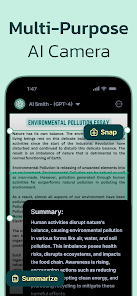
- 📚 Integrated translation tool – The chatbot can translate text between over 40 languages directly in the chat, without needing a separate app. This is much faster than copying text into Google Translate, and it supports entire paragraphs, not just single words. Apps like Poe also have translation, but it's often limited to shorter phrases.
pros
- ✅ No account required – You can start using the app immediately without signing up or linking a social media profile. This is a huge plus compared to ChatGPT, which demands an account, and even Replika requires email registration. It's great for privacy-minded users.
- ✅ Lightweight and fast – The app loads almost instantly even on older phones, unlike ChatOn or YouChat, which can be sluggish. This makes it a good choice for users with limited device storage or slower internet connections.
- ✅ Straightforward free version – The free tier isn't heavily crippled. You get a generous number of daily queries and only occasional ad breaks. In contrast, TextGPT severely limits free usage after a few conversations, pushing you to buy credits.
cons
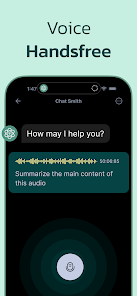
- ❌ No voice input or output – You have to type everything, which feels outdated compared to apps like Replika or ChatGPT that support voice conversations. This makes it less convenient for driving or hands-free use.
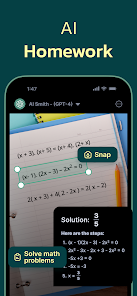
- ❌ Limited deep reasoning – The AI struggles with complex, multi-step problems like math or coding logic. Tools like YouChat or Perplexity handle these tasks far better, making this app less suitable for technical users.
- ❌ Occasional irrelevant ads – Although ads support the free model, they pop up at awkward moments, like mid-conversation. Other free apps like Genie show ads in a less intrusive banner format that doesn't interrupt your flow.
- ❌ No web search capability – The chatbot relies solely on its training data and cannot fetch real-time information from the internet. For current news or live data, alternatives like Google's Bard or Bing Chat are far more useful.
Articles
![]()
Guide
How to Update Google Play Store on Android 2026
![]()
Guide
How to Download Older Versions of Android Apps
![]()
Guide
How to Download Apps Without Google Play Store
![]()
Guide
What Is an APK File for Android?
If you use an Android phone, you may have seen the term APK while searching for apps or games online. Some websites offer an APK download instead of a Google Play install button. Some users also mention APK files when talking about apps that are not available in their region, older app versions, or Android games downloaded outside the Play Store.
![]()
Guide
How to Install Games from Google Play for Beginners
Installing games on an Android phone is usually simple, but for beginners, the process can still feel confusing at first. You may not know where to search, which button to tap, whether the game is safe, or why Google Play sometimes asks for account settings, storage access, or payment information. If you are using an Android phone for the first time, learning how to install games from Google Play is one of the easiest ways to get started.
![]()
Guide
How Useful Gemini Is for Everyday Questions and Quick Tasks
emini feels different from many AI apps because it is not only trying to be a chatbot. After using it for everyday questions, quick writing, image understanding, and planning, I think its biggest strength is convenience.
![]()
Guide
What to Know Before Downloading APKs
For many Android users, downloading an APK is a common way to install apps and games. Sometimes an app is not available in a certain country.
![]()
Guide
ChatGPT Review: Is It Still the Best AI App in 2026?
![]()
Guide
Seedance 2.0 vs Sora: The Future of AI Video Generation
The AI video race has intensified dramatically over the past two years. Platforms like Sora from OpenAI and Luma Dream Machine pushed the boundaries of text-to-video realism. Yet, despite their impressive outputs, most tools still operate as probabilistic generators—you describe a scene, and the model interprets it. Control remains limited. With the February 2026 release of Seedance 2.0, developed by ByteDance, the paradigm shifted. Internally known as Jimeng 2.0, Seedance does not position itself as just another video model. It positions itself as an AI Director. Rather than guessing what you want, Seedance 2.0 allows you to direct what happens. This distinction defines everything that follows.









Recommended Apps
![]()
Home Design 3D
Anuman4.2
![]()
Truth or Dare Game - Party App
Chouic4.8
![]()
Photo Collage Maker
Scoompa4.7![]()
Learn to Draw Flower
Creative APPS4.2![]()
FIFA World Cup 2026™
FIFA2.8![]()
Mirror Plus: Mirror with Light
Digitalchemy, LLC4.4![]()
Meitu- Photo Editor & AI Art
Meitu (China) Limited4.5![]()
Perplexity - Ask Anything
PerplexityAI4.7![]()
GhostTube SLS Camera Alternate
GhostTube4![]()
Boom Chip Blast: 2-Player
Black Pyramid 3D Games Studio0![]()
Healthy Benefits+
Solutran, Inc.4.5![]()
Deepcheck AI Search Assistant
rohe.ai4![]()
Idol Prank Video Call & Chat
LightCode Solutions4![]()
Face Shape - Pretty Scale
GlintTec Apps3.9![]()
Plant App - Plant Identifier
ScaleUp4.6












































