
Custom Skin Creator Minecraft

10M+
Installs
Blakzero
Developer
-
Productivity
Category
-
Rated for 3+
Content Rating
-
support@blakzero.com
Developer Email
-
https://blakzero.com/privacy-policy/
Privacy Policy
Screenshots
editor reviews
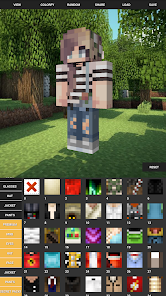
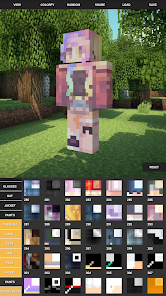
Custom Skin Creator Minecraft is essentially a companion tool for the mobile version of the game, designed for players who want to build personalized player skins without having to boot up a PC or use complex editing software. It falls squarely into the utility app category, something you'd grab from Google Play or the App Store just to tweak your in-game look. When you first open it after a quick download and install, the interface is surprisingly straightforward, with a clean layout that doesn't bombard you with menus. There's no forced registration or account creation, which makes the first impression quite welcoming. You just launch it, and you're immediately looking at a blank canvas with some basic skin templates, which feels exactly right for someone who doesn't want to waste time setting things up.
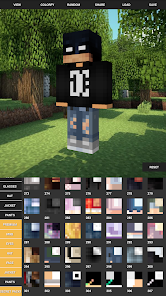
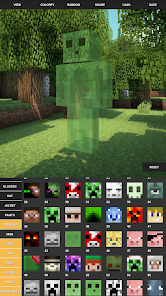
Once you start actually using it, the app really shows its practical side. The onboarding is minimal, there's no tutorial nagging you, so you can just jump into editing. The main workspace gives you a 3D preview of your skin, letting you paint directly onto the model, and it handles rotations smoothly, so you can see how colors look from every angle. Common steps include picking a base template, then using the brush tool to add layers or details like clothing patterns or facial features. I found the color picker easy to use, and the undo button saved me more than once when I made a messy stroke. A small tip is to zoom in with two fingers for precise pixel work, which works well on a phone screen. The whole experience feels fluid, though there's a slight lag when applying large color fills, but nothing that breaks the flow.
After spending some time with it, I'd say this app is great for Minecraft players who enjoy customizing their characters but don't want to deal with clunky web tools or pay for premium editors. It's definitely not for someone who just uses default skins and never thinks about appearances. What sets it apart from apps like Nova Skin or SkinSeed is that it focuses purely on creation without any social features or extra fluff, which I personally appreciate. Some people might keep it installed for quick edits, but others might uninstall after making one or two skins because there isn't much else to do once you're done. It's a simple, no-nonsense utility, and that's exactly what it should be.
features
- 🎨 You get a real-time 3D preview of your skin as you paint, which is something apps like SkinTools lack. Instead of guessing how colors look, you can rotate the model and see every angle instantly, making edits way more intuitive.
- 🖌️ The brush system includes adjustable sizes, opacity, and an eye dropper tool, giving you fine control over pixel-level details. Compared to Simple Skin Editor, this feels much more precise, especially when adding small touches like eyes or symbols.
- 📦 It includes a library of pre-made templates that cover everything from classic Steve-style skins to more modern designs. You're not starting from scratch every time, which saves a ton of time.
- 📁 Exporting is dead simple, just a single button saves your skin to your device, and you can load it into Minecraft directly. No weird file conversions or extra steps, unlike some online editors that require manual downloads.
pros
- 👍 The interface is incredibly lightweight, unlike Nova Skin, which feels bloated with ads and community posts. Here, you just open the app and start editing without any distractions.
- 👍 Offline functionality is a huge plus. You don't need an internet connection to work on your skins, which makes it perfect for using on a commute or in areas with bad reception. SkinSeed requires a connection for full features.
- 👍 The learning curve is almost nonexistent. Even a young player can pick it up in minutes, whereas something like Blockbench Skin Editor requires a bit more patience and understanding of layers.
- 👍 It saves your unfinished work automatically. If you close the app halfway through a design, your progress is there when you return, no need to hit save or remember to export.
cons
- 👎 The brush tool lacks a symmetry mode, which is a bummer when designing balanced faces or armor. Other editors like Nova Skin have a mirror painting option that makes that stuff way easier.
- 👎 You can't import custom images or textures, so you're limited to painting by hand. If you want to use a pre-made design from a PNG file, you'll have to look elsewhere, like at SkinTools.
- 👎 The color palette feels a bit limited out of the box. There's no color history or custom swatch saving, so if you use a specific shade, you have to remember or re-pick it manually each time.
- 👎 There are very few layering options. You can't stack multiple layers with different opacity masks, which means shading and complex patterns require more effort than in dedicated editors like Blockbench Skin Editor.
Articles
![]()
Guide
How to Update Google Play Store on Android 2026
![]()
Guide
How to Download Older Versions of Android Apps
![]()
Guide
How to Download Apps Without Google Play Store
![]()
Guide
What Is an APK File for Android?
If you use an Android phone, you may have seen the term APK while searching for apps or games online. Some websites offer an APK download instead of a Google Play install button. Some users also mention APK files when talking about apps that are not available in their region, older app versions, or Android games downloaded outside the Play Store.
![]()
Guide
How to Install Games from Google Play for Beginners
Installing games on an Android phone is usually simple, but for beginners, the process can still feel confusing at first. You may not know where to search, which button to tap, whether the game is safe, or why Google Play sometimes asks for account settings, storage access, or payment information. If you are using an Android phone for the first time, learning how to install games from Google Play is one of the easiest ways to get started.
![]()
Guide
How Useful Gemini Is for Everyday Questions and Quick Tasks
emini feels different from many AI apps because it is not only trying to be a chatbot. After using it for everyday questions, quick writing, image understanding, and planning, I think its biggest strength is convenience.
![]()
Guide
What to Know Before Downloading APKs
For many Android users, downloading an APK is a common way to install apps and games. Sometimes an app is not available in a certain country.
![]()
Guide
ChatGPT Review: Is It Still the Best AI App in 2026?
![]()
Guide
Seedance 2.0 vs Sora: The Future of AI Video Generation
The AI video race has intensified dramatically over the past two years. Platforms like Sora from OpenAI and Luma Dream Machine pushed the boundaries of text-to-video realism. Yet, despite their impressive outputs, most tools still operate as probabilistic generators—you describe a scene, and the model interprets it. Control remains limited. With the February 2026 release of Seedance 2.0, developed by ByteDance, the paradigm shifted. Internally known as Jimeng 2.0, Seedance does not position itself as just another video model. It positions itself as an AI Director. Rather than guessing what you want, Seedance 2.0 allows you to direct what happens. This distinction defines everything that follows.









Recommended Apps
![]()
Home Design 3D
Anuman4.2
![]()
Truth or Dare Game - Party App
Chouic4.8
![]()
Photo Collage Maker
Scoompa4.7![]()
Learn to Draw Flower
Creative APPS4.2![]()
FIFA World Cup 2026™
FIFA2.8![]()
Mirror Plus: Mirror with Light
Digitalchemy, LLC4.4![]()
Meitu- Photo Editor & AI Art
Meitu (China) Limited4.5![]()
Perplexity - Ask Anything
PerplexityAI4.7![]()
GhostTube SLS Camera Alternate
GhostTube4![]()
Boom Chip Blast: 2-Player
Black Pyramid 3D Games Studio0![]()
Healthy Benefits+
Solutran, Inc.4.5![]()
Deepcheck AI Search Assistant
rohe.ai4![]()
Idol Prank Video Call & Chat
LightCode Solutions4![]()
Face Shape - Pretty Scale
GlintTec Apps3.9![]()
Plant App - Plant Identifier
ScaleUp4.6












































