
Voice Changer by Sound Effects

5M+
Installs
Lutech Ltd
Developer
-
Entertainment
Category
-
Rated for 3+
Content Rating
-
teammarketing@lutech.ltd
Developer Email
-
https://doc-hosting.flycricket.io/voice-changer-by-sound-effects-privacy-policy/530d0763-bb26-40ad-9eed-0941d18d92c2/privacy
Privacy Policy
Screenshots
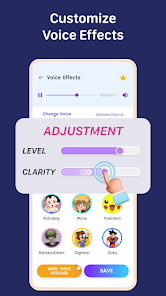
editor reviews
Voice Changer by Sound Effects is one of those apps you download on a whim, maybe to send a funny voice note or prank a friend. It's a utility app, pure and simple, found on both Google Play and the App Store, and it's free to install. Over ten million people have grabbed it so far, which says something about its appeal. You don't need to sign up for anything, just open it and you're ready to go. The first impression after launching is a bit busy, honestly the screen hits you with a lot of buttons and sample sounds, but it doesn't feel overwhelming. You can record something immediately or pick a pre-recorded clip to mess with. There are in-app purchases if you want extra voice packs or effects, and you'll see an ad after a few uses, but it's not shoved in your face constantly.
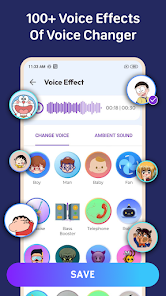
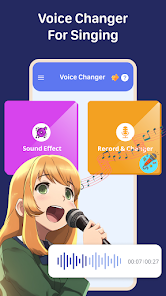
Once you actually start using it, the app makes sense pretty quick. You press the big red button to record, talk for a few seconds, then stop. A list of voice effects shows up, things like chipmunk, robot, deep demon, helium, or echo cave. You tap one and it previews the result instantly, which is satisfying because there's almost no lag. The interface is straightforward: your recording sits at the top, effects are in a scrollable grid below, and you can save or share the final file with one tap. I found it smooth until I tried layering effects, that part is not possible without paying for a premium pack. A small tip: if you adjust your microphone distance while recording, the effects sound way more natural. The app also lets you apply effects to existing audio files from your phone, which is handy for editing voice memos or funny clips from videos.
After using it for a few weeks, I think it's great for quick laughs or content creators who need silly voiceovers for short videos. But if you're looking for professional voice modulation or clean studio-quality results, you'll be disappointed. Its strength is speed and simplicity, not depth. Compared to something like Voicemod, which needs a desktop and offers real-time voice changing, this app is more for offline, pre-recorded fun. It lacks real-time processing, so you can't use it during a live call. That said, because it's lightweight and doesn't drain battery, I kept it on my phone for the occasional goof-off session. I can see someone uninstalling if they don't prank friends often or if ads start getting repetitive, but for a one-trick pony, it executes that trick well.
features
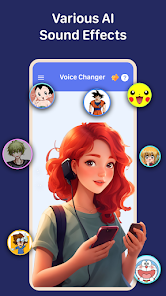
- 🎤 The app offers a huge library of voice effects, over fifty different presets, including some seasonal ones like Santa or ghost. You won't find this variety in many free voice changers on mobile. Most apps cap you at ten or fifteen options.
- 🎤 It allows you to apply effects to existing audio files from your device, not just new recordings. That means you can take a saved voice memo or a funny WhatsApp clip and transform it after the fact, which apps like Snapchat or TikTok don't let you do natively.
- 🎤 The background noise removal is surprisingly decent for a free app. Even if you record in a slightly noisy room, the effects don't sound muddy. In contrast, Voice Changer with Effects from AudioTool often picks up room echo and amplifies it with the effects.
- 🎤 You can trim and cut recordings inside the app before applying effects. This is a small but useful feature that saves you from editing elsewhere. Most rivals force you to prepare the clip externally first.
pros
- ⚡ It loads and applies effects instantly, with no lag between tapping an effect and hearing it. Voicemod on PC is faster for live use, but on mobile, many alternatives like Fun Voice Changer have a noticeable half-second delay that kills the spontaneity.
- ⚡ The app works completely offline after you download the voice packs. You can record and change your voice in airplane mode. Most similar tools, including VoiceFX, require an internet connection to process audio, which makes them useless on a subway or in a low-signal area.
- ⚡ The sound quality after applying effects is crisp and doesn't distort the original recording unless you push the volume too high. Cheaper apps often turn your voice into a staticky mess, but this one keeps clarity intact.
cons
- 🐢 Real-time voice changing is completely missing. You cannot use this app to change your voice during phone calls or live streams. Voicemod and Clownfish do that on desktop, and even some mobile apps like Snapchat offer real-time filters during video recording.
- 🐢 The free version limits you to a certain number of saves per day unless you watch an ad. After about five or six exports, the app blocks further saving until you sit through a 30-second commercial. This feels restrictive compared to Voice Changer Plus, which allows unlimited free saves with smaller ads.
- 🐢 There is no pitch adjustment slider or fine-tuning control. You can only pick preset effects, not customize them. If you want a slightly deeper voice than “deep demon,” you're out of luck. Rival tools like MorphVOX let you tweak pitch and tone independently.
- 🐢 The interface feels a bit cluttered with constant banner ads at the bottom, which sometimes shift the layout if they refresh during use. This can cause you to accidentally tap an ad instead of a button, especially on smaller phone screens.
Articles
![]()
Guide
How to Update Google Play Store on Android 2026
![]()
Guide
How to Download Older Versions of Android Apps
![]()
Guide
How to Download Apps Without Google Play Store
![]()
Guide
What Is an APK File for Android?
If you use an Android phone, you may have seen the term APK while searching for apps or games online. Some websites offer an APK download instead of a Google Play install button. Some users also mention APK files when talking about apps that are not available in their region, older app versions, or Android games downloaded outside the Play Store.
![]()
Guide
How to Install Games from Google Play for Beginners
Installing games on an Android phone is usually simple, but for beginners, the process can still feel confusing at first. You may not know where to search, which button to tap, whether the game is safe, or why Google Play sometimes asks for account settings, storage access, or payment information. If you are using an Android phone for the first time, learning how to install games from Google Play is one of the easiest ways to get started.
![]()
Guide
How Useful Gemini Is for Everyday Questions and Quick Tasks
emini feels different from many AI apps because it is not only trying to be a chatbot. After using it for everyday questions, quick writing, image understanding, and planning, I think its biggest strength is convenience.
![]()
Guide
What to Know Before Downloading APKs
For many Android users, downloading an APK is a common way to install apps and games. Sometimes an app is not available in a certain country.
![]()
Guide
ChatGPT Review: Is It Still the Best AI App in 2026?
![]()
Guide
Seedance 2.0 vs Sora: The Future of AI Video Generation
The AI video race has intensified dramatically over the past two years. Platforms like Sora from OpenAI and Luma Dream Machine pushed the boundaries of text-to-video realism. Yet, despite their impressive outputs, most tools still operate as probabilistic generators—you describe a scene, and the model interprets it. Control remains limited. With the February 2026 release of Seedance 2.0, developed by ByteDance, the paradigm shifted. Internally known as Jimeng 2.0, Seedance does not position itself as just another video model. It positions itself as an AI Director. Rather than guessing what you want, Seedance 2.0 allows you to direct what happens. This distinction defines everything that follows.









Recommended Apps
![]()
Home Design 3D
Anuman4.2
![]()
Truth or Dare Game - Party App
Chouic4.8
![]()
Photo Collage Maker
Scoompa4.7![]()
Learn to Draw Flower
Creative APPS4.2![]()
FIFA World Cup 2026™
FIFA2.8![]()
Mirror Plus: Mirror with Light
Digitalchemy, LLC4.4![]()
Meitu- Photo Editor & AI Art
Meitu (China) Limited4.5![]()
Perplexity - Ask Anything
PerplexityAI4.7![]()
GhostTube SLS Camera Alternate
GhostTube4![]()
Boom Chip Blast: 2-Player
Black Pyramid 3D Games Studio0![]()
Healthy Benefits+
Solutran, Inc.4.5![]()
Deepcheck AI Search Assistant
rohe.ai4![]()
Idol Prank Video Call & Chat
LightCode Solutions4![]()
Face Shape - Pretty Scale
GlintTec Apps3.9![]()
Plant App - Plant Identifier
ScaleUp4.6











































