

Accupedo Pedometer

5M+
Installs
Corusen LLC
Developer
-
Health & Fitness
Category
-
Rated for 3+
Content Rating
-
accupedo@gmail.com
Developer Email
-
https://www.accupedo.com/privacy.html
Privacy Policy
Screenshots
editor reviews
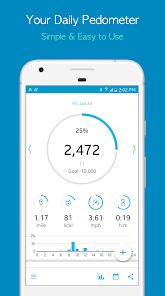
Accupedo Pedometer is a step-tracking app from Corusen LLC, designed for anyone who wants to keep tabs on their daily movement without needing a fancy fitness band or smartwatch. It's essentially a simple pedometer that runs in the background, turning your phone's sensors into a step counter. For a normal user, downloading it from Google Play or the App Store is a no-brainer if you're curious about how much you walk in a day but don't want to invest in extra hardware. When you first launch the app, the clean interface feels surprisingly straightforward, with a big number showing your steps right on the main screen. It's free to install, though you'll hit a few ads unless you opt for the in-app purchase to remove them. There's no mandatory registration, which is a huge plus for just wanting to get started right away.
Using Accupedo day-to-day is largely a set-it-and-forget-it experience. Once you open it and grant location permission for better accuracy, it starts counting steps almost immediately. The home screen shows more than just steps, including estimated distance, calories burned, and active time, which updates as you move. Moving through the app, you can tap into a bar chart to see your hourly progress, which is handy for realizing how sedentary your morning was compared to your afternoon walk. One slightly confusing moment is setting your stride length manually, but the app offers a tip to walk a known distance once to calibrate it. For daily use, you just close the app, and it keeps counting in the background; checking it at the end of the day to see your total feels natural.
After using Accupedo for a few weeks, I found it a reliable companion for casual fitness tracking. It's perfect for people who just want a baseline understanding of their activity without syncing data to a cloud or fussing over charts. What sets it apart from more complex apps is its battery efficiency, it doesn't drain your phone like some always-on GPS trackers. That said, serious runners or gym-goers might find it lacking because it doesn't track routes or specific exercises. I ended up keeping it on my phone because it's lightweight and honestly pretty accurate for walking, but I could see someone uninstalling it if they upgrade to a wearable. Compared to Pacer or Google Fit, Accupedo feels simpler but less social or connected, which is either a blessing or a bore depending on what you want.
features
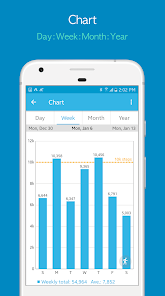
- 📊 The hourly activity bar chart is a standout feature that most pedometers bury in settings. Accupedo shows you a clean graph on the main dashboard, letting you quickly see if you've been a couch potato between meetings. Pacer offers a similar breakdown, but requires more tapping to find it. Accupedo's chart is immediate and easy to read.
- 🔋 Battery management is handled smarter here than in many step counters. The app uses the phone's built-in accelerometer efficiently, so it doesn't kill your battery like some GPS-heavy fitness apps. Google Fit, for instance, tends to be more aggressive with its sensors, making Accupedo a better choice for older phones or long days away from a charger.
- 🚶 The automatic stride detection calibration is a nice touch. You can walk a known distance, enter it, and the app adjusts your step length automatically. This beats manually guessing or using generic averages found in similar apps like StepsApp, which often require you to enter your height and hope for the best.
- 📱 The no-registration policy means you can start using it instantly without creating an account. Many pedometers, like Runkeeper or Pedometer++, push for sign-ups early on. Accupedo just opens up and starts counting, which respects your time and privacy from the get-go.
pros
- 🎯 Its accuracy for walking steps is surprisingly good on flat ground, often matching what you get from a dedicated fitness band. This makes it more reliable than free versions of MapMyWalk, which sometimes confuses driving or bumpy car rides with steps.
- 📉 The app uses very little phone memory and runs smoothly even on older Android or iOS devices. This is a clear advantage over heavier apps like Samsung Health, which can lag on budget phones with less RAM.
- 🧭 The manual stride length adjustment gives you control over your distance estimates, something many free pedometers skip entirely. Pacer, for example, relies solely on height-based calculations, which can be off for people with longer or shorter legs than average.
- 🔄 Background step counting works even if you force stop the app accidentally, as it picks up from the phone's stored sensor data. This is more forgiving than Pedometer++ on iOS, which sometimes resets your count after a full restart if you don't open it right away.
cons
- 😒 The free version shows banner ads and occasional full-screen ads after unlocking your phone, which can get annoying quickly. Competitors like Google Fit are completely ad-free, making Accupedo feel a bit cheap unless you pay for removal.
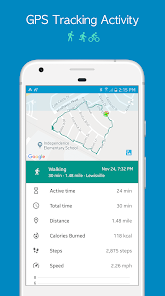
- 📊 The lack of GPS route tracking makes it useless for runners or hikers who want to see their path on a map. Apps like Runkeeper or Strava offer detailed route maps, while Accupedo only gives you distance estimates based on step count.
- 🔁 There's no cloud backup or sync across devices, so if you get a new phone, your step history is gone unless you manually export it. Pacer syncs your data across platforms seamlessly, which is more convenient for long-term users.
- 📱 The app drains battery faster on some devices during long periods of inactivity, because it keeps checking sensors for movement. Simple step counters like the pre-installed Apple Health or Google Fit manage this more efficiently in the background.
Articles
![]()
Guide
How to Update Google Play Store on Android 2026
![]()
Guide
How to Download Older Versions of Android Apps
![]()
Guide
How to Download Apps Without Google Play Store
![]()
Guide
What Is an APK File for Android?
If you use an Android phone, you may have seen the term APK while searching for apps or games online. Some websites offer an APK download instead of a Google Play install button. Some users also mention APK files when talking about apps that are not available in their region, older app versions, or Android games downloaded outside the Play Store.
![]()
Guide
How to Install Games from Google Play for Beginners
Installing games on an Android phone is usually simple, but for beginners, the process can still feel confusing at first. You may not know where to search, which button to tap, whether the game is safe, or why Google Play sometimes asks for account settings, storage access, or payment information. If you are using an Android phone for the first time, learning how to install games from Google Play is one of the easiest ways to get started.
![]()
Guide
How Useful Gemini Is for Everyday Questions and Quick Tasks
emini feels different from many AI apps because it is not only trying to be a chatbot. After using it for everyday questions, quick writing, image understanding, and planning, I think its biggest strength is convenience.
![]()
Guide
What to Know Before Downloading APKs
For many Android users, downloading an APK is a common way to install apps and games. Sometimes an app is not available in a certain country.
![]()
Guide
ChatGPT Review: Is It Still the Best AI App in 2026?
![]()
Guide
Seedance 2.0 vs Sora: The Future of AI Video Generation
The AI video race has intensified dramatically over the past two years. Platforms like Sora from OpenAI and Luma Dream Machine pushed the boundaries of text-to-video realism. Yet, despite their impressive outputs, most tools still operate as probabilistic generators—you describe a scene, and the model interprets it. Control remains limited. With the February 2026 release of Seedance 2.0, developed by ByteDance, the paradigm shifted. Internally known as Jimeng 2.0, Seedance does not position itself as just another video model. It positions itself as an AI Director. Rather than guessing what you want, Seedance 2.0 allows you to direct what happens. This distinction defines everything that follows.









Recommended Apps
![]()
Home Design 3D
Anuman4.2
![]()
Truth or Dare Game - Party App
Chouic4.8
![]()
Photo Collage Maker
Scoompa4.7![]()
Learn to Draw Flower
Creative APPS4.2![]()
FIFA World Cup 2026™
FIFA2.8![]()
Mirror Plus: Mirror with Light
Digitalchemy, LLC4.4![]()
Meitu- Photo Editor & AI Art
Meitu (China) Limited4.5![]()
Perplexity - Ask Anything
PerplexityAI4.7![]()
GhostTube SLS Camera Alternate
GhostTube4![]()
Boom Chip Blast: 2-Player
Black Pyramid 3D Games Studio0![]()
Healthy Benefits+
Solutran, Inc.4.5![]()
Deepcheck AI Search Assistant
rohe.ai4![]()
Idol Prank Video Call & Chat
LightCode Solutions4![]()
Face Shape - Pretty Scale
GlintTec Apps3.9![]()
Plant App - Plant Identifier
ScaleUp4.6












































