
Draw Glow Comics

5M+
Installs
ColorJoy
Developer
-
Art & Design
Category
-
Rated for 3+
Content Rating
-
colorjoy.feedback@outlook.com
Developer Email
-
http://coloring.hk/colorjoy_privacy.html
Privacy Policy
Screenshots
editor reviews
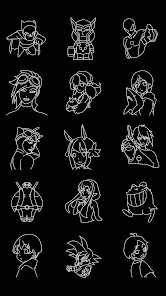
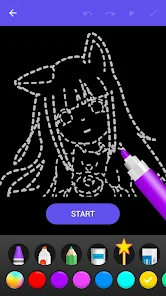
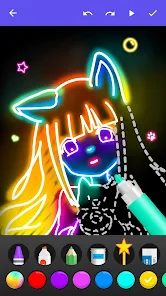
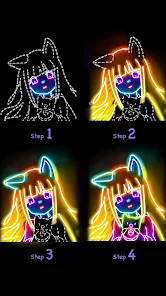
Draw Glow Comics is a mobile app that turns your regular doodles into glowing, neon-style artwork, making it a neat little tool for anyone into creative drawing or just looking for a fun way to pass the time. It sits somewhere between a casual sketchpad and a light-hearted art game, mainly letting you create glowing pictures with a variety of neon colors and brushes that simulate that cool cyberpunk or ultraviolet look. Most people download it from the Google Play or App Store because they want to try something different from standard coloring apps, something that feels a bit more eye-catching and playful. The first launch gives you a simple, colorful interface that doesn't overwhelm you with buttons or prompts, just a clean canvas and a set of glowing tools right in your face, so you can start messing around immediately without any registration or tutorial getting in the way. It's free to install, though there are some optional in-app purchases for extra brush packs or tools, and you might see a few ads here and there, but nothing too intrusive that would ruin the fun.
Once you actually start using the app, the experience feels pretty hands-on and intuitive. There's a straightforward onboarding that shows you how to pick a glow color, adjust the brush size, and choose between different drawing effects like a soft neon glow or a sharp laser line. You just tap the screen to select where you want to draw, swipe your finger to create lines or shapes, and the glow effect pops up instantly, which is super satisfying. The main actions are all about layering colors, using an eraser tool to clean up messy strokes, and experimenting with the black background that makes the neon pop so well. One small tip I found useful is to use the undo button sparingly because redoing things can get a bit finicky, but honestly, the simplicity of just drawing straight onto the canvas without worrying about layers or complex menus keeps things smooth. Some people might find the selection of brushes a bit limited compared to more serious drawing apps, but for a casual session, it's more than enough to get creative and have fun without any hiccups.
After spending a bit of time with Draw Glow Comics, I can see it appealing to folks who enjoy doodling on their phones, fans of neon or retro aesthetics, and even kids who love bright, flashy colors without needing a complicated setup. It's not really for serious digital artists who need pressure sensitivity or detailed layer management, because those features just aren't there, so professionals might get bored or frustrated quickly. What sets it apart from similar apps like Glow Draw or Neon Paint is how straightforward it feels, with no login, no heavy permissions, and a focus purely on the glowing effect rather than trying to be a full art studio. You might keep it installed if you're into making quick wallpapers, social media stickers, or just need a chill activity during a commute, but if you're looking for advanced tools or a more realistic drawing experience, you'll likely uninstall it after a few tries. It's fun for what it is, but it doesn't pretend to be anything more.
features
- 💡 The standout feature is the real-time glow effect that reacts instantly as you draw, giving your strokes a luminous, radiant look that feels almost like working with actual light. Unlike apps like Procreate that focus on realistic brushes, this one makes every line pop with a vibrant, almost magical glow that changes depending on how much pressure you apply.
- 💡 It offers a simple color palette specifically designed for neon shades, so you don't have to mix or adjust hues manually. This is way more accessible than something like Adobe Fresco, where color customization can be overwhelming for a casual user just wanting to create something flashy quickly.
- 💡 The app includes a unique "glow spread" tool that lets you expand the neon effect outward from your drawing, creating a soft halo around your artwork. This is something you rarely see in other drawing apps, which usually require manual layer duplication or blur effects to achieve a similar look.
pros
- ✨ One big strength is how lightweight and fast the app runs, even on older phones, so you can draw without lag or crashes. That's a clear advantage over heavier apps like Ibis Paint X, which can bog down on mid-range devices.
- ✨ The interface is incredibly clean with no cluttered menus or hidden features, so you can just open and draw in seconds. Compared to MediBang Paint, which throws a ton of options at you, this app respects your time and focus.
- ✨ The glow effects are genuinely unique and fun, making your art stand out without needing any artistic skill. Apps like Sketchbook don't offer this kind of built-in visual flair, so it's a fresh alternative for quick creative expression.
cons
- 🚫 The main weakness is the limited brush selection, with only a handful of basic options that don't support customization. Apps like Krita Mobile offer dozens of brush presets and adjustable parameters, so this feels bare bones in comparison.
- 🚫 There's no layer system at all, which means you can't separate different parts of your drawing or edit them independently. In Procreate Pocket, layers are a core feature that makes complex artwork possible, but here you're stuck with everything on one flat canvas.
- 🚫 The app lacks an export option with high resolution or transparent backgrounds, so if you want to use your drawings for anything outside the app, you're limited to lower-quality screenshots. Apps like Adobe Illustrator Draw handle exports much better for sharing or printing.
- 🚫 The undo history is pretty shallow, so if you mess up a few steps back, you can't easily recover. That's a letdown compared to apps like Tayasui Sketches, which offer unlimited undo to let you experiment freely.
Articles
![]()
Guide
How to Update Google Play Store on Android 2026
![]()
Guide
How to Download Older Versions of Android Apps
![]()
Guide
How to Download Apps Without Google Play Store
![]()
Guide
What Is an APK File for Android?
If you use an Android phone, you may have seen the term APK while searching for apps or games online. Some websites offer an APK download instead of a Google Play install button. Some users also mention APK files when talking about apps that are not available in their region, older app versions, or Android games downloaded outside the Play Store.
![]()
Guide
How to Install Games from Google Play for Beginners
Installing games on an Android phone is usually simple, but for beginners, the process can still feel confusing at first. You may not know where to search, which button to tap, whether the game is safe, or why Google Play sometimes asks for account settings, storage access, or payment information. If you are using an Android phone for the first time, learning how to install games from Google Play is one of the easiest ways to get started.
![]()
Guide
How Useful Gemini Is for Everyday Questions and Quick Tasks
emini feels different from many AI apps because it is not only trying to be a chatbot. After using it for everyday questions, quick writing, image understanding, and planning, I think its biggest strength is convenience.
![]()
Guide
What to Know Before Downloading APKs
For many Android users, downloading an APK is a common way to install apps and games. Sometimes an app is not available in a certain country.
![]()
Guide
ChatGPT Review: Is It Still the Best AI App in 2026?
![]()
Guide
Seedance 2.0 vs Sora: The Future of AI Video Generation
The AI video race has intensified dramatically over the past two years. Platforms like Sora from OpenAI and Luma Dream Machine pushed the boundaries of text-to-video realism. Yet, despite their impressive outputs, most tools still operate as probabilistic generators—you describe a scene, and the model interprets it. Control remains limited. With the February 2026 release of Seedance 2.0, developed by ByteDance, the paradigm shifted. Internally known as Jimeng 2.0, Seedance does not position itself as just another video model. It positions itself as an AI Director. Rather than guessing what you want, Seedance 2.0 allows you to direct what happens. This distinction defines everything that follows.









Recommended Apps
![]()
Home Design 3D
Anuman4.2
![]()
Truth or Dare Game - Party App
Chouic4.8
![]()
Photo Collage Maker
Scoompa4.7![]()
Learn to Draw Flower
Creative APPS4.2![]()
FIFA World Cup 2026™
FIFA2.8![]()
Mirror Plus: Mirror with Light
Digitalchemy, LLC4.4![]()
Meitu- Photo Editor & AI Art
Meitu (China) Limited4.5![]()
Perplexity - Ask Anything
PerplexityAI4.7![]()
GhostTube SLS Camera Alternate
GhostTube4![]()
Boom Chip Blast: 2-Player
Black Pyramid 3D Games Studio0![]()
Healthy Benefits+
Solutran, Inc.4.5![]()
Deepcheck AI Search Assistant
rohe.ai4![]()
Idol Prank Video Call & Chat
LightCode Solutions4![]()
Face Shape - Pretty Scale
GlintTec Apps3.9![]()
Plant App - Plant Identifier
ScaleUp4.6












































