
Fake Chat WhatsMock Text Prank

10M+
Installs
Playfake
Developer
-
Entertainment
Category
-
Rated for 3+
Content Rating
-
contact@playfake.in
Developer Email
-
https://www.playfake.app/privacy-policy.html?app=whatsmock
Privacy Policy
Screenshots
editor reviews
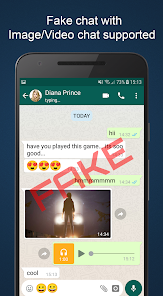
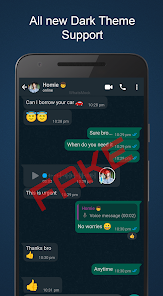
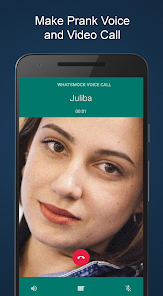
Fake Chat WhatsMock Text Prank is a simulation app, not a real messaging tool, designed to let users create fake chat conversations that look like they came from WhatsApp. People download it from the Google Play Store mostly for pranks, to mess with friends by showing screenshots of made-up chats, or to test how someone might react to a fake scenario. After installing and launching it, the first thing that stands out is how the interface tries to copy WhatsApp's green-and-white look, which feels familiar but obviously fake once you start interacting. It's free to download, though there are some in-app purchases to unlock more customization options, and you don't need to register or log in, which makes it quick to jump into.
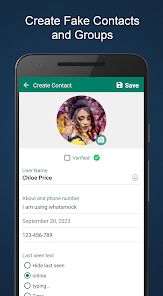
After using it for a bit, the experience is straightforward but a bit rough around the edges. The screen shows a blank chat area where you can add contacts, type messages, and even fake timestamps or delivery statuses like "double ticks." You pick a contact name, write whatever dialogue you want, and then hit a button to generate the screenshot. It's easy enough to figure out—tap here, type there—but the interface feels cluttered with too many options up front, like choosing phone models or network icons, which can make the simple task of faking a chat feel more complicated than it needs to be. A practical tip: stick to the basic chat creator first, because diving into the extra features like fake notifications or calls just adds steps without much payoff for a quick prank.
After spending a week with it, I think this app works best for someone who wants a laugh with friends or needs to create a fake conversation for a joke, maybe for social media content. But if you're looking for a polished tool or something more convincing, it falls short because the generated chats often have slight font mismatches or odd spacing that a sharp eye might catch. Compared to similar prank apps like Fake WhatsApp Chat, this one leans more into customization with more phone model options, but it doesn't feel as smooth to use. Most users will probably keep it for a one-time prank and then uninstall, but if you enjoy pulling quick stunts, it's worth a download.
features
- 🤳 You can customize almost every element: contact names, messages, timestamps, and even network signals. This goes way beyond similar apps like Fake Chat, which often limit how much you can edit. The level of control here is the standout feature for a prank app.
- 🕒 The app lets you fake real-time elements like typing indicators and delivery ticks. In apps like Fake WhatsApp Simulator, these are usually static or missing entirely. Here, they add a layer of believability to the generated screenshots.
- 📱 It includes options to simulate different smartphone brands and models, so the fake chats don't instantly look like a generic template. Most competitors stick to a one-size-fits-all look, but this app tries to match the user's actual device interface.
pros
- 🎨 The interface is free to use without registration, so you can start creating right away. Similar apps like Fake Chat often force a login or restrict basic features for free users.
- 📸 Generating high-resolution screenshots is smooth and quick, with no watermarks unless you choose to add them. This is a clear win over Fake WhatsApp Generator, which sometimes blurs the output on the free plan.
- 💬 You can save multiple chat templates and reuse them later, which is handy for recurring pranks or series content. Most rivals only offer one-off creation without a library feature.
cons
- 🐌 The app has occasional lag when switching between customization menus, which can kill the flow of creating a prank quickly. Fake Chat feels snappier in navigation overall.
- 🚫 You cannot preview the fake chat as a full screenshot before saving it, so you have to export and check on your gallery each time. In contrast, Fake WhatsApp Simulator offers a live preview.
- 🔇 Notification simulation is glitchy—sometimes the fake banner doesn't show up correctly on certain Android versions. Other apps like Prank Chat handle this more reliably across devices.
- 📂 Exported images sometimes have extra padding at the edges, which makes them look less authentic when shared. This is less of an issue with more polished competitors.
Articles
![]()
Guide
How to Update Google Play Store on Android 2026
![]()
Guide
How to Download Older Versions of Android Apps
![]()
Guide
How to Download Apps Without Google Play Store
![]()
Guide
What Is an APK File for Android?
If you use an Android phone, you may have seen the term APK while searching for apps or games online. Some websites offer an APK download instead of a Google Play install button. Some users also mention APK files when talking about apps that are not available in their region, older app versions, or Android games downloaded outside the Play Store.
![]()
Guide
How to Install Games from Google Play for Beginners
Installing games on an Android phone is usually simple, but for beginners, the process can still feel confusing at first. You may not know where to search, which button to tap, whether the game is safe, or why Google Play sometimes asks for account settings, storage access, or payment information. If you are using an Android phone for the first time, learning how to install games from Google Play is one of the easiest ways to get started.
![]()
Guide
How Useful Gemini Is for Everyday Questions and Quick Tasks
emini feels different from many AI apps because it is not only trying to be a chatbot. After using it for everyday questions, quick writing, image understanding, and planning, I think its biggest strength is convenience.
![]()
Guide
What to Know Before Downloading APKs
For many Android users, downloading an APK is a common way to install apps and games. Sometimes an app is not available in a certain country.
![]()
Guide
ChatGPT Review: Is It Still the Best AI App in 2026?
![]()
Guide
Seedance 2.0 vs Sora: The Future of AI Video Generation
The AI video race has intensified dramatically over the past two years. Platforms like Sora from OpenAI and Luma Dream Machine pushed the boundaries of text-to-video realism. Yet, despite their impressive outputs, most tools still operate as probabilistic generators—you describe a scene, and the model interprets it. Control remains limited. With the February 2026 release of Seedance 2.0, developed by ByteDance, the paradigm shifted. Internally known as Jimeng 2.0, Seedance does not position itself as just another video model. It positions itself as an AI Director. Rather than guessing what you want, Seedance 2.0 allows you to direct what happens. This distinction defines everything that follows.









Recommended Apps
![]()
Home Design 3D
Anuman4.2
![]()
Truth or Dare Game - Party App
Chouic4.8
![]()
Photo Collage Maker
Scoompa4.7![]()
Learn to Draw Flower
Creative APPS4.2![]()
FIFA World Cup 2026™
FIFA2.8![]()
Mirror Plus: Mirror with Light
Digitalchemy, LLC4.4![]()
Meitu- Photo Editor & AI Art
Meitu (China) Limited4.5![]()
Perplexity - Ask Anything
PerplexityAI4.7![]()
GhostTube SLS Camera Alternate
GhostTube4![]()
Boom Chip Blast: 2-Player
Black Pyramid 3D Games Studio0![]()
Healthy Benefits+
Solutran, Inc.4.5![]()
Deepcheck AI Search Assistant
rohe.ai4![]()
Idol Prank Video Call & Chat
LightCode Solutions4![]()
Face Shape - Pretty Scale
GlintTec Apps3.9![]()
Plant App - Plant Identifier
ScaleUp4.6











































