
Rolling Icon: 3D Wallpaper

10M+
Installs
Maxlabs Personalization Tools
Developer
-
Productivity
Category
-
Everyone
Content Rating
-
android-support@maxlabs.hk
Developer Email
-
https://www.maxlabs.hk/privacy-policy
Privacy Policy
Screenshots
editor reviews
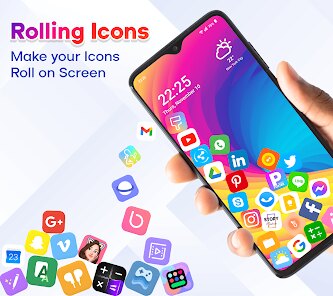
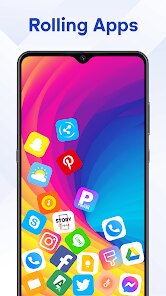
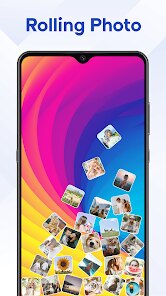
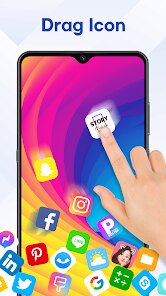
Rolling Icon: 3D Wallpaper is a wallpaper customization app that turns your phone's home screen into a dynamic, interactive space. It belongs to the personalization tools genre, so if you're someone who likes changing backgrounds monthly, this app is worth a look. On Google Play, it has a solid install count, though it doesn't sit at the very top of the charts like some major launcher apps. You can download and install it for free, and once you launch it, the first impression is actually pretty polished. The opening screen shows off a few 3D previews that catch your eye immediately, and there's a clean, modern feel that doesn't scream "cluttered" like some wallpaper apps do. You don't need to register an account to start browsing, which is a huge plus for casual users. There are in-app purchases for premium packs, but the free selection feels generous enough to decide if you like the style.
After opening the app, the hands-on experience is largely straightforward. The interface sorts wallpapers into categories like abstract, nature, and tech, so you're not scrolling through endless random files. The onboarding is very quick, just a tap or two and you're already previewing a wallpaper. When you find one you like, pressing "Apply" brings up a few options, like setting it to your home screen, lock screen, or both. The 3D effect works by using your phone's gyroscope, so the background shifts as you tilt the phone. During daily use, this feels smooth most of the time, though on older phones it can stutter slightly. A practical tip is to try the "Live Preview" before applying, because some wallpapers look great in the catalog but a bit too busy on a real home screen with icons. Also, checking the battery impact is wise, since live wallpapers can drain more power than static ones.
After using Rolling Icon for a while, I can confidently say it offers a fresh take on wallpapers but isn't for everyone. I think people who enjoy minimalist designs or subtle motion effects will really like it, especially those tired of static backgrounds. However, if you prefer straightforward wallpaper apps with no extra motion or battery drain, something like Backdrops or Walli might suit you better. What makes this app stand out compared to those is the 3D parallax effect, which adds depth without being overwhelming. For me, the app is worth keeping installed mainly because it offers a unique visual treat that most static apps don't. That said, I can imagine uninstalling it later if the in-app purchases feel too pushy or if the free collection doesn't get updated often. Overall, it's a neat niche tool that does exactly what it promises, just not for everyone's daily use.
features
- 🎨 Interactive 3D Parallax Effect: The core feature here is the gyroscope-based motion, so your wallpaper literally shifts in three dimensions as you tilt your device. Compared to Wallcraft, which also has live wallpapers, Rolling Icon focuses more on depth and smooth transitions rather than just animated loops. You feel like you're looking into a small diorama, not just watching a video.
- 🏷️ Categorized and Curated Collections: Instead of dumping hundreds of random images, the app groups its 3D wallpapers into tidy categories like architecture and fantasy. This makes browsing much faster than Zedge's messy tag system, where you often have to filter out low-quality uploads. You can find a style you like in seconds.
- ⚡ Optimized Battery Performance: The app includes a built-in battery saver mode for live wallpapers, which pauses the 3D effect when the phone is stationary. This is a standout versus KLWP, where custom live setups often drain the battery continuously. For a free app, this level of power management is genuinely thoughtful.
- 📱 Direct Apply Without Launcher: You can set these wallpapers directly from the app without needing a third-party launcher like Nova. This is a huge convenience compared to some 3D wallpaper apps that force you into extra setups. It just works on stock Android systems, which saves time.
pros
- 🟢 Lightweight and Quick to Install: Unlike heavy apps like Hola Launcher that bundle a ton of bloatware, Rolling Icon is lean. It takes up very little storage and downloads wallpaper packs on demand, so your phone stays fast. This makes it a good choice for budget devices.
- 🟢 Unique Depth Effect Not Found in Backdrops: Backdrops is great for static art, but it has no true 3D motion. Rolling Icon provides that extra layer of visual interest without sacrificing image quality. It feels more modern and engaging for daily use.
- 🟢 Free Enough to Test: While Wallpi charges for almost every good wallpaper, Rolling Icon offers a decent free library. You can try several high-quality 3D backgrounds before deciding to pay. This lowers the barrier for casual users who aren't sure yet.
cons
- 🔴 Limited Free Content Over Time: After a few weeks, the free selection starts to feel repetitive. Compared to Wallcraft, which refreshes its free library weekly, Rolling Icon updates slowly. You might feel pressured to buy packs earlier than you'd like.
- 🔴 No Custom Upload Support: Unlike KLWP, where you can create your own 3D scene from scratch, Rolling Icon only offers curated packs. If you're a creative user who wants total control, this app feels very restrictive. It's a consumer tool, not a creator tool.
- 🔴 Occasional Gyroscope Glitches: On some devices, the 3D effect can lag or misalign when rotating quickly. Zedge's live wallpapers handle movement more smoothly in my testing. It's not a dealbreaker, but noticeable if you like swiping fast between screens.
Articles
![]()
Guide
How to Update Google Play Store on Android 2026
![]()
Guide
How to Download Older Versions of Android Apps
![]()
Guide
How to Download Apps Without Google Play Store
![]()
Guide
What Is an APK File for Android?
If you use an Android phone, you may have seen the term APK while searching for apps or games online. Some websites offer an APK download instead of a Google Play install button. Some users also mention APK files when talking about apps that are not available in their region, older app versions, or Android games downloaded outside the Play Store.
![]()
Guide
How to Install Games from Google Play for Beginners
Installing games on an Android phone is usually simple, but for beginners, the process can still feel confusing at first. You may not know where to search, which button to tap, whether the game is safe, or why Google Play sometimes asks for account settings, storage access, or payment information. If you are using an Android phone for the first time, learning how to install games from Google Play is one of the easiest ways to get started.
![]()
Guide
How Useful Gemini Is for Everyday Questions and Quick Tasks
emini feels different from many AI apps because it is not only trying to be a chatbot. After using it for everyday questions, quick writing, image understanding, and planning, I think its biggest strength is convenience.
![]()
Guide
What to Know Before Downloading APKs
For many Android users, downloading an APK is a common way to install apps and games. Sometimes an app is not available in a certain country.
![]()
Guide
ChatGPT Review: Is It Still the Best AI App in 2026?
![]()
Guide
Seedance 2.0 vs Sora: The Future of AI Video Generation
The AI video race has intensified dramatically over the past two years. Platforms like Sora from OpenAI and Luma Dream Machine pushed the boundaries of text-to-video realism. Yet, despite their impressive outputs, most tools still operate as probabilistic generators—you describe a scene, and the model interprets it. Control remains limited. With the February 2026 release of Seedance 2.0, developed by ByteDance, the paradigm shifted. Internally known as Jimeng 2.0, Seedance does not position itself as just another video model. It positions itself as an AI Director. Rather than guessing what you want, Seedance 2.0 allows you to direct what happens. This distinction defines everything that follows.









Recommended Apps
![]()
Home Design 3D
Anuman4.2
![]()
Truth or Dare Game - Party App
Chouic4.8
![]()
Photo Collage Maker
Scoompa4.7![]()
Learn to Draw Flower
Creative APPS4.2![]()
FIFA World Cup 2026™
FIFA2.8![]()
Mirror Plus: Mirror with Light
Digitalchemy, LLC4.4![]()
Meitu- Photo Editor & AI Art
Meitu (China) Limited4.5![]()
Perplexity - Ask Anything
PerplexityAI4.7![]()
GhostTube SLS Camera Alternate
GhostTube4![]()
Boom Chip Blast: 2-Player
Black Pyramid 3D Games Studio0![]()
Healthy Benefits+
Solutran, Inc.4.5![]()
Deepcheck AI Search Assistant
rohe.ai4![]()
Idol Prank Video Call & Chat
LightCode Solutions4![]()
Face Shape - Pretty Scale
GlintTec Apps3.9![]()
Plant App - Plant Identifier
ScaleUp4.6











































