

StyleLab: AI Clothes Try On

100K+
Installs
IRONTECH
Developer
-
Lifestyle
Category
-
Rated for 3+
Content Rating
-
stylelab@irontech.mobi
Developer Email
-
https://irontech.mobi/stylelab/android/privacy
Privacy Policy
Screenshots

editor reviews
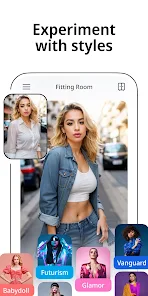
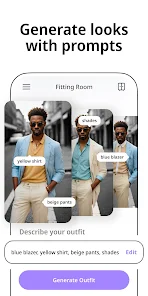
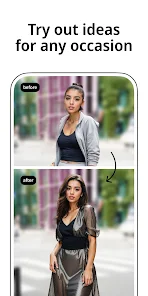
StyleLab: AI Clothes Try On is one of those fashion utility apps that tries to solve a pretty common problem - how clothes actually look on you before buying. It uses AI to superimpose clothing items onto your uploaded photos, so you can virtually "try on" outfits without stepping into a fitting room. The app sits in the lifestyle category on Google Play and has a decent number of installs, though I didn't see an exact figure. It's free to download, and after launching it, the first impression is a clean, modern interface with a focus on the camera and photo upload buttons. The onboarding explains the privacy policy around image handling, which is reassuring since you're sharing personal photos. There are subscription options for unlimited try-ons, and ads pop up occasionally, but nothing too aggressive during initial use.
Once you start using StyleLab, the experience is fairly straightforward. You either snap a full-body photo or choose one from your gallery, then the app guides you to select a clothing item from their catalog. The AI processing takes a few seconds - sometimes longer depending on the complexity of the outfit and background. The overlay results are impressive when the lighting matches, but I noticed that busy backgrounds or patterned clothes can confuse the AI, leading to awkward edges or misaligned sleeves. The app includes a size recommendation feature based on your measurements, which I found handy, though it's not always accurate with loose-fitting garments. For daily use, you'd probably need to take a few test shots to get a good base photo - solid color backgrounds work best. The try-on history is saved, so you can compare different looks side by side, which is nice for outfit planning.
After a few weeks of use, I think StyleLab appeals most to fashion shoppers who buy clothes online frequently and want to avoid return hassles. It's also fun for experimenting with new styles without commitment. However, if you're someone who prefers in-store shopping or already has a good eye for fit, this might feel like an unnecessary extra step. Compared to other virtual try-on apps like ZARA's AR feature or Amazon's Outfit Compare, StyleLab offers a broader catalog beyond a single brand. What keeps it on my phone is the convenience of testing multiple looks quickly. Yet, the AI glitches and the subscription cost for unlimited access might push casual users to uninstall after a few uses. It's a solid tool with room to grow, but not a wardrobe essential for everyone.
features
- 🧥 AI Clothes Overlay: This is StyleLab's core trick. It uses AI to map clothing onto your body shape and pose, which works surprisingly well for straight-on shots. Compared to ZARA's AR try-on that only works with their limited catalog, StyleLab offers more variety across different brands and styles, making it more versatile for general online shopping.
- 📏 Measurement-Based Sizing: The app asks for your height, weight, and body shape to recommend sizes. While ZARA's app doesn't offer this level of personalization, StyleLab's predictions are hit or miss - especially for oversized or stretchy fabrics. Still, it's a feature that saves guesswork if you input accurate details.
- 🔄 Try-On History & Side-by-Side Compare: You can save past try-ons and compare them in a single view. This is something Amazon's Outfit Compare doesn't do natively. It helps when you're deciding between two dresses or tops, though the comparison view feels a bit cramped on smaller phone screens.
pros
- 📸 Broad Clothing Catalog: Unlike ZARA AR or ASOS's virtual try-on that locks you into their inventory, StyleLab lets you upload photos of clothes from any online store or personal wardrobe. This openness is a big plus if you shop across multiple retailers.
- ⚡ Quick Processing Speed: The AI generates results in under 10 seconds on most phones, which is faster than some competitors like the Vue.ai-powered apps that can take up to 30 seconds. That speed makes trying multiple outfits feel seamless, not tedious.
- 🔒 Privacy-First Approach: The app emphasizes that photos are processed locally and not stored on servers after the session ends. This is a stronger stance than many similar apps that upload images to the cloud, and it gives peace of mind when sharing body photos.
cons
- 🎯 Limited Free Use: The free version gives only a handful of try-ons before asking for a subscription, which feels restrictive compared to apps like Style Me or Pureple that offer more tries without immediate payment. Casually browsing outfits can quickly hit a paywall.
- 🤖 AI Accuracy Gaps: The overlay struggles with non-standard poses, dark backgrounds, or transparent fabrics. Competitors like ZARA AR handle these better because they train on their own clothing data. Misaligned sleeves or floating hems break the illusion and undermine trust in the results.
- 📱 No iOS Version: As of now, StyleLab seems available only on Android. This limits its user base compared to cross-platform alternatives like Zeekit (now part of Walmart) that work on both iOS and Android. iPhone users looking for virtual fitting will need to look elsewhere.
Articles
![]()
Guide
How to Update Google Play Store on Android 2026
![]()
Guide
How to Download Older Versions of Android Apps
![]()
Guide
How to Download Apps Without Google Play Store
![]()
Guide
What Is an APK File for Android?
If you use an Android phone, you may have seen the term APK while searching for apps or games online. Some websites offer an APK download instead of a Google Play install button. Some users also mention APK files when talking about apps that are not available in their region, older app versions, or Android games downloaded outside the Play Store.
![]()
Guide
How to Install Games from Google Play for Beginners
Installing games on an Android phone is usually simple, but for beginners, the process can still feel confusing at first. You may not know where to search, which button to tap, whether the game is safe, or why Google Play sometimes asks for account settings, storage access, or payment information. If you are using an Android phone for the first time, learning how to install games from Google Play is one of the easiest ways to get started.
![]()
Guide
How Useful Gemini Is for Everyday Questions and Quick Tasks
emini feels different from many AI apps because it is not only trying to be a chatbot. After using it for everyday questions, quick writing, image understanding, and planning, I think its biggest strength is convenience.
![]()
Guide
What to Know Before Downloading APKs
For many Android users, downloading an APK is a common way to install apps and games. Sometimes an app is not available in a certain country.
![]()
Guide
ChatGPT Review: Is It Still the Best AI App in 2026?
![]()
Guide
Seedance 2.0 vs Sora: The Future of AI Video Generation
The AI video race has intensified dramatically over the past two years. Platforms like Sora from OpenAI and Luma Dream Machine pushed the boundaries of text-to-video realism. Yet, despite their impressive outputs, most tools still operate as probabilistic generators—you describe a scene, and the model interprets it. Control remains limited. With the February 2026 release of Seedance 2.0, developed by ByteDance, the paradigm shifted. Internally known as Jimeng 2.0, Seedance does not position itself as just another video model. It positions itself as an AI Director. Rather than guessing what you want, Seedance 2.0 allows you to direct what happens. This distinction defines everything that follows.









Recommended Apps
![]()
Home Design 3D
Anuman4.2
![]()
Truth or Dare Game - Party App
Chouic4.8
![]()
Photo Collage Maker
Scoompa4.7![]()
Learn to Draw Flower
Creative APPS4.2![]()
FIFA World Cup 2026™
FIFA2.8![]()
Mirror Plus: Mirror with Light
Digitalchemy, LLC4.4![]()
Meitu- Photo Editor & AI Art
Meitu (China) Limited4.5![]()
Perplexity - Ask Anything
PerplexityAI4.7![]()
GhostTube SLS Camera Alternate
GhostTube4![]()
Boom Chip Blast: 2-Player
Black Pyramid 3D Games Studio0![]()
Healthy Benefits+
Solutran, Inc.4.5![]()
Deepcheck AI Search Assistant
rohe.ai4![]()
Idol Prank Video Call & Chat
LightCode Solutions4![]()
Face Shape - Pretty Scale
GlintTec Apps3.9![]()
Plant App - Plant Identifier
ScaleUp4.6











































