

FunSwap - AI Face Swap

100K+
Installs
AI Tech Hub
Developer
-
Generative AI
Category
-
Everyone
Content Rating
-
appscloud1@gmail.com
Developer Email
-
https://sites.google.com/view/aifaceswap1/home
Privacy Policy
Screenshots
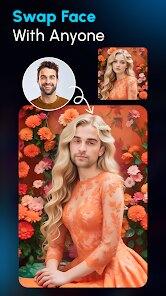

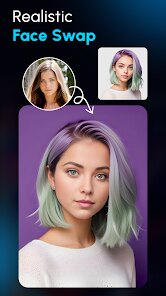



editor reviews
FunSwap is basically an AI-powered face swap app that lets you take someone's face from a photo and put it onto another picture or even a video. It falls into the photo editing and entertainment category, so it's more about fun and creativity than serious photo retouching. I first came across it on Google Play, where it has a couple of million downloads and sits as a free download, though there are in-app purchases if you want to unlock extra features or remove ads. The first impression after launching it is pretty clean — the interface isn't cluttered, and it immediately invites you to pick a photo from your gallery or snap a new one. It feels like a toy, but a well-designed one, and you can tell right away that the developers wanted this to be simple and fast, not bogged down with too many buttons or instructions.
Once you start using it, the experience is mostly smooth. After selecting a base photo, the app automatically detects faces and lets you tap on the one you want to swap. Then you pick the target image where that face should go. The swap itself takes only a few seconds, which is impressive since some similar apps can freeze or lag during processing. The onboarding is minimal — there's a short tutorial overlay that shows the basic steps, but it's easy enough to figure out on your own. There were a couple of times when the face detection didn't pick up on smaller faces in group photos, which was a bit annoying, but for standard solo or duo shots, it works just fine. A small tip I picked up: if you want the swap to look more natural, use photos with similar lighting and angles. Otherwise, the result can look a bit cartoony.
After using FunSwap for about a week, I think it's a solid choice for people who just want to mess around with friends' photos or create funny memes without overcomplicating things. It's not for someone looking for professional-grade editing tools — apps like FaceApp or Reface offer more refined swaps and better blending, but they often come with subscription fees or slower processing. What sets FunSwap apart is how quickly it gets the job done and how lightweight the app feels on older phones. I kept it installed because it's useful for quick laughs, but I can see someone uninstalling it after a few uses if they're not into sharing funny edits regularly. The ads can feel a bit pushy after every few swaps, which might drive some people away.
features
- 🎯 FunSwap delivers face swaps in just a few seconds, which is noticeably faster than Reface, where you often wait 10-15 seconds for processing. For a casual user, that difference really matters when you're just trying to make a quick joke.
- 🎯 The app handles both still images and short videos, while something like Snapchat limits you to real-time filters rather than letting you swap faces from saved media. This gives FunSwap more flexibility for editing old photos or clips.
- 🎯 Unlike FaceApp, which requires a subscription for HD exports, FunSwap lets you save high-resolution swaps in the free tier. That caught me off guard — this is a rare case where the free version doesn't feel intentionally crippled.
- 🎯 The face detection is surprisingly good with tilted or partial faces, whereas Zao often fails if the person is looking away from the camera. FunSwap manages to grab the facial landmarks even in less-than-ideal shots.
pros
- 🟢 FunSwap is completely free to download and use for basic swaps, whereas Reface locks most video features behind a paid subscription. That alone makes it a better first choice for someone who isn't sure if they'll use the app long-term.
- 🟢 The app doesn't require creating an account to start swapping. This is a big plus compared to Zao, which forces you to login via social media and collects more data. FunSwap feels more respectful of your privacy right from the start.
- 🟢 It works reliably offline for photo swaps, while FaceApp needs a constant internet connection for most features. If you're in a subway or just want to play around without Wi-Fi, FunSwap is the better pick.
cons
- 🔴 The swap quality can look unnatural with mismatched skin tones or lighting. Reface does a better job at blending the swapped face with the target image's color palette and texture, so the result feels more realistic.
- 🔴 FaceApp offers far more editing options beyond just swapping, like age filters, hairstyle changes, and background edits. FunSwap feels one-dimensional once the novelty of swapping wears off, since there's really nothing else to do.
- 🔴 The app inserts full-screen ads after every successful swap, which gets annoying quickly. In comparison, Snapchat doesn't interrupt your experience with ads when you're just using its face filters.
- 🔴 There's no undo button during the editing process. If you tap the wrong face or pick the wrong photo, you have to start over. Similar apps like Zao let you go back a step without losing everything, which saves time.
Articles
![]()
Guide
How to Update Google Play Store on Android 2026
![]()
Guide
How to Download Older Versions of Android Apps
![]()
Guide
How to Download Apps Without Google Play Store
![]()
Guide
What Is an APK File for Android?
If you use an Android phone, you may have seen the term APK while searching for apps or games online. Some websites offer an APK download instead of a Google Play install button. Some users also mention APK files when talking about apps that are not available in their region, older app versions, or Android games downloaded outside the Play Store.
![]()
Guide
How to Install Games from Google Play for Beginners
Installing games on an Android phone is usually simple, but for beginners, the process can still feel confusing at first. You may not know where to search, which button to tap, whether the game is safe, or why Google Play sometimes asks for account settings, storage access, or payment information. If you are using an Android phone for the first time, learning how to install games from Google Play is one of the easiest ways to get started.
![]()
Guide
How Useful Gemini Is for Everyday Questions and Quick Tasks
emini feels different from many AI apps because it is not only trying to be a chatbot. After using it for everyday questions, quick writing, image understanding, and planning, I think its biggest strength is convenience.
![]()
Guide
What to Know Before Downloading APKs
For many Android users, downloading an APK is a common way to install apps and games. Sometimes an app is not available in a certain country.
![]()
Guide
ChatGPT Review: Is It Still the Best AI App in 2026?
![]()
Guide
Seedance 2.0 vs Sora: The Future of AI Video Generation
The AI video race has intensified dramatically over the past two years. Platforms like Sora from OpenAI and Luma Dream Machine pushed the boundaries of text-to-video realism. Yet, despite their impressive outputs, most tools still operate as probabilistic generators—you describe a scene, and the model interprets it. Control remains limited. With the February 2026 release of Seedance 2.0, developed by ByteDance, the paradigm shifted. Internally known as Jimeng 2.0, Seedance does not position itself as just another video model. It positions itself as an AI Director. Rather than guessing what you want, Seedance 2.0 allows you to direct what happens. This distinction defines everything that follows.









Recommended Apps
![]()
Home Design 3D
Anuman4.2
![]()
Truth or Dare Game - Party App
Chouic4.8
![]()
Photo Collage Maker
Scoompa4.7![]()
Learn to Draw Flower
Creative APPS4.2![]()
FIFA World Cup 2026™
FIFA2.8![]()
Mirror Plus: Mirror with Light
Digitalchemy, LLC4.4![]()
Meitu- Photo Editor & AI Art
Meitu (China) Limited4.5![]()
Perplexity - Ask Anything
PerplexityAI4.7![]()
GhostTube SLS Camera Alternate
GhostTube4![]()
Boom Chip Blast: 2-Player
Black Pyramid 3D Games Studio0![]()
Healthy Benefits+
Solutran, Inc.4.5![]()
Deepcheck AI Search Assistant
rohe.ai4![]()
Idol Prank Video Call & Chat
LightCode Solutions4![]()
Face Shape - Pretty Scale
GlintTec Apps3.9![]()
Plant App - Plant Identifier
ScaleUp4.6












































