

16Personalities

100K+
Installs
16Personalities
Developer
-
Productivity
Category
-
Everyone
Content Rating
-
support@16personalities.com
Developer Email
-
https://www.16personalities.com/terms/privacy
Privacy Policy
Screenshots
editor reviews
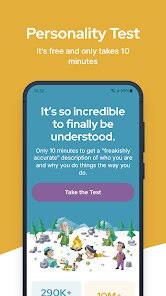
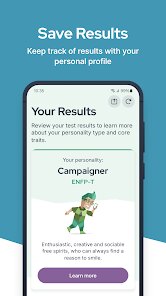
16Personalities is a personality assessment app that maps users into 16 distinct types based on the Myers-Briggs-like framework. It belongs to the self-discovery and personal development genre, so people mainly use it to better understand their own traits, strengths, and blind spots. A typical person might download it out of curiosity after seeing friends share their four-letter type on social media, or perhaps they want a clearer sense of direction for career or relationships. The app is available on both Google Play and the App Store, and as far as I remember, the install count is in the tens of millions, which gives it a solid reputation. It is completely free to download, though there is a paid option for an in-depth profile report. You do not need to register to take the test, which is a huge plus for privacy-conscious users. Upon launch, the first impression is clean and calm, with a buttery smooth interface and a color scheme that feels professional without being dull. There are no intrusive pop-ups pushing a subscription right away, so it feels inviting rather than pushy.
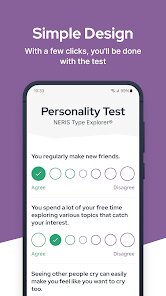
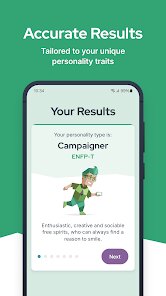
As you step into the hands-on experience, the app guides you through a brief questionnaire with roughly 60 questions. Each question presents a simple statement like "You often worry about things," and you pick a response on a five-point scale from "Disagree" to "Agree." The interface makes it effortless to tap through without overthinking, and you can see a progress bar at the top so you know how far along you are. After finishing the test, your result appears almost instantly as a snapshot, like "INFJ" or "ENFP," accompanied by a short description of your traits. From there, the app lays out sections on strengths, weaknesses, relationships, and career paths. A small practical tip: you can save your type as a card to share on social media, which many friends found surprisingly fun. The navigation between sections feels smooth, but once you read through all the content, you realize there is not much more to do. There is no journal feature, no community chat, and no way to compare types with friends directly within the app. It feels more like a one-time report than a living tool you revisit daily.
After using it for a while, I think this app works best for people who are new to personality typing and want a quick, approachable introduction. It is much simpler and more visually appealing than the clinical tests on Truity or the overwhelming number of options on 16 Personalities' own website. But if you already know your type from other sources, or you want deeper analytics like cognitive functions in the MBTI sense, this app will feel shallow. The same test result does not change even if you retake it weeks later, so there is little reason to open it again. I kept it installed for a few days, then uninstalled because the free version shows every page as a small extract, and paying for the full report felt steep for what is essentially the same info found in a few blog posts. Still, for that initial spark of "Who am I?" and the joy of sharing a type with friends, it does the job better than most of its competitors.
features
- 🎯 Personality snapshot after a 12-minute test – The app condenses a full MBTI-like assessment into about 60 simple agree/disagree questions, spitting out a readable, color-coded type profile. Compared to the more academic and question-heavy Myers-Briggs Type Indicator (MBTI) official tests, this feels like a refreshing breeze. You do not need a psychology degree to follow along, and the presentation is playful yet professional.
- 📊 Visualized trait sliders – Instead of just giving you a four-letter code, the result screen also shows five sliders like Mind (Introverted vs. Extraverted) and Nature (Observant vs. Intuitive), letting you see exactly where you fall on each spectrum. This is a standout feature because sites like Truity dump raw percentages on you, but here the sliders are interactive and animated, making the data feel personal and alive.
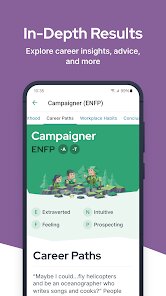
- 📚 The "In-Depth Profile" unlocks deeper layers – While the free version offers a generous starter pack, upgrading unlocks a 30+ page report covering romantic relationships, friendship styles, parenting habits, and career paths. No other free personality app gives this much tailored advice without pushing a monthly subscription. It beats apps like Personality Max which hide basic info behind a paywall.
- 🔗 One-tap sharing card – After your test, you get a beautifully designed card with your type description that you can save or share instantly. This simple feature makes the app more social than competitors like HumanMetrics, which force you to screenshot janky text. It encourages conversations without making everything feel like a data dump.
pros
- ⚡ Super fast assessment – The entire quiz takes only about 12 minutes, compared to the 20–30 minutes typical on Truity or the official MBTI. This makes it great for casual users with short attention spans.
- 🎨 Beautiful, modern UI – The app looks and feels premium, with smooth animations and a light pastel aesthetic. Other apps like Personality Database feel cluttered or dated in comparison, making 16Personalities more pleasant to use daily.
- 💡 Clear, practical advice – Each type comes with actionable tips for personal growth, relationships, and careers. The advice is specific enough to feel useful, unlike the vague suggestions on many free quiz apps.
- 🆓 No hard paywall for basics – You get your type, strengths, and weaknesses for free without a subscription. Similar apps like TypeMatch require payment just to see your full profile, which creates friction early on.
cons
- ⏳ No community features – There is no way to chat with other types, join groups, or send friend requests. Apps like Personality Database thrive on user interaction, but 16Personalities feels isolated after the test.
- 📉 Limited scientific depth – The test uses a simplified version of the MBTI framework, so it lacks nuance compared to the official MBTI Step II or the Big Five test. Users looking for cognitive functions or detailed statistical analysis will be disappointed.
- 💸 Paid report feels overpriced – The in-depth profile costs around $20–$30 for a one-time unlock, which is steep when you consider similar content is freely available in PDFs online. Truity offers comparable depth for half the price.
- ♻️ No retest capability – Once you get your type, there is no easy way to retake the test and see how your answers change over time. This makes the app feel like a one-and-done experience, whereas apps like Boo allow repeated assessments to track growth.
Articles
![]()
Guide
How to Update Google Play Store on Android 2026
![]()
Guide
How to Download Older Versions of Android Apps
![]()
Guide
How to Download Apps Without Google Play Store
![]()
Guide
What Is an APK File for Android?
If you use an Android phone, you may have seen the term APK while searching for apps or games online. Some websites offer an APK download instead of a Google Play install button. Some users also mention APK files when talking about apps that are not available in their region, older app versions, or Android games downloaded outside the Play Store.
![]()
Guide
How to Install Games from Google Play for Beginners
Installing games on an Android phone is usually simple, but for beginners, the process can still feel confusing at first. You may not know where to search, which button to tap, whether the game is safe, or why Google Play sometimes asks for account settings, storage access, or payment information. If you are using an Android phone for the first time, learning how to install games from Google Play is one of the easiest ways to get started.
![]()
Guide
How Useful Gemini Is for Everyday Questions and Quick Tasks
emini feels different from many AI apps because it is not only trying to be a chatbot. After using it for everyday questions, quick writing, image understanding, and planning, I think its biggest strength is convenience.
![]()
Guide
What to Know Before Downloading APKs
For many Android users, downloading an APK is a common way to install apps and games. Sometimes an app is not available in a certain country.
![]()
Guide
ChatGPT Review: Is It Still the Best AI App in 2026?
![]()
Guide
Seedance 2.0 vs Sora: The Future of AI Video Generation
The AI video race has intensified dramatically over the past two years. Platforms like Sora from OpenAI and Luma Dream Machine pushed the boundaries of text-to-video realism. Yet, despite their impressive outputs, most tools still operate as probabilistic generators—you describe a scene, and the model interprets it. Control remains limited. With the February 2026 release of Seedance 2.0, developed by ByteDance, the paradigm shifted. Internally known as Jimeng 2.0, Seedance does not position itself as just another video model. It positions itself as an AI Director. Rather than guessing what you want, Seedance 2.0 allows you to direct what happens. This distinction defines everything that follows.









Recommended Apps
![]()
Home Design 3D
Anuman4.2
![]()
Truth or Dare Game - Party App
Chouic4.8
![]()
Photo Collage Maker
Scoompa4.7![]()
Learn to Draw Flower
Creative APPS4.2![]()
FIFA World Cup 2026™
FIFA2.8![]()
Mirror Plus: Mirror with Light
Digitalchemy, LLC4.4![]()
Meitu- Photo Editor & AI Art
Meitu (China) Limited4.5![]()
Perplexity - Ask Anything
PerplexityAI4.7![]()
GhostTube SLS Camera Alternate
GhostTube4![]()
Boom Chip Blast: 2-Player
Black Pyramid 3D Games Studio0![]()
Healthy Benefits+
Solutran, Inc.4.5![]()
Deepcheck AI Search Assistant
rohe.ai4![]()
Idol Prank Video Call & Chat
LightCode Solutions4![]()
Face Shape - Pretty Scale
GlintTec Apps3.9![]()
Plant App - Plant Identifier
ScaleUp4.6












































