
AI Anime Filter - Anime AI

500K+
Installs
TAPUNIVERSE
Developer
-
Generative AI
Category
-
Everyone
Content Rating
-
tapuniverse@gmail.com
Developer Email
-
https://tapuniverse.com/policy/
Privacy Policy
Screenshots
editor reviews
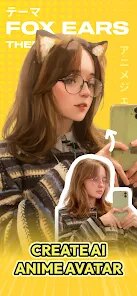
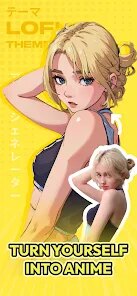
AI Anime Filter - Anime AI is a photo-to-anime app designed for users who want to turn their selfies or any picture into an anime-style character. It fits squarely into the growing niche of AI image transformation tools, sitting somewhere between playful filters for social media and more serious artistic experimentation. You can download it from both Google Play and the App Store, and it's free to install, though you will encounter a mix of ads and in-app purchases once you start playing around. When I first launched the app, I was a bit taken aback by how many pop-ups and subscription nudges hit me within the first thirty seconds. The interface itself looks modern and has a clean, vibrant design, but the constant push to upgrade right away does make it feel less like a toy and more like a storefront.
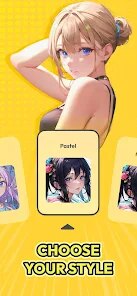
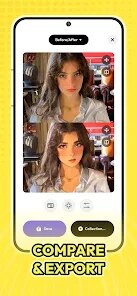
Once you get past the initial prompts, the actual experience of using it is fairly straightforward. You upload a photo from your gallery or snap one with your camera, and the app processes it for a few seconds before showing you the result. I tested it with a few different shots — a portrait with good lighting, a blurry group photo, and a picture with a busy background. The lighting in the original image really matters here; the best results came from clear, front-facing selfies. There are a handful of different anime styles to choose from, like shoujo or more dramatic action-hero looks, but they aren't explained very clearly at first. You kind of have to just try each one to see what clicks. I did appreciate that the app saves the original and the final image side-by-side, which makes sharing comparisons easy, but the editing options beyond the filter itself are quite limited. You can't tweak details like eye color or hair shade unless you pay.
Honestly, after using it for a few days, I think this app works best for someone who just wants a quick, flashy anime avatar for a profile picture and isn't too picky about fine-tuning the output. It's not a serious art tool by any stretch. Compared to a free alternative like AnimeGAN, this one feels way more polished in terms of how fast it renders results and the overall aesthetic of the output — less blocky and more consistent. But the trade-off is the sheer amount of advertising and the cost of removing watermarks, which makes it feel a bit cheap. I could see keeping it installed for a few weeks to mess around with friends' photos, but eventually, the novelty wears off and the ads start to kill the mood. For a casual user, it delivers what it promises, but for anyone looking for a deep creative experience or a tool without paywalls, it's probably going to feel frustrating.
features
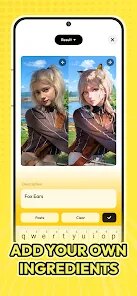
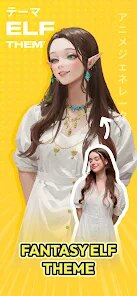
- 🎨 The most notable feature is the variety of anime style presets. You're not just stuck with one generic filter; instead, you can toggle between something resembling Studio Ghibli softness, a Shonen Jump style with sharper lines, or even a more retro 90s anime look. Compared to Meitu, which leans heavily into one type of cartoonish filter, AI Anime Filter gives you more thematic choices that actually feel distinct.
- ⚡ Speed of processing is another highlight. On a decent connection, a single image transforms in under ten seconds, which surprised me because some similar apps like ToonMe can take fifteen to twenty seconds. The trade-off might be slight detail loss in complex backgrounds, but for a headshot, the turnaround feels almost instant.
- 🖼️ The dual preview layout — showing the original photo next to the transformed anime version — is a small but clever touch. It makes sharing or comparing much easier without needing to manually screenshot or switch tabs. Some apps like AnimeGAN force you to save files separately before comparing, so this saves time.
pros
- 🌈 The color reproduction is genuinely impressive. Even in tricky lighting conditions, like dim indoor shots, the app manages to preserve skin tones and hair colors without washing everything out. Apps like ToonMe often struggle with yellow or uneven lighting, but AI Anime Filter handles it much better.
- 🚫 The interface is clean and modern, with no confusing jargon cluttering the screen. Unlike certain alternatives that bury style options under menus and submenus, everything is laid out on one page after you upload a photo, so even a first-time user won't feel lost.
- 📦 The file size of the output images is reasonable for sharing on social media. They compress gracefully without heavy pixelation, which is not always the case with similar tools like Picsart's anime filter that can sometimes export overly large or blurry results.
cons
- 💸 The biggest weakness is the aggressive monetization. You get a very limited number of free transformations before you're forced to either watch an ad or pay for a subscription. Free alternatives like AnimeGAN offer unlimited processing with just a watermark, which feels less restrictive.
- 🔒 Lack of manual editing controls. Once the filter is applied, you can't tweak anything — no adjusting the line thickness, brightness, or facial feature proportions. Compared to Meitu, which offers granular slider adjustments, this feels very one-dimensional.
- 📉 Results vary wildly depending on the type of photo. Group shots or images with multiple people often result in garbled faces, and the app struggles with side profiles or occluded faces. Tools like ToonMe handle off-angle faces better because they have more robust face detection algorithms.
- 🎦 No batch processing feature. If you want to transform an entire album or a set of photos, you have to do them one by one, which is tedious. Many users looking for consistent profile picture sets for social media would find this a real pain point.
Articles
![]()
Guide
How to Update Google Play Store on Android 2026
![]()
Guide
How to Download Older Versions of Android Apps
![]()
Guide
How to Download Apps Without Google Play Store
![]()
Guide
What Is an APK File for Android?
If you use an Android phone, you may have seen the term APK while searching for apps or games online. Some websites offer an APK download instead of a Google Play install button. Some users also mention APK files when talking about apps that are not available in their region, older app versions, or Android games downloaded outside the Play Store.
![]()
Guide
How to Install Games from Google Play for Beginners
Installing games on an Android phone is usually simple, but for beginners, the process can still feel confusing at first. You may not know where to search, which button to tap, whether the game is safe, or why Google Play sometimes asks for account settings, storage access, or payment information. If you are using an Android phone for the first time, learning how to install games from Google Play is one of the easiest ways to get started.
![]()
Guide
How Useful Gemini Is for Everyday Questions and Quick Tasks
emini feels different from many AI apps because it is not only trying to be a chatbot. After using it for everyday questions, quick writing, image understanding, and planning, I think its biggest strength is convenience.
![]()
Guide
What to Know Before Downloading APKs
For many Android users, downloading an APK is a common way to install apps and games. Sometimes an app is not available in a certain country.
![]()
Guide
ChatGPT Review: Is It Still the Best AI App in 2026?
![]()
Guide
Seedance 2.0 vs Sora: The Future of AI Video Generation
The AI video race has intensified dramatically over the past two years. Platforms like Sora from OpenAI and Luma Dream Machine pushed the boundaries of text-to-video realism. Yet, despite their impressive outputs, most tools still operate as probabilistic generators—you describe a scene, and the model interprets it. Control remains limited. With the February 2026 release of Seedance 2.0, developed by ByteDance, the paradigm shifted. Internally known as Jimeng 2.0, Seedance does not position itself as just another video model. It positions itself as an AI Director. Rather than guessing what you want, Seedance 2.0 allows you to direct what happens. This distinction defines everything that follows.









Recommended Apps
![]()
Home Design 3D
Anuman4.2
![]()
Truth or Dare Game - Party App
Chouic4.8
![]()
Photo Collage Maker
Scoompa4.7![]()
Learn to Draw Flower
Creative APPS4.2![]()
FIFA World Cup 2026™
FIFA2.8![]()
Mirror Plus: Mirror with Light
Digitalchemy, LLC4.4![]()
Meitu- Photo Editor & AI Art
Meitu (China) Limited4.5![]()
Perplexity - Ask Anything
PerplexityAI4.7![]()
GhostTube SLS Camera Alternate
GhostTube4![]()
Boom Chip Blast: 2-Player
Black Pyramid 3D Games Studio0![]()
Healthy Benefits+
Solutran, Inc.4.5![]()
Deepcheck AI Search Assistant
rohe.ai4![]()
Idol Prank Video Call & Chat
LightCode Solutions4![]()
Face Shape - Pretty Scale
GlintTec Apps3.9![]()
Plant App - Plant Identifier
ScaleUp4.6












































