
AR Drawing - Sketchar App

10M+
Installs
Braly JSC
Developer
-
Art & Design
Category
-
Everyone
Content Rating
-
feedback.drawsketch@bralyvn.com
Developer Email
-
https://bralyvn.com/privacy-policy.php
Privacy Policy
Screenshots
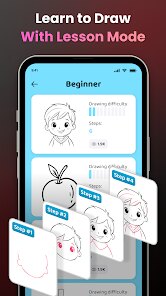
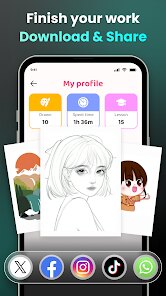
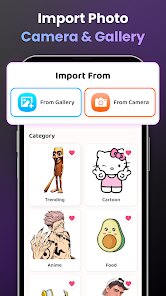
editor reviews
So I stumbled upon AR Drawing - Sketchar the other day, and it's basically a mobile app that uses augmented reality to help you draw. It's one of those creative tools you find on Google Play and the App Store that turns your phone into a tracing assistant. With over 10 million downloads, it's surprisingly popular for a niche app, and yeah, it's free to download, though there are in-app purchases for extra features. I installed it out of pure curiosity because I can't draw to save my life, but the idea of projecting an image onto paper through my camera sounded like magic. First impression after launching it? The interface is clean but a bit overwhelming if you're not used to AR apps. You gotta grant camera permissions right away, and then it throws you into a tutorial that explains how to lock your phone at a specific angle above your paper. It felt a bit like setting up a science experiment, honestly.
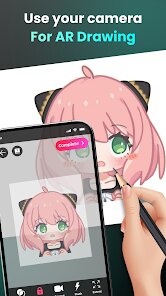
After playing around with it for a while, the actual hands-on experience is pretty straightforward once you get the hang of it. You pick an image from their library or upload your own, adjust the opacity, and aim your phone's camera at a blank sheet of paper. The app shows a ghost version of the image on your screen, and you trace along using real pencils or markers. The onboarding is a bit rushed—I wish it slowed down to explain the calibration process better because my first few attempts had the projection drifting off the page. Once I figured out you need a steady tripod or a stack of books to keep the phone in place, it got smoother. Common usage steps for me were: pick a simple outline, calibrate the angle by tapping the screen to set the reference corners, and then just follow the lines. A small tip I learned is to start with high-contrast images—black and white sketches work way better than colorful photos because the ghosting is clearer. The app does have moments of lag if your phone isn't powerful enough, especially with complex images, but for basic tracing, it gets the job done.
After using AR Drawing for a couple of weeks, here's my personal take. If you're someone who loves drawing but struggles with proportions or getting the first lines down, this app is a game-changer. It takes the fear out of a blank page. But if you're already skilled at freehand drawing, you might find it too restrictive—it feels more like training wheels than a tool for original art. What sets it apart from something like SketchBook or Procreate is the AR element; no other app lets you physically trace with real materials. That said, the subscription model for unlocking more images and advanced features is annoying because the free collection feels limited after a week. I kept it installed because it's genuinely useful for quick sketches or when I want to try drawing a character from scratch. Someone might uninstall it if they prefer digital drawing or find the setup too fiddly. Compared to traditional tracing methods, it's cool, but it's not for everyone.
features
- 🎨 AR Projection Technology: This is the core feature that sets it apart from apps like Procreate or Adobe Fresco. Instead of drawing on a screen, you physically trace onto paper with real pens or pencils, using your phone's camera to project the image. It feels like magic the first time you try it, and it completely changes how you approach learning to draw.
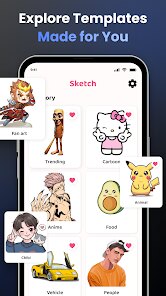
- 🖼️ Extensive Image Library: They have a built-in library with hundreds of images, from simple beginner outlines like animals and flowers to advanced portraits and anime characters. It beats searching for references online in apps like Pinterest, because the images are pre-calibrated for tracing, so you don't have to waste time adjusting contrast or brightness manually.
- 📷 Custom Image Upload: You're not stuck with their library. You can upload your own photos or artwork, which is huge if you want to draw your own pet or a specific character. Other drawing apps let you import images too, but AR Drawing processes them into traceable outlines automatically, which saves a lot of hassle compared to manually tracing in Photoshop first.
- ⚙️ Adaptive Calibration System: The app uses your phone's sensors to adjust the projection if you move your phone slightly. It's not perfect, but it's better than static tracing guides. Apps like SketchAR offer this too, but AR Drawing seems to handle slight shifts more gracefully without losing the alignment entirely.
pros
- 🌟 Low Learning Curve: For beginners, this app is way more approachable than traditional drawing tutorials. You don't need to understand anatomy or perspective; just trace lines and your hand learns the motions. Compare it to apps like Learn to Draw with Easy Drawings, which rely on step-by-step guides—this AR version gives you a direct physical experience that sticks better.
- 🌟 Real Material Practice: Unlike most art apps that only work digitally, AR Drawing lets you use actual paint, colored pencils, or markers. That means your final piece feels like real art, not a digital render. Apps like Infinite Painter confine you to a screen, but here you build muscle memory with physical tools, which is invaluable for traditional artists.
- 🌟 Creative Freedom in Output: Because you're tracing onto paper, you can modify the design as you go. Add your own colors, change the background, or combine elements from different images. This is way more flexible than the step-by-step lockstep of apps like Draw It, where you follow a rigid order. You're not just copying; you're translating the projection into your personal style.
cons
- ⚠️ Phone Stability Sensitivity: The biggest headache is keeping your phone perfectly still. If the phone shifts even a millimeter, the traced lines are ruined. You need a tripod or a built-in paper stand to get consistent results, which adds extra cost and setup time. In contrast, apps like Adobe Illustrator Draw don't require any physical setup—you just open the app and doodle.
- ⚠️ Limited Image Resolution: The free library images are often low-res, so when you enlarge them for tracing on bigger paper, the pixels become blocky and the lines look jagged. This makes the final drawing look cheap. Competing platforms like Clip Studio Paint allow you to import ultra-high-resolution images without any compression issues.
- ⚠️ Battery and Performance Drain: Running the camera continuously for tracing drains your phone battery fast. A 30-minute session can eat up 40% of juice. On older phones, the app also lags and heats up the device. Apps like ArtFlow don't have this problem because they don't rely on live video processing—they just use the touchscreen, which is way more power-efficient.
- ⚠️ Paid Lock for Quality Content: The most useful features, like removing the watermark, saving full-resolution traces, and accessing premium image packs, are locked behind a subscription. Free users get a very limited experience, making it feel like a trial rather than a full app. Compare that to Autodesk SketchBook, which offers a robust free version with no permanent paywalls.
Articles
![]()
Guide
How to Update Google Play Store on Android 2026
![]()
Guide
How to Download Older Versions of Android Apps
![]()
Guide
How to Download Apps Without Google Play Store
![]()
Guide
What Is an APK File for Android?
If you use an Android phone, you may have seen the term APK while searching for apps or games online. Some websites offer an APK download instead of a Google Play install button. Some users also mention APK files when talking about apps that are not available in their region, older app versions, or Android games downloaded outside the Play Store.
![]()
Guide
How to Install Games from Google Play for Beginners
Installing games on an Android phone is usually simple, but for beginners, the process can still feel confusing at first. You may not know where to search, which button to tap, whether the game is safe, or why Google Play sometimes asks for account settings, storage access, or payment information. If you are using an Android phone for the first time, learning how to install games from Google Play is one of the easiest ways to get started.
![]()
Guide
How Useful Gemini Is for Everyday Questions and Quick Tasks
emini feels different from many AI apps because it is not only trying to be a chatbot. After using it for everyday questions, quick writing, image understanding, and planning, I think its biggest strength is convenience.
![]()
Guide
What to Know Before Downloading APKs
For many Android users, downloading an APK is a common way to install apps and games. Sometimes an app is not available in a certain country.
![]()
Guide
ChatGPT Review: Is It Still the Best AI App in 2026?
![]()
Guide
Seedance 2.0 vs Sora: The Future of AI Video Generation
The AI video race has intensified dramatically over the past two years. Platforms like Sora from OpenAI and Luma Dream Machine pushed the boundaries of text-to-video realism. Yet, despite their impressive outputs, most tools still operate as probabilistic generators—you describe a scene, and the model interprets it. Control remains limited. With the February 2026 release of Seedance 2.0, developed by ByteDance, the paradigm shifted. Internally known as Jimeng 2.0, Seedance does not position itself as just another video model. It positions itself as an AI Director. Rather than guessing what you want, Seedance 2.0 allows you to direct what happens. This distinction defines everything that follows.









Recommended Apps
![]()
Home Design 3D
Anuman4.2
![]()
Truth or Dare Game - Party App
Chouic4.8
![]()
Photo Collage Maker
Scoompa4.7![]()
Learn to Draw Flower
Creative APPS4.2![]()
FIFA World Cup 2026™
FIFA2.8![]()
Mirror Plus: Mirror with Light
Digitalchemy, LLC4.4![]()
Meitu- Photo Editor & AI Art
Meitu (China) Limited4.5![]()
Perplexity - Ask Anything
PerplexityAI4.7![]()
GhostTube SLS Camera Alternate
GhostTube4![]()
Boom Chip Blast: 2-Player
Black Pyramid 3D Games Studio0![]()
Healthy Benefits+
Solutran, Inc.4.5![]()
Deepcheck AI Search Assistant
rohe.ai4![]()
Idol Prank Video Call & Chat
LightCode Solutions4![]()
Face Shape - Pretty Scale
GlintTec Apps3.9![]()
Plant App - Plant Identifier
ScaleUp4.6











































