
Astrolink: Birth Chart

1M+
Installs
Astrolink Orbe
Developer
-
Lifestyle
Category
-
Everyone
Content Rating
-
contato@astrolink.com.br
Developer Email
-
https://www.astrolink.com.br/privacidade
Privacy Policy
Screenshots
editor reviews
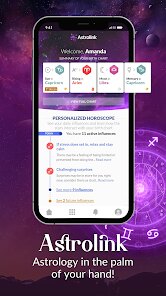
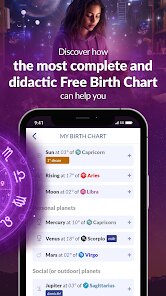
Astrolink: Birth Chart is a mobile app that brings astrology right into your pocket. It's not just a daily horoscope reader — it's a full-on astrology tool where you can pull up your natal chart, check planetary transits, and even look into compatibility with other people. The app belongs to the lifestyle and spirituality category, and it's available for free on both Google Play and the App Store, though there are in-app purchases and ads if you want to unlock deeper insights. I downloaded it out of curiosity after seeing it pop up in recommendations, and the first thing that struck me was how clean and modern the interface feels. Launching the app, you're asked to enter your birth details, and once that's done, the main chart appears in front of you — colorful, circular, and honestly a bit overwhelming at first if you're not used to reading astrological symbols.
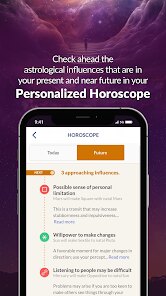
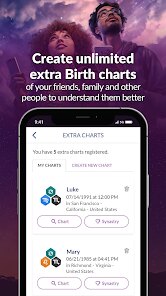
Once you get past that initial chart, the real experience starts. The app guides you through a simple onboarding that explains the houses, planets, and aspects, which is helpful if you're a beginner like I was. The main screen shows your birth chart with clickable elements — tap on the sun, and it tells you about your sun sign in the context of the whole chart. There's also a daily transits section that feels more practical; I found myself checking it every morning to see which planets were active that day. Navigating through the menus was mostly smooth, though sometimes the ads popped up at slightly annoying moments, like right after I wanted to read a full transit interpretation. One thing I appreciated was the ability to save multiple profiles, so I could look up friends and family without re-entering data every time. The learning curve isn't steep, but you do need to spend a few minutes poking around before it clicks.
After using Astrolink for a couple of weeks, I'd say it's a solid pick for anyone who's already into astrology and wants more than a generic sun sign reading. It gives you actual chart data you can explore, and it's less cluttered than some other apps I've tried, like Co—Star or The Pattern. That said, if you're just looking for a quick daily horoscope or you don't care about aspects and houses, this might feel like overkill. What keeps me coming back is how it lets me check real-time transits without having to open a web browser or dig through forums. But I can also see why someone might uninstall it — the free version's ads can get repetitive, and unlocking everything costs money. Still, compared to other astrology apps, Astrolink feels more grounded and less gimmicky, which is probably why it's still on my phone.
features
- 🌞 Detailed natal chart breakdown: Unlike The Pattern, which focuses more on vague personality summaries, Astrolink shows you the actual planetary placements, aspects, and houses. You can tap each planet and get a specific interpretation tied to your exact birth time, which makes it feel more personal and less generic.
- 🌞 Real-time transit tracker: This one stands out because it updates throughout the day based on where the planets are right now. Co—Star gives you daily notifications, but Astrolink lets you view the transit chart visually and read how each configuration affects your own chart. Perfect if you're into astrological weather.
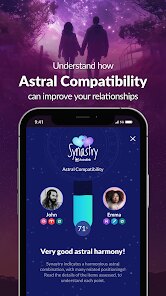
- 🌞 Compatibility comparisons: You can enter another person's birth details and see synastry aspects between your charts. TimePassages has a similar feature, but Astrolink presents it in a more digestible way without overwhelming you with too many technical terms.
pros
- ✅ Clean, modern interface: Astrolink looks way more polished than many astrology apps. Co—Star's design is cool but can feel cold, while this one uses softer colors and clearer typography that makes reading charts easier on the eyes.
- ✅ No fluff or spiritual jargon overload: Some apps like The Pattern throw a lot of abstract phrases at you. Astrolink sticks to traditional astrology with clear explanations, so you actually learn how the chart works instead of just getting vague affirmations.
- ✅ Free access to core features: You can view your full birth chart, check daily transits, and save multiple profiles without paying a cent. TimePassages locks more behind a paywall, so this is a big plus for casual users.
cons
- ❌ Too many ads in the free version: While you get a lot for free, the ads interrupt the experience more than I'd like. Co—Star runs fewer ads in comparison, which makes extended browsing less annoying there.
- ❌ No widget or quick glance option: Astrolink doesn't offer a home screen widget showing your daily transits at a glance. Something like The Pattern or even some horoscope widgets do that better, so you have to open the app every time.
- ❌ Lacks community or social features: Unlike Co—Star, where you can add friends and compare charts directly through the app, Astrolink feels more solitary. You can save other people's charts, but there's no feed or social layer to share insights.
Articles
![]()
Guide
How to Update Google Play Store on Android 2026
![]()
Guide
How to Download Older Versions of Android Apps
![]()
Guide
How to Download Apps Without Google Play Store
![]()
Guide
What Is an APK File for Android?
If you use an Android phone, you may have seen the term APK while searching for apps or games online. Some websites offer an APK download instead of a Google Play install button. Some users also mention APK files when talking about apps that are not available in their region, older app versions, or Android games downloaded outside the Play Store.
![]()
Guide
How to Install Games from Google Play for Beginners
Installing games on an Android phone is usually simple, but for beginners, the process can still feel confusing at first. You may not know where to search, which button to tap, whether the game is safe, or why Google Play sometimes asks for account settings, storage access, or payment information. If you are using an Android phone for the first time, learning how to install games from Google Play is one of the easiest ways to get started.
![]()
Guide
How Useful Gemini Is for Everyday Questions and Quick Tasks
emini feels different from many AI apps because it is not only trying to be a chatbot. After using it for everyday questions, quick writing, image understanding, and planning, I think its biggest strength is convenience.
![]()
Guide
What to Know Before Downloading APKs
For many Android users, downloading an APK is a common way to install apps and games. Sometimes an app is not available in a certain country.
![]()
Guide
ChatGPT Review: Is It Still the Best AI App in 2026?
![]()
Guide
Seedance 2.0 vs Sora: The Future of AI Video Generation
The AI video race has intensified dramatically over the past two years. Platforms like Sora from OpenAI and Luma Dream Machine pushed the boundaries of text-to-video realism. Yet, despite their impressive outputs, most tools still operate as probabilistic generators—you describe a scene, and the model interprets it. Control remains limited. With the February 2026 release of Seedance 2.0, developed by ByteDance, the paradigm shifted. Internally known as Jimeng 2.0, Seedance does not position itself as just another video model. It positions itself as an AI Director. Rather than guessing what you want, Seedance 2.0 allows you to direct what happens. This distinction defines everything that follows.









Recommended Apps
![]()
Home Design 3D
Anuman4.2
![]()
Truth or Dare Game - Party App
Chouic4.8
![]()
Photo Collage Maker
Scoompa4.7![]()
Learn to Draw Flower
Creative APPS4.2![]()
FIFA World Cup 2026™
FIFA2.8![]()
Mirror Plus: Mirror with Light
Digitalchemy, LLC4.4![]()
Meitu- Photo Editor & AI Art
Meitu (China) Limited4.5![]()
Perplexity - Ask Anything
PerplexityAI4.7![]()
GhostTube SLS Camera Alternate
GhostTube4![]()
Boom Chip Blast: 2-Player
Black Pyramid 3D Games Studio0![]()
Healthy Benefits+
Solutran, Inc.4.5![]()
Deepcheck AI Search Assistant
rohe.ai4![]()
Idol Prank Video Call & Chat
LightCode Solutions4![]()
Face Shape - Pretty Scale
GlintTec Apps3.9![]()
Plant App - Plant Identifier
ScaleUp4.6












































