
Fingerprint Scan Simulator

1M+
Installs
Dream-Up
Developer
-
Lifestyle
Category
-
Teen
Content Rating
-
contact@dream-up.eu
Developer Email
-
https://www.dream-up.eu/index.php/privacy-policy
Privacy Policy
Screenshots
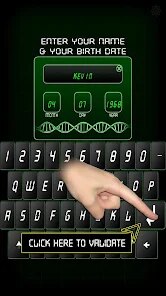
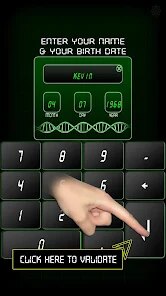

editor reviews
Fingerprint Scan Simulator is exactly what it sounds like -- a playful tool app on the Play Store that lets you pretend to scan your finger on the screen. It's more of a gag or prank app than anything serious, designed for people who want to mess with friends or just enjoy a bit of silliness. When you first download and install it, the launch screen is straightforward: a simple fingerprint icon sitting in the middle, waiting for you to tap it. The app is free to download, and based on the install count, it's been picked up by quite a few folks who are curious about the concept. There's no registration needed, and I didn't notice any aggressive in-app purchases or ads popping up right away, which made the first impression feel clean and harmless.
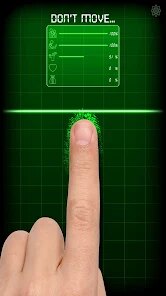
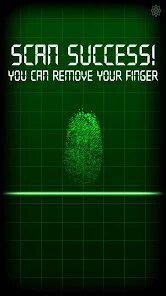
Once you open the app and place your finger on the scanner area, the screen reacts with a flashing animation and a satisfying vibration -- nothing too fancy, but it sells the illusion pretty well for a few seconds. The interface is minimal: just one main screen with the scanner graphic, a settings button, and maybe a few customization options depending on the version you got. Onboarding is almost nonexistent, which is fine because there's not much to learn. You basically tap, and it scans, then you can repeat it. I found myself pressing it a few times just to test different pressure levels, and it handled each attempt smoothly without crashing. A small tip: if you want to keep the joke going longer, turn off the vibration in the settings so it feels more subtle.
After using it for a bit, I think this app works best for kids, teens, or anyone who enjoys light-hearted pranks at parties or gatherings. You probably won't keep it installed long-term unless you're the type to show it off every now and then. Compared to something like Fake Fingerprint Scanner or Fingerprint Lock Screen, this one stands out because it doesn't pretend to be a real security tool -- it's fully honest about being a joke. That honesty makes it refreshingly simple. I can see someone installing it, laughing with a friend for five minutes, and then forgetting it exists. It's not an app you'll rely on daily, but for what it costs (nothing), it does exactly what it promises without any fuss.
features
- 🔒 The core feature is one-tap simulated scanning -- place your finger anywhere on the designated area, and the app triggers a flashy scan animation with haptic feedback. It feels convincing enough to trick someone for a few seconds, which is the whole point. Compared to Face Scan Simulator, which requires you to aim and hold, this is much quicker and less obvious.
- ⚙️ There are a few customization options buried in the settings, like changing the scan animation color or toggling sound effects. It's not a deep menu by any stretch, but it gives you a little control over how the prank looks. Fake Fingerprint Scanner doesn't offer this level of tweaking, so this app edges ahead in personalization.
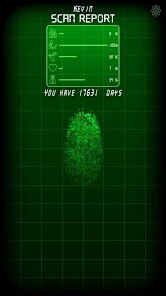
- 📷 After a successful scan, the app can show a fake results screen that looks like it's reading your fingerprint data -- complete with fake percentages and random text. It's just for show, but it adds an extra layer to the joke. Most similar apps just end the gag after the scan, so this extra step makes it more entertaining.
- 🔄 The app also includes a reset button that instantly clears the fake scan history, so you can prank someone multiple times without them catching on. It's a small detail, but it makes the experience feel more polished than other prank apps that force you to exit and reopen each time.
pros
- 🌍 No unnecessary permissions required -- unlike many fake scanner apps that ask for camera or storage access, this one keeps things minimal. You only need to accept the vibration permission and that's it. Apps like Fake Fingerprint Scanner often request more, which feels intrusive.
- ⚡ Launch speed is impressive -- the app opens instantly even on older phones, and there's zero loading delay when you tap the scanner. Some competitors like Fingerprint Lock Screen take a few seconds to initialize, which ruins the spontaneity of a prank.
- 💡 The entire experience is ad-free during use -- I didn't see a single banner or pop-up until I deliberately checked the menu. That's rare among free prank apps, where ads often interrupt the joke at the worst moment. It makes this app feel more respectful of your time.
- 🛠️ No background processes running after you close it -- the app doesn't drain battery or nag you with notifications. That's a big plus compared to similar tools that try to keep themselves alive in the background for no reason.
cons
- ❌ Very limited functionality beyond the prank -- there's nothing else to do once you've scanned a few times, so boredom sets in fast. Apps like Fake Fingerprint Scanner at least offer multiple prank modes to keep things fresh, but this one feels one-note.
- 💔 No option to customize the scanning result screen -- while you can tweak colors and sounds, the fake data shown after scanning is completely random and cannot be edited. Some users might prefer typing their own "joke results" for better comedy timing.
- 📦 The free version feels complete but lacks community-created content -- unlike prank apps like Voice Changer, which let you download new sound packs, this app offers zero expansion options. After a few uses, it feels repetitive without new content to explore.
- 🔇 The haptic feedback can't be fully disabled in older versions -- some users on low-end devices reported that the vibration persists even when toggled off in settings. That's a minor annoyance, but it can ruin the stealth element if you're trying to pull a prank quietly.
Articles
![]()
Guide
How to Update Google Play Store on Android 2026
![]()
Guide
How to Download Older Versions of Android Apps
![]()
Guide
How to Download Apps Without Google Play Store
![]()
Guide
What Is an APK File for Android?
If you use an Android phone, you may have seen the term APK while searching for apps or games online. Some websites offer an APK download instead of a Google Play install button. Some users also mention APK files when talking about apps that are not available in their region, older app versions, or Android games downloaded outside the Play Store.
![]()
Guide
How to Install Games from Google Play for Beginners
Installing games on an Android phone is usually simple, but for beginners, the process can still feel confusing at first. You may not know where to search, which button to tap, whether the game is safe, or why Google Play sometimes asks for account settings, storage access, or payment information. If you are using an Android phone for the first time, learning how to install games from Google Play is one of the easiest ways to get started.
![]()
Guide
How Useful Gemini Is for Everyday Questions and Quick Tasks
emini feels different from many AI apps because it is not only trying to be a chatbot. After using it for everyday questions, quick writing, image understanding, and planning, I think its biggest strength is convenience.
![]()
Guide
What to Know Before Downloading APKs
For many Android users, downloading an APK is a common way to install apps and games. Sometimes an app is not available in a certain country.
![]()
Guide
ChatGPT Review: Is It Still the Best AI App in 2026?
![]()
Guide
Seedance 2.0 vs Sora: The Future of AI Video Generation
The AI video race has intensified dramatically over the past two years. Platforms like Sora from OpenAI and Luma Dream Machine pushed the boundaries of text-to-video realism. Yet, despite their impressive outputs, most tools still operate as probabilistic generators—you describe a scene, and the model interprets it. Control remains limited. With the February 2026 release of Seedance 2.0, developed by ByteDance, the paradigm shifted. Internally known as Jimeng 2.0, Seedance does not position itself as just another video model. It positions itself as an AI Director. Rather than guessing what you want, Seedance 2.0 allows you to direct what happens. This distinction defines everything that follows.









Recommended Apps
![]()
Home Design 3D
Anuman4.2
![]()
Truth or Dare Game - Party App
Chouic4.8
![]()
Photo Collage Maker
Scoompa4.7![]()
Learn to Draw Flower
Creative APPS4.2![]()
FIFA World Cup 2026™
FIFA2.8![]()
Mirror Plus: Mirror with Light
Digitalchemy, LLC4.4![]()
Meitu- Photo Editor & AI Art
Meitu (China) Limited4.5![]()
Perplexity - Ask Anything
PerplexityAI4.7![]()
GhostTube SLS Camera Alternate
GhostTube4![]()
Boom Chip Blast: 2-Player
Black Pyramid 3D Games Studio0![]()
Healthy Benefits+
Solutran, Inc.4.5![]()
Deepcheck AI Search Assistant
rohe.ai4![]()
Idol Prank Video Call & Chat
LightCode Solutions4![]()
Face Shape - Pretty Scale
GlintTec Apps3.9![]()
Plant App - Plant Identifier
ScaleUp4.6












































