
Call Santa Claus & Prank Call

1M+
Installs
WELLY GLOBAL PUBLISHING
Developer
-
Entertainment
Category
-
Everyone
Content Rating
-
globalworks.helps@gmail.com
Developer Email
-
https://callsantaclaus.wellyglobal.net/privacy-policy
Privacy Policy
Screenshots

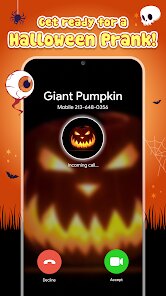
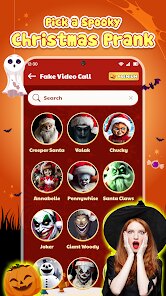
editor reviews
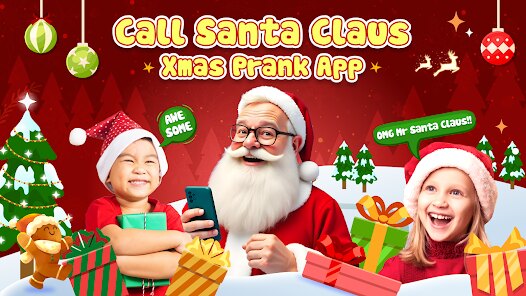
So, "Call Santa Claus & Prank Call" is exactly what it sounds like—a novelty app that lets you simulate phone calls with Santa. It's one of those seasonal joke apps that pop up around the holidays, designed more for laughs than actual utility. You download it from Google Play, and the install count seems decent for this type of thing, though I wouldn't call it a massive hit. It's free to download, but like most of these apps, there are in-app purchases and ads that pop up fairly regularly. My first impression after launching it was honestly a bit chaotic—the screen is busy with buttons and animations, and it's not immediately obvious what you're supposed to press first. It feels more like a novelty toy than a polished app.
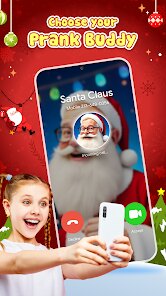
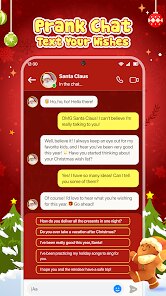
When you actually get into using it, the main idea is you pick a scenario—like Santa pranking a friend, or a nice call for kids—and then the app simulates a conversation. The Santa voice is pre-recorded, so you're not actually speaking to anyone; you just listen to the lines and your phone screen shows what's happening. For kids, it might be fun for about five minutes, but as an adult testing it, I found the interactions pretty awkward and repetitive. The voice acting isn't great, and the timing of the fake conversations feels off. There's also an option to record the call and share it, which is one of the few bright spots. Navigating the menus took a bit of trial and error, and I accidentally triggered an ad a couple of times because of how the buttons are laid out.
After spending some time with it, I'd say this app is really only for very young kids who still believe in Santa, or for someone who wants to pull a quick, harmless joke on a friend. It's definitely not something you'd use more than once or twice—it gets old fast. Compared to other prank call apps like "Prank Call 2" or "Fake Call," this one is much more limited and gimmicky. It doesn't have the variety or polish of those. I think most people would uninstall it after a day or two, but for a holiday-themed gag, it serves its purpose. If you're not in the holiday spirit or don't have a kid to show it to, you can safely skip this one.
features
- 🎅 The main feature is simulated call scenarios with Santa, which includes options like "Nice Call for Kids" or "Prank Call for Friends." You pick one, and the app plays a pre-recorded conversation that mimics a real phone call.
- 📞 You can record the fake call and share it via social media or messaging apps. This is probably the most useful part if you want to prank a friend who's not around.
- 🎄 Compared to "Fake Call" by LavaThinking, which lets you simulate calls with custom contacts and ringtones, this app is much more limited—it only has Santa scenarios and no real customization. It's less about utility and more about the seasonal gimmick.
- 🔔 The app includes short animations and sound effects during the calls, like jingle bells and snowflakes on screen. It adds to the festive feel but doesn't change the core experience much.
pros
- 👍 It's completely free to start with no paywall blocking the main prank call feature. Unlike "Prank Call 2," which locks some voices behind a subscription, here you can use the Santa calls right away.
- 👍 The recording and sharing feature is straightforward. I recorded a call and sent it to a friend in under a minute—no complicated steps or editing needed.
- 👍 For a niche holiday app, it does what it promises. If your goal is to hear a robotic Santa say "Ho ho ho" to a kid, it works fine without any technical hiccups.
cons
- 👎 The app is full of ads. After every call or when you switch menus, a full-screen video ad plays. It's annoying and slows down the experience compared to "Fake Call," which has fewer and less intrusive ads.
- 👎 The Santa voice acting is low quality and repetitive. After two calls, you've heard every line, and the timing of the fake conversation feels unnatural—awkward pauses and mismatched responses.
- 👎 There's almost no customization. You can't change the caller ID, ringtone, or add your own lines. Apps like "Prank Call 2" let you create custom pranks with your own voice, which is way more flexible.
- 👎 The interface is cluttered and not very intuitive. Buttons overlap with ads, and it took me a few taps to figure out how to start a call without accidentally opening the Play Store.
Articles
![]()
Guide
How to Update Google Play Store on Android 2026
![]()
Guide
How to Download Older Versions of Android Apps
![]()
Guide
How to Download Apps Without Google Play Store
![]()
Guide
What Is an APK File for Android?
If you use an Android phone, you may have seen the term APK while searching for apps or games online. Some websites offer an APK download instead of a Google Play install button. Some users also mention APK files when talking about apps that are not available in their region, older app versions, or Android games downloaded outside the Play Store.
![]()
Guide
How to Install Games from Google Play for Beginners
Installing games on an Android phone is usually simple, but for beginners, the process can still feel confusing at first. You may not know where to search, which button to tap, whether the game is safe, or why Google Play sometimes asks for account settings, storage access, or payment information. If you are using an Android phone for the first time, learning how to install games from Google Play is one of the easiest ways to get started.
![]()
Guide
How Useful Gemini Is for Everyday Questions and Quick Tasks
emini feels different from many AI apps because it is not only trying to be a chatbot. After using it for everyday questions, quick writing, image understanding, and planning, I think its biggest strength is convenience.
![]()
Guide
What to Know Before Downloading APKs
For many Android users, downloading an APK is a common way to install apps and games. Sometimes an app is not available in a certain country.
![]()
Guide
ChatGPT Review: Is It Still the Best AI App in 2026?
![]()
Guide
Seedance 2.0 vs Sora: The Future of AI Video Generation
The AI video race has intensified dramatically over the past two years. Platforms like Sora from OpenAI and Luma Dream Machine pushed the boundaries of text-to-video realism. Yet, despite their impressive outputs, most tools still operate as probabilistic generators—you describe a scene, and the model interprets it. Control remains limited. With the February 2026 release of Seedance 2.0, developed by ByteDance, the paradigm shifted. Internally known as Jimeng 2.0, Seedance does not position itself as just another video model. It positions itself as an AI Director. Rather than guessing what you want, Seedance 2.0 allows you to direct what happens. This distinction defines everything that follows.









Recommended Apps
![]()
Home Design 3D
Anuman4.2
![]()
Truth or Dare Game - Party App
Chouic4.8
![]()
Photo Collage Maker
Scoompa4.7![]()
Learn to Draw Flower
Creative APPS4.2![]()
FIFA World Cup 2026™
FIFA2.8![]()
Mirror Plus: Mirror with Light
Digitalchemy, LLC4.4![]()
Meitu- Photo Editor & AI Art
Meitu (China) Limited4.5![]()
Perplexity - Ask Anything
PerplexityAI4.7![]()
GhostTube SLS Camera Alternate
GhostTube4![]()
Boom Chip Blast: 2-Player
Black Pyramid 3D Games Studio0![]()
Healthy Benefits+
Solutran, Inc.4.5![]()
Deepcheck AI Search Assistant
rohe.ai4![]()
Idol Prank Video Call & Chat
LightCode Solutions4![]()
Face Shape - Pretty Scale
GlintTec Apps3.9![]()
Plant App - Plant Identifier
ScaleUp4.6












































