

Santa Prank Call: Fake video

10M+
Installs
Era Global Publishing
Developer
-
Entertainment
Category
-
Everyone
Content Rating
-
bravechain.2021@gmail.com
Developer Email
-
https://era-global-publishing.netlify.app/privacy-policy
Privacy Policy
Screenshots


editor reviews
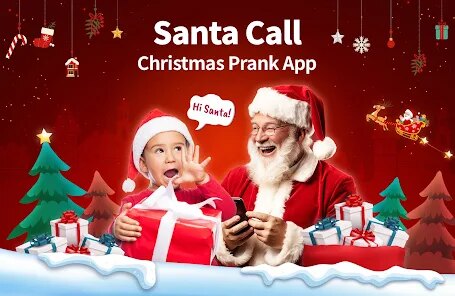
Santa Prank Call: Fake video is one of those apps you download for a laugh, not for any serious daily use. It's a prank-call simulator that lets you create fake video calls with Santa Claus, which is a pretty niche genre within the entertainment and simulation category on the App Store. The app is completely free to download, with no registration required, which is the first thing that makes it appealing to someone who just wants a quick joke. After launching it, the first impression is that it's very straightforward—there's no clutter or confusing menus. You're immediately presented with a few Santa characters and a big call button. It feels a bit like those old-school gag apps, but with a video twist. While it doesn't have a huge install count compared to big-name games, it's the kind of thing that spreads through word of mouth around the holidays.
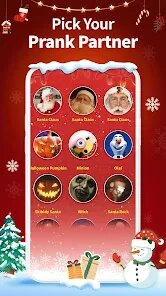
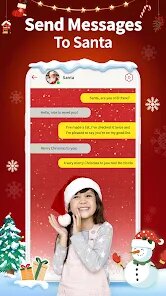
Once you actually start using it, the experience is pretty simple. You pick a Santa from a small selection of cartoonish video loops, enter a friend's name, and then hit the call button. The app generates a fake incoming video call screen that you can show to someone else. The interface is basic—almost too basic, honestly. There are no complex onboarding steps or tutorials, which is fine because you can figure it out in ten seconds. The video loops themselves are short and repetitive, and there's no real interactivity; the Santa on the screen just repeats the same pre-recorded phrases. One practical tip: make sure your friend isn't looking at your screen as you set it up, or the whole illusion falls apart. The app does its job, but after one or two pranks, the novelty wears off quickly.
After spending a bit of time with it, I feel like this app has a very specific audience and a very short lifespan on your phone. Kids around five to eight years old would probably find it hilarious, especially if you show it to them around Christmas. On the other hand, anyone looking for a deep or replayable experience will delete it within five minutes. Compared to apps like Fake Call or Prank Dial, Santa Prank Call is much more themed but also much more limited. Those other prank apps let you customize conversations or call real numbers; this one just plays a video. The main reason you might keep it installed is for a one-time surprise on Christmas Eve. But honestly, after that one trick, most people will uninstall it because there's just not enough content to justify the storage space. It's a gimmick, and it knows it.
features
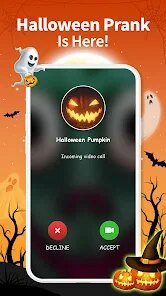
- 🎅 The app generates a full fake video call interface, not just a static image. This means the receiver sees the Santa character actually speaking and moving on their screen, which makes the prank feel much more convincing than a simple picture or audio clip.
- 🎅 Compared to a prank app like Fake Call Me, which mainly uses voice messages or text, Santa Prank Call focuses entirely on the video aspect. Fake Call Me has more features like scheduled calls and custom audio, but Santa Prank Call's unique angle is the specific, holiday-themed video loop with Santa's real-time lip-synced speech.
- 🎅 The standout feature is how simple it is to use. There's no need to set up contacts, download extra assets, or navigate through a complex settings menu. You pick a Santa, type a name, and call. This makes it perfect for a spontaneous prank with zero preparation, which is something prank apps like Prank Calls 3D lack with their more complicated interfaces.
pros
- 👍 The biggest strength is the pure gift factor for young children. A kid who still believes in Santa will be completely fooled and delighted by a fake video call from him. No other prank app has this specific emotional hook for that age group.
- 👍 It's very light on system resources. The app loads fast and doesn't drain your battery, unlike many modern simulation or video apps that are resource hogs. This makes it easy to keep around just in case.
- 👍 The zero-commitment design is a plus. There are no subscriptions, no ad bombardment, and no account creation. You just download, prank, and forget, which is very different from apps like PrankDial that try to push in-app purchases for more features.
cons
- 👎 The content is extremely limited. You only get a handful of Santa video loops with the same few phrases. After you've shown them all, there is zero replay value, unlike Fake Call apps that let you record your own voice or use text-to-speech for endless variations.
- 👎 The video quality is noticeably low-resolution and the Santa animation is stiff. It looks like it was made several years ago. Apps like Video Call: Fake Chat have much higher quality video backgrounds and avatars.
- 👎 There is no customisation. You can't change what Santa says, how long the video plays, or choose a different background. Compared to even basic prank apps, the lack of user control makes it feel like a cheap one-trick pony.
Articles
![]()
Guide
How to Update Google Play Store on Android 2026
![]()
Guide
How to Download Older Versions of Android Apps
![]()
Guide
How to Download Apps Without Google Play Store
![]()
Guide
What Is an APK File for Android?
If you use an Android phone, you may have seen the term APK while searching for apps or games online. Some websites offer an APK download instead of a Google Play install button. Some users also mention APK files when talking about apps that are not available in their region, older app versions, or Android games downloaded outside the Play Store.
![]()
Guide
How to Install Games from Google Play for Beginners
Installing games on an Android phone is usually simple, but for beginners, the process can still feel confusing at first. You may not know where to search, which button to tap, whether the game is safe, or why Google Play sometimes asks for account settings, storage access, or payment information. If you are using an Android phone for the first time, learning how to install games from Google Play is one of the easiest ways to get started.
![]()
Guide
How Useful Gemini Is for Everyday Questions and Quick Tasks
emini feels different from many AI apps because it is not only trying to be a chatbot. After using it for everyday questions, quick writing, image understanding, and planning, I think its biggest strength is convenience.
![]()
Guide
What to Know Before Downloading APKs
For many Android users, downloading an APK is a common way to install apps and games. Sometimes an app is not available in a certain country.
![]()
Guide
ChatGPT Review: Is It Still the Best AI App in 2026?
![]()
Guide
Seedance 2.0 vs Sora: The Future of AI Video Generation
The AI video race has intensified dramatically over the past two years. Platforms like Sora from OpenAI and Luma Dream Machine pushed the boundaries of text-to-video realism. Yet, despite their impressive outputs, most tools still operate as probabilistic generators—you describe a scene, and the model interprets it. Control remains limited. With the February 2026 release of Seedance 2.0, developed by ByteDance, the paradigm shifted. Internally known as Jimeng 2.0, Seedance does not position itself as just another video model. It positions itself as an AI Director. Rather than guessing what you want, Seedance 2.0 allows you to direct what happens. This distinction defines everything that follows.









Recommended Apps
![]()
Home Design 3D
Anuman4.2
![]()
Truth or Dare Game - Party App
Chouic4.8
![]()
Photo Collage Maker
Scoompa4.7![]()
Learn to Draw Flower
Creative APPS4.2![]()
FIFA World Cup 2026™
FIFA2.8![]()
Mirror Plus: Mirror with Light
Digitalchemy, LLC4.4![]()
Meitu- Photo Editor & AI Art
Meitu (China) Limited4.5![]()
Perplexity - Ask Anything
PerplexityAI4.7![]()
GhostTube SLS Camera Alternate
GhostTube4![]()
Boom Chip Blast: 2-Player
Black Pyramid 3D Games Studio0![]()
Healthy Benefits+
Solutran, Inc.4.5![]()
Deepcheck AI Search Assistant
rohe.ai4![]()
Idol Prank Video Call & Chat
LightCode Solutions4![]()
Face Shape - Pretty Scale
GlintTec Apps3.9![]()
Plant App - Plant Identifier
ScaleUp4.6











































