

Satisfying Coloring

10M+
Installs
Mad1 Games
Developer
-
Casual
Category
-
Teen
Content Rating
-
info@mad1games.com
Developer Email
-
https://www.mad1games.com/privacy-policy/
Privacy Policy
Screenshots
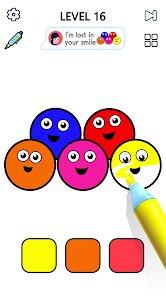
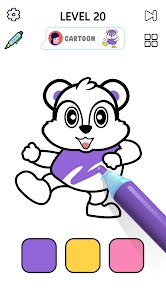
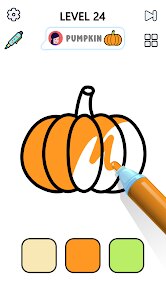
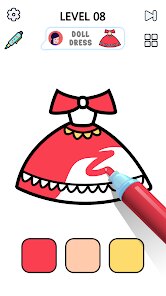
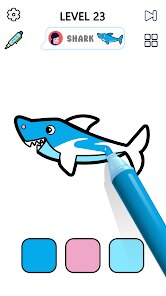
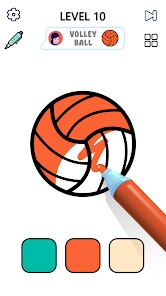
editor reviews
So I finally caved and downloaded Satisfying Coloring on Android, and honestly, for a free coloring book game, it's way more engaging than I expected. This is a straight-up mobile casual puzzle app, available exclusively on Google Play and the App Store for phones and tablets—no PC or console version here, so don't go looking for it on Steam or Switch. It launched a couple of years back and has quietly racked up over 10 million installs on Google Play alone, which is pretty solid for a niche relaxation title. The best part? It's completely free to download and play, but like most mobile games, there are in-app purchases. You'll see ads between levels unless you pay around $4.99 for the ad-free version, and there are optional coin packs for unlocking premium coloring pages, usually costing $1.99 to $9.99. Honestly, the free experience is totally playable if you can tolerate a 15-second ad every few pages—it didn't ruin the flow for me.
When you jump in, the gameplay is super straightforward: you pick a black-and-white outline, select your colors from a palette, and tap the sections to fill them in. It's basically digital paint-by-numbers, but the "satisfying" part comes from the haptic feedback and sound effects—every tap makes a soft, plush "pop" noise, and when you complete a section, the screen gives a tiny vibration. My favorite part is the "Magic Brush" mode, where you just hold your finger down and the app auto-fills the entire area with a gradient effect. It sounds lazy, but watching the colors bleed into the picture without manual tapping is oddly therapeutic. The best aspect, though, is the variety of themes—there are mandalas, animals, fantasy scenes, and even abstract patterns. I've spent hours on the ocean-themed pages, just zoning out while the app plays ambient wave sounds in the background. It's not a game you "win" at; it's more like a digital stress ball that keeps your hands busy while you listen to a podcast.
Compared to other coloring games like Colorify or Happy Color, Satisfying Coloring feels a bit more polished in its animations. Happy Color is great but feels too rigid—the colors snap into place without any flair. Here, the ink spreads out in a tiny ripple effect, and the page counts are generous; you get about 80 free designs before hitting the paywall. Colorify has more social features, like sharing your creations, but this game keeps things private and calming, which I prefer. If you're the type who just wants to zone out after work without dealing with leaderboards or friends' requests, this is the better pick. I wouldn't call it groundbreaking, but for a free Android app, it nails the relaxation vibe better than most. Just be ready to sit through a few ads unless you chip in for the no-ad option.
features
- Auto-Fill Mechanics 🖌️: Unlike Happy Color where you tap each tiny section individually, Satisfying Coloring has a "long press to fill" feature that automatically colors entire connected areas. This cuts down on repetitive tapping and makes the process feel smoother, especially on larger pages like dragons or landscapes.
- Sound & Vibe Feedback 🔉: Every tap and fill generates a satisfying "pop" sound effect paired with light haptic vibrations. Compare this to Colorify, which has muted audio—this app uses ASMR-style sounds that make the coloring feel physically rewarding, almost like popping bubble wrap.
- Gradient & Glitter Effects ✨: You're not stuck with flat colors. The app offers gradient fills, metallic shimmer, and even glow effects that other free coloring apps typically lock behind paywalls. The glitter option on flower petals looks really nice on a phone screen, and it's all available in the free version.
pros
- Relaxation-First Design 🧘: This game is built purely for de-stressing, with no timers, scores, or pressure to finish fast. Unlike Pixel Art games that push you to complete puzzles quickly, this one encourages you to take your time. I've sat for 20 minutes on a single mandala without any rush.
- Generous Free Content 🎨: You get access to around 80 free pages across multiple categories without paying a dime. Most similar games only offer 15-20 free images. The variety includes animals, florals, patterns, and fantasy themes—something for every mood.
- Smooth & Clean Interface 📱: The UI is incredibly simple to navigate. No cluttered menus, no constant pop-ups begging you to rate the app. It feels like a premium paid app in terms of layout, which is rare for a free puzzle game on Google Play.
cons
- Frequent Ad Breaks 📺: After every 3-4 colorings, a forced 15-30 second video ad plays. Happy Color handles ads better by only showing them when you switch categories. Here, it breaks your flow constantly unless you pay for the $4.99 ad removal.
- Limited Zoom Feature 🔍: You can't pinch-to-zoom as much as you'd like on detailed pages. In games like Colorify, you can zoom all the way into a single petal, but Satisfying Coloring restricts the zoom level, making it tricky to color tiny sections on complex mandalas without accidentally filling adjacent areas.
- No Undo Button 🔄: If you accidentally tap the wrong color into a section, you can't undo it. You have to restart the entire page or live with the mistake. Other similar Android apps offer at least 3-5 undo steps, which is a sorely missed feature here.
Articles
![]()
Guide
How to Update Google Play Store on Android 2026
![]()
Guide
How to Download Older Versions of Android Apps
![]()
Guide
How to Download Apps Without Google Play Store
![]()
Guide
What Is an APK File for Android?
If you use an Android phone, you may have seen the term APK while searching for apps or games online. Some websites offer an APK download instead of a Google Play install button. Some users also mention APK files when talking about apps that are not available in their region, older app versions, or Android games downloaded outside the Play Store.
![]()
Guide
How to Install Games from Google Play for Beginners
Installing games on an Android phone is usually simple, but for beginners, the process can still feel confusing at first. You may not know where to search, which button to tap, whether the game is safe, or why Google Play sometimes asks for account settings, storage access, or payment information. If you are using an Android phone for the first time, learning how to install games from Google Play is one of the easiest ways to get started.
![]()
Guide
How Useful Gemini Is for Everyday Questions and Quick Tasks
emini feels different from many AI apps because it is not only trying to be a chatbot. After using it for everyday questions, quick writing, image understanding, and planning, I think its biggest strength is convenience.
![]()
Guide
What to Know Before Downloading APKs
For many Android users, downloading an APK is a common way to install apps and games. Sometimes an app is not available in a certain country.
![]()
Guide
ChatGPT Review: Is It Still the Best AI App in 2026?
![]()
Guide
Seedance 2.0 vs Sora: The Future of AI Video Generation
The AI video race has intensified dramatically over the past two years. Platforms like Sora from OpenAI and Luma Dream Machine pushed the boundaries of text-to-video realism. Yet, despite their impressive outputs, most tools still operate as probabilistic generators—you describe a scene, and the model interprets it. Control remains limited. With the February 2026 release of Seedance 2.0, developed by ByteDance, the paradigm shifted. Internally known as Jimeng 2.0, Seedance does not position itself as just another video model. It positions itself as an AI Director. Rather than guessing what you want, Seedance 2.0 allows you to direct what happens. This distinction defines everything that follows.









Recommended Apps
![]()
My Supermarket Simulator 3D®
Game District LLC3.9

![]()
Fortnite
Epic Games, Inc4![]()
Poppy Playtime Chapter 3
Mob Entertainment4.2![]()
Diamond Painting ASMR Coloring
CrazyLabs LTD4.5![]()
Real Bus Simulator : Bus Games
Solo Studio Inc3.2![]()
Sprunki All Phases Beat Maker
Gotstar Studio0![]()
Looper!
Kwalee (Ltd)4.2![]()
Gugu Gaga Penguin: Mini Games
Kids Games LLC3![]()
KPop Demon Hunter Wallpaper
Highlights Devloper0![]()
Count Masters: Stickman Games
Freeplay Inc4.6![]()
Scary Teacher 3D
Z & K Games4.3![]()
Papa's Wingeria HD
Flipline Studios4.6![]()
Who's Your Daddy?!
Evil Tortilla Games Incorporated2.7![]()
AFK Arena
LilithGames4.6![]()
Hungry Balls
HYPERCELL4.6












































