
Eye Test

1K+
Installs
arabtok
Developer
-
Productivity
Category
-
Everyone
Content Rating
-
smsimapps@gmail.com
Developer Email
-
https://eyeshealthtest.com/privacy.html
Privacy Policy
Screenshots
editor reviews
Eye Test is a straightforward visual acuity checker available on Google Play, falling into the health and medical utility category. People mainly use it to quickly screen their eyesight at home, checking for changes in vision without needing an appointment. A normal user might download it after noticing occasional blurriness or just out of curiosity about their eye health. When I first opened the app after installing it, the interface felt surprisingly clean and minimal, with no clutter or confusing menus. It immediately asks you to set the phone at a certain distance and tap start, which gives a serious, almost clinical first impression. The app is free to download, but there are in-app purchases for unlocking detailed reports or removing ads, which appear after a few tests.
Moving into actual use, the hands-on experience is quite straightforward. After launching, you calibrate by holding the phone at arm's length and adjusting a scale line to match your actual distance. Then the test begins, showing letters or symbols (like the letter E in different orientations) that you have to identify by tapping arrows or matching options. The onboarding is quick and no-nonsense, just one screen explaining how to hold the device. The main actions involve tapping left, right, up, or down buttons to indicate which way the symbol is pointing. I found it smooth overall, though the distance calibration step can be a bit fiddly if you're not precise. A small tip: make sure you're in good lighting, as dim light makes the symbols harder to see and might skew results. After finishing, the app shows a rough prescription equivalent and provides basic advice, like recommending you see an optometrist if results are poor.
After using Eye Test for a while, my personal take is that it's handy for quick self-checks but not a replacement for professional exams. People who want a casual way to monitor vision changes between doctor visits might enjoy it, especially if they notice slight blurriness and want confirmation. Those expecting clinical accuracy may be disappointed, as the test feels less precise than a clinic's equipment. What makes it different from similar apps, like EyeQue's vision test tools, is that Eye Test is simpler and less feature-heavy, focusing purely on basic acuity without tracking progress over time. I might keep it installed for occasional use, but I can see others uninstalling it if ads get annoying or if they realize the results aren't detailed enough. Compared to built-in phone vision test features (like those in some health platforms), this app is more dedicated but less polished overall.
features
- 👁️ Visual acuity testing is the core function, where the app shows symbols like the letter "E" in different orientations and you tap the matching direction. Compared to EyeQue, which requires a separate device attachment, Eye Test works with just your phone's screen and your finger taps, making it more accessible right after installation.
- 👁️ The distance calibration step uses a simple on-screen slider to match your arm's length to a virtual line, ensuring standardized testing without needing measuring tape. This is more user-friendly than apps like Vision Test Pro, which assumes you already know exact distances.
- 👁️ The app offers a basic prescription estimate after the test, giving you a rough idea of your diopter values. While less comprehensive than professional tools like ZEISS Online Vision Check, it serves as a quick reference without requiring any registration or email.
pros
- 💡 Simplicity and speed are major strengths. Unlike EyeQue, which involves multiple steps and optional purchases, Eye Test delivers results in under two minutes with minimal tapping, ideal for impatient users.
- 💡 The no-frills interface is easy to navigate even for older adults, who might find apps like Vision Test HD overwhelming with too many options and settings.
- 💡 It's completely free to start testing without any forced sign-up or credit card, unlike some competitors that gatekeep basic features behind accounts.
cons
- 🔴 Accuracy is limited. The tests rely on your phone's screen size and your own distance judgment, so results can vary significantly compared to a real eye chart or apps like Peek Acuity that use calibrated charts.
- 🔴 Advertisements interrupt after every test, which is more intrusive than similar apps like Eye Chart that show ads only on menu screens.
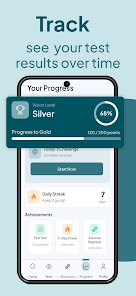
- 🔴 The app lacks progress tracking or history logs, so you can't compare results over time. Competitors like VisionCheck offer graphs and trend data for free.
Articles
![]()
Guide
How to Update Google Play Store on Android 2026
![]()
Guide
How to Download Older Versions of Android Apps
![]()
Guide
How to Download Apps Without Google Play Store
![]()
Guide
What Is an APK File for Android?
If you use an Android phone, you may have seen the term APK while searching for apps or games online. Some websites offer an APK download instead of a Google Play install button. Some users also mention APK files when talking about apps that are not available in their region, older app versions, or Android games downloaded outside the Play Store.
![]()
Guide
How to Install Games from Google Play for Beginners
Installing games on an Android phone is usually simple, but for beginners, the process can still feel confusing at first. You may not know where to search, which button to tap, whether the game is safe, or why Google Play sometimes asks for account settings, storage access, or payment information. If you are using an Android phone for the first time, learning how to install games from Google Play is one of the easiest ways to get started.
![]()
Guide
How Useful Gemini Is for Everyday Questions and Quick Tasks
emini feels different from many AI apps because it is not only trying to be a chatbot. After using it for everyday questions, quick writing, image understanding, and planning, I think its biggest strength is convenience.
![]()
Guide
What to Know Before Downloading APKs
For many Android users, downloading an APK is a common way to install apps and games. Sometimes an app is not available in a certain country.
![]()
Guide
ChatGPT Review: Is It Still the Best AI App in 2026?
![]()
Guide
Seedance 2.0 vs Sora: The Future of AI Video Generation
The AI video race has intensified dramatically over the past two years. Platforms like Sora from OpenAI and Luma Dream Machine pushed the boundaries of text-to-video realism. Yet, despite their impressive outputs, most tools still operate as probabilistic generators—you describe a scene, and the model interprets it. Control remains limited. With the February 2026 release of Seedance 2.0, developed by ByteDance, the paradigm shifted. Internally known as Jimeng 2.0, Seedance does not position itself as just another video model. It positions itself as an AI Director. Rather than guessing what you want, Seedance 2.0 allows you to direct what happens. This distinction defines everything that follows.









Recommended Apps
![]()
Home Design 3D
Anuman4.2
![]()
Truth or Dare Game - Party App
Chouic4.8
![]()
Photo Collage Maker
Scoompa4.7![]()
Learn to Draw Flower
Creative APPS4.2![]()
FIFA World Cup 2026™
FIFA2.8![]()
Mirror Plus: Mirror with Light
Digitalchemy, LLC4.4![]()
Meitu- Photo Editor & AI Art
Meitu (China) Limited4.5![]()
Perplexity - Ask Anything
PerplexityAI4.7![]()
GhostTube SLS Camera Alternate
GhostTube4![]()
Boom Chip Blast: 2-Player
Black Pyramid 3D Games Studio0![]()
Healthy Benefits+
Solutran, Inc.4.5![]()
Deepcheck AI Search Assistant
rohe.ai4![]()
Idol Prank Video Call & Chat
LightCode Solutions4![]()
Face Shape - Pretty Scale
GlintTec Apps3.9![]()
Plant App - Plant Identifier
ScaleUp4.6











































