

Genie: AI Photo Video Editor

50K+
Installs
AIGX-Studio
Developer
-
Generative AI
Category
-
Teen
Content Rating
-
support@aigxapp.com
Developer Email
-
https://home.aigxapp.com/website-cfg/policy
Privacy Policy
Screenshots





editor reviews
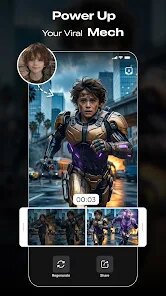
Genie is an AI-powered editing tool from AIGX-Studio that sits squarely in the photo and video enhancement category. It's the kind of app you'd grab from Google Play or the App Store when you want to fix up a snapshot or turn a clip into something more polished without learning complex software. After downloading and launching it for the first time, the initial screen is clean and unassuming, which I appreciated. It doesn't demand registration right away, letting you jump straight into the workspace. A quick scan shows it handles basic edits like cropping and filters, plus some AI-driven features that promise smarter adjustments. For a normal user, the appeal is clear: a straightforward tool that feels approachable, not intimidating.
In everyday use, Genie walks you through its main actions with a simple layout. You start by importing a photo or video, and the app sorts your media into a timeline-like view. The onboarding is minimal, just a few prompts, and then you're on your own. I found the editing flow smooth for quick tasks: boosting colors with a tap, adding text overlays, or applying preset effects. The AI stuff, like object removal or background swaps, works after a short processing wait, and results vary from decent to impressive. There were moments of confusion, like when i couldn't find the undo button immediately (it's tucked in a side menu). A practical tip: use the preview mode before finalizing, as some effects change depending on export settings. Overall, it's responsive for most lightweight edits, though heavy files can cause lag.
After sticking with Genie for a while, i think it suits casual users who want quick, AI-assisted results without a steep learning curve. It's a solid pick if you're less bothered about fine-grained control and more about speed, like fixing family photos or making Instagram-ready clips. Compared to apps like Adobe Lightroom, Genie lacks depth in manual adjustments, but its AI tools make up for that in convenience. Who might skip it? Power users needing raw-level precision will find it limiting. For me, i kept it installed because it handles routine edits in seconds, but uninstalled it later when i needed more advanced options for a project. It's not a game changer, just a reliable companion for everyday photo and video touch-ups.
features
- 🧠 AI Background Removal: Genie's object and background removal works with a single tap, unlike older apps like AutoDesk Pixlr, which required manual masking. It handles tricky edges, like hair or fur, surprisingly well for a mobile tool.
- 🎨 One-Tap Color Grading: The AI applies scene-aware color adjustments based on the content of your photo or video. Edit videos easier than Apple's iMovie presets, which are more generic and don't adapt to each frame.
- 🔄 Smart Resize for Social Media: It suggests aspect ratios for platforms like TikTok or YouTube automatically. This feature stands out over basic editors like Snapseed, which only offer manual crop options, saving you guesswork when repurposing content.
pros
- 👍 Interface is intuitive: Navigating Genie feels natural after just a few uses, unlike KineMaster, which has a cluttered toolbar that takes time to memorize. I got comfortable making edits within minutes, not hours.
- 👍 Export options are generous: Genie lets you save in high resolution without forcing watermarks, a clear win over free versions of InShot, which adds branding to exports. It accommodates both photos and videos seamlessly.
- 👍 AI processing speed: For a free app, the AI tasks (like subject selection) often finish faster than similar features in paid tools like Luminar AI, making it feel efficient for on-the-go edits.
cons
- 👎 Limited manual control: You can't adjust curves or do layer-based editing like in Adobe Lightroom. If you need precise masking, you'll hit walls with Genie's simplified toolset.
- 👎 Occasional AI inaccuracies: Background removal, while good with simple scenes, sometimes misinterprets similar colors. Better than basic apps, but not as reliable as remove.bg for complex photos.
- 👎 No advanced video timeline: Unlike CapCut, which offers keyframe animations, Genie only supports basic cuts and transitions. For serious video projects, it feels restrictive after a few uses.
- 👎 Privacy concerns with cloud processing: Some AI features depend on server-side analysis, unlike offline editors like Photoshop Mix. This might worry users who keep sensitive media on their phones.
Articles
![]()
Guide
How to Update Google Play Store on Android 2026
![]()
Guide
How to Download Older Versions of Android Apps
![]()
Guide
How to Download Apps Without Google Play Store
![]()
Guide
What Is an APK File for Android?
If you use an Android phone, you may have seen the term APK while searching for apps or games online. Some websites offer an APK download instead of a Google Play install button. Some users also mention APK files when talking about apps that are not available in their region, older app versions, or Android games downloaded outside the Play Store.
![]()
Guide
How to Install Games from Google Play for Beginners
Installing games on an Android phone is usually simple, but for beginners, the process can still feel confusing at first. You may not know where to search, which button to tap, whether the game is safe, or why Google Play sometimes asks for account settings, storage access, or payment information. If you are using an Android phone for the first time, learning how to install games from Google Play is one of the easiest ways to get started.
![]()
Guide
How Useful Gemini Is for Everyday Questions and Quick Tasks
emini feels different from many AI apps because it is not only trying to be a chatbot. After using it for everyday questions, quick writing, image understanding, and planning, I think its biggest strength is convenience.
![]()
Guide
What to Know Before Downloading APKs
For many Android users, downloading an APK is a common way to install apps and games. Sometimes an app is not available in a certain country.
![]()
Guide
ChatGPT Review: Is It Still the Best AI App in 2026?
![]()
Guide
Seedance 2.0 vs Sora: The Future of AI Video Generation
The AI video race has intensified dramatically over the past two years. Platforms like Sora from OpenAI and Luma Dream Machine pushed the boundaries of text-to-video realism. Yet, despite their impressive outputs, most tools still operate as probabilistic generators—you describe a scene, and the model interprets it. Control remains limited. With the February 2026 release of Seedance 2.0, developed by ByteDance, the paradigm shifted. Internally known as Jimeng 2.0, Seedance does not position itself as just another video model. It positions itself as an AI Director. Rather than guessing what you want, Seedance 2.0 allows you to direct what happens. This distinction defines everything that follows.









Recommended Apps
![]()
Home Design 3D
Anuman4.2
![]()
Truth or Dare Game - Party App
Chouic4.8
![]()
Photo Collage Maker
Scoompa4.7![]()
Learn to Draw Flower
Creative APPS4.2![]()
FIFA World Cup 2026™
FIFA2.8![]()
Mirror Plus: Mirror with Light
Digitalchemy, LLC4.4![]()
Meitu- Photo Editor & AI Art
Meitu (China) Limited4.5![]()
Perplexity - Ask Anything
PerplexityAI4.7![]()
GhostTube SLS Camera Alternate
GhostTube4![]()
Boom Chip Blast: 2-Player
Black Pyramid 3D Games Studio0![]()
Healthy Benefits+
Solutran, Inc.4.5![]()
Deepcheck AI Search Assistant
rohe.ai4![]()
Idol Prank Video Call & Chat
LightCode Solutions4![]()
Face Shape - Pretty Scale
GlintTec Apps3.9![]()
Plant App - Plant Identifier
ScaleUp4.6












































