

AndrOpen Office

5M+
Installs
Akikazu Yoshikawa
Developer
-
Productivity
Category
-
Everyone
Content Rating
-
support@andropenoffice.com
Developer Email
-
https://www.andropenoffice.com/privacy-policy
Privacy Policy
Screenshots
editor reviews
Office suites on mobile devices often feel stripped down or frustrating to use. AndrOpen Office, developed by Akikazu Yoshikawa and available for free on Google Play, takes a different approach by bringing a full-featured desktop-style office package to smartphones and tablets. The app includes a word processor, spreadsheet, presentation tool, drawing application, and a database manager. It is completely free without any subscription fees, though users should expect occasional ads and optional in-app purchases for removing them. The download and install process is straightforward, and the app has reached over five million installs on the platform.
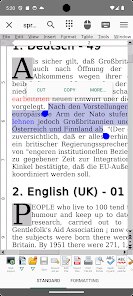
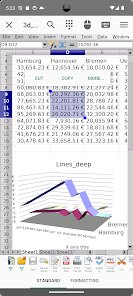
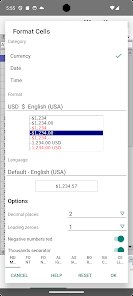
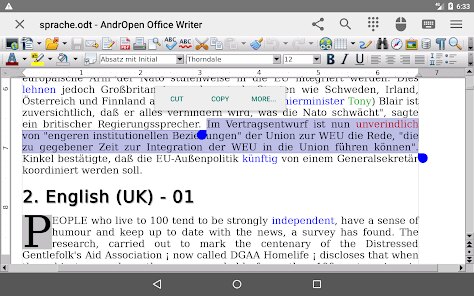
When you open the application, the interface resembles older desktop office software rather than modern mobile design. The toolbar sits at the top with dropdown menus for File, Edit, View, and Insert, which invites a more deliberate workflow. Creating a document starts with selecting a template or a blank file. I found the word processor handles formatting well, with fonts, styles, and alignment options all accessible. The spreadsheet component supports formulas and chart creation, which many mobile alternatives simplify too much. Navigating through these tools on a phone screen requires patience due to small touch targets, but on a tablet the experience becomes more comfortable. The app also reads and writes native formats like DOCX, ODF, and XLSX without conversion issues.
Compared to applications like Google Docs or Microsoft Office Mobile, AndrOpen Office feels less polished in visual design but offers substantially more control. Google prioritizes cloud integration and real-time collaboration, while this app focuses on local file handling and offline functionality. Microsoft Office Mobile restricts editing after a short trial unless you subscribe, whereas this app provides unrestricted access. The trade-off is an interface that feels dated and a learning curve for users accustomed to gestures and touch-first navigation. For someone who needs advanced formatting or frequent offline editing, the difference in depth is noticeable.
features
- The file format compatibility stands out. I opened a complex spreadsheet with pivot tables from my work email, and the app preserved the data and structure accurately. Google Drive's viewer often mangled the same file, so this reliability matters for professional use.
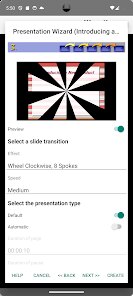
- Editing presentations feels more complete than in many competitors. I could add speaker notes, adjust animations, and insert charts without switching to another tool. The presentation mode works smoothly when connected to an external display or projector.
- The database component, while rarely found in mobile office suites, lets you create and edit tables with SQL queries. It is not something I use daily, but having it available avoids needing a separate app for occasional database checks.
- Performance on older devices can be inconsistent. Opening large files with many images caused noticeable lag on my three-year-old tablet, though recent flagship phones handled the same files without stuttering.
pros
- Working offline is the biggest practical advantage. I edit documents during train commutes without worrying about signal drops affecting my progress or waiting for cloud sync.
- No subscription cost removes the pressure to keep paying for occasional use. For someone who only needs office tools a few times a month, the free model works well.
- Supporting standard ODF format means I can share files with colleagues using LibreOffice or other open-source tools without format conversion errors.
cons
- The touch interface requires precision. Buttons are small and dropdown menus expand fully, making accidental taps common during quick edits on a phone.
- Ads appear after saving or opening files, which disrupts workflow. The one-time purchase to remove them is inexpensive but not prominently advertised in the app description.
- Cloud storage integration is minimal. You can open files from local storage or import via the system share menu, but there is no direct sync with Google Drive or OneDrive built into the app.
Articles
![]()
Guide
How to Update Google Play Store on Android 2026
![]()
Guide
How to Download Older Versions of Android Apps
![]()
Guide
How to Download Apps Without Google Play Store
![]()
Guide
What Is an APK File for Android?
If you use an Android phone, you may have seen the term APK while searching for apps or games online. Some websites offer an APK download instead of a Google Play install button. Some users also mention APK files when talking about apps that are not available in their region, older app versions, or Android games downloaded outside the Play Store.
![]()
Guide
How to Install Games from Google Play for Beginners
Installing games on an Android phone is usually simple, but for beginners, the process can still feel confusing at first. You may not know where to search, which button to tap, whether the game is safe, or why Google Play sometimes asks for account settings, storage access, or payment information. If you are using an Android phone for the first time, learning how to install games from Google Play is one of the easiest ways to get started.
![]()
Guide
How Useful Gemini Is for Everyday Questions and Quick Tasks
emini feels different from many AI apps because it is not only trying to be a chatbot. After using it for everyday questions, quick writing, image understanding, and planning, I think its biggest strength is convenience.
![]()
Guide
What to Know Before Downloading APKs
For many Android users, downloading an APK is a common way to install apps and games. Sometimes an app is not available in a certain country.
![]()
Guide
ChatGPT Review: Is It Still the Best AI App in 2026?
![]()
Guide
Seedance 2.0 vs Sora: The Future of AI Video Generation
The AI video race has intensified dramatically over the past two years. Platforms like Sora from OpenAI and Luma Dream Machine pushed the boundaries of text-to-video realism. Yet, despite their impressive outputs, most tools still operate as probabilistic generators—you describe a scene, and the model interprets it. Control remains limited. With the February 2026 release of Seedance 2.0, developed by ByteDance, the paradigm shifted. Internally known as Jimeng 2.0, Seedance does not position itself as just another video model. It positions itself as an AI Director. Rather than guessing what you want, Seedance 2.0 allows you to direct what happens. This distinction defines everything that follows.









Recommended Apps
![]()
Home Design 3D
Anuman4.2
![]()
Truth or Dare Game - Party App
Chouic4.8
![]()
Photo Collage Maker
Scoompa4.7![]()
Learn to Draw Flower
Creative APPS4.2![]()
FIFA World Cup 2026™
FIFA2.8![]()
Mirror Plus: Mirror with Light
Digitalchemy, LLC4.4![]()
Meitu- Photo Editor & AI Art
Meitu (China) Limited4.5![]()
Perplexity - Ask Anything
PerplexityAI4.7![]()
GhostTube SLS Camera Alternate
GhostTube4![]()
Boom Chip Blast: 2-Player
Black Pyramid 3D Games Studio0![]()
Healthy Benefits+
Solutran, Inc.4.5![]()
Deepcheck AI Search Assistant
rohe.ai4![]()
Idol Prank Video Call & Chat
LightCode Solutions4![]()
Face Shape - Pretty Scale
GlintTec Apps3.9![]()
Plant App - Plant Identifier
ScaleUp4.6












































