

Curso Inglés, Aprender Inglés

500K+
Installs
TomatoTB
Developer
-
Education
Category
-
Everyone
Content Rating
-
tomato.studio0807@gmail.com
Developer Email
-
https://sites.google.com/view/tomatotb/home
Privacy Policy
Screenshots

editor reviews
For anyone looking to build or refresh their English skills on mobile, Curso Inglés, Aprender Inglés offers a straightforward path focused on practical vocabulary and grammar. Available for download from Google Play, the app is completely free to install and use, though it does include advertisements and optional in-app purchases for those wanting to remove them or unlock additional content. It covers a wide range of common topics from basic greetings to more complex sentence structures, making it suitable for beginners and intermediate learners alike.
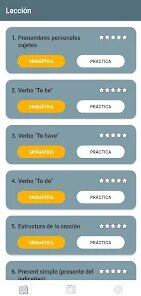
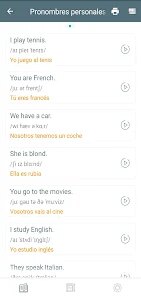
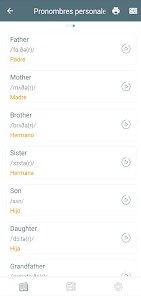
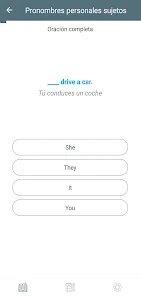
The learning process is built around themed lessons that mix word lists, example sentences, and short quizzes. After selecting a topic like "At the restaurant" or "Daily routines," users can study flashcards, listen to audio pronunciations, and then test their recall through multiple-choice or fill-in-the-blank exercises. I found the interface to be clean and uncluttered, with progress tracked lesson by lesson, which gave a clear sense of moving forward without feeling overwhelming.
Compared to many flashcard-based language apps, Curso Inglés, Aprender Inglés feels more focused on structured learning rather than gamified repetition. Apps like Duolingo emphasize streaks and rewards, while this one prioritizes a direct, lesson-by-lesson approach that some may find more efficient for deliberate study. It lacks the social features or extensive listening exercises of larger platforms, but its simplicity can be a benefit for those who prefer to concentrate on core material without distractions.
features
- The lesson structure is well organized, each one building naturally on the last. Moving from vocabulary to example sentences and then to quizzes felt logical, and I appreciated not having to jump around to find related content. It flows more like a textbook chapter than a random collection of exercises.
- Audio quality for pronunciation is clear and recorded at a steady pace. Unlike some apps where speech sounds rushed or robotic, the voice here is easy to follow, which is helpful when practicing difficult sounds or unfamiliar word stress patterns.
- Progress tracking is simple but effective. Each completed lesson marks a percentage on the main screen, and you can revisit any lesson to repeat exercises. This is more structured than a similar app like Memrise, which often relies on spaced repetition timers that can feel less predictable.
- Multiple choice quizzes provide immediate feedback with a brief explanation when a mistake is made. While not as varied as the typing exercises found in Babbel, it keeps the experience low-pressure and suitable for short study sessions.
pros
- It requires no account or sign-in to start learning, so you can jump straight into lessons after installation. This makes it easy to use during commutes or short breaks without any setup time.
- The ad-supported free model means full access to all core lessons without paying upfront. For someone on a tight budget, this is a practical way to practice regularly without subscription fees.
- Offline access to downloaded lessons means studying isn't dependent on a data connection. I found this useful when traveling or in areas with poor reception.
cons
- Ads appear between lessons and sometimes during quizzes, which can interrupt focus. The removal purchase is reasonably priced, but the frequency of ads is noticeable in the free version.
- Listening exercises are limited mostly to vocabulary pronunciation; there are no extended dialogues or conversation practice. Learners hoping to improve comprehension of natural speech may need supplementary resources.
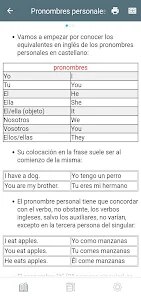
- The app does not offer grammar explanations in depth. While example sentences illustrate usage, there is no separate grammar section to clarify rules like verb tenses or prepositions, which might leave some users confused on more complex topics.
Articles
![]()
Guide
How to Update Google Play Store on Android 2026
![]()
Guide
How to Download Older Versions of Android Apps
![]()
Guide
How to Download Apps Without Google Play Store
![]()
Guide
What Is an APK File for Android?
If you use an Android phone, you may have seen the term APK while searching for apps or games online. Some websites offer an APK download instead of a Google Play install button. Some users also mention APK files when talking about apps that are not available in their region, older app versions, or Android games downloaded outside the Play Store.
![]()
Guide
How to Install Games from Google Play for Beginners
Installing games on an Android phone is usually simple, but for beginners, the process can still feel confusing at first. You may not know where to search, which button to tap, whether the game is safe, or why Google Play sometimes asks for account settings, storage access, or payment information. If you are using an Android phone for the first time, learning how to install games from Google Play is one of the easiest ways to get started.
![]()
Guide
How Useful Gemini Is for Everyday Questions and Quick Tasks
emini feels different from many AI apps because it is not only trying to be a chatbot. After using it for everyday questions, quick writing, image understanding, and planning, I think its biggest strength is convenience.
![]()
Guide
What to Know Before Downloading APKs
For many Android users, downloading an APK is a common way to install apps and games. Sometimes an app is not available in a certain country.
![]()
Guide
ChatGPT Review: Is It Still the Best AI App in 2026?
![]()
Guide
Seedance 2.0 vs Sora: The Future of AI Video Generation
The AI video race has intensified dramatically over the past two years. Platforms like Sora from OpenAI and Luma Dream Machine pushed the boundaries of text-to-video realism. Yet, despite their impressive outputs, most tools still operate as probabilistic generators—you describe a scene, and the model interprets it. Control remains limited. With the February 2026 release of Seedance 2.0, developed by ByteDance, the paradigm shifted. Internally known as Jimeng 2.0, Seedance does not position itself as just another video model. It positions itself as an AI Director. Rather than guessing what you want, Seedance 2.0 allows you to direct what happens. This distinction defines everything that follows.









Recommended Apps
![]()
Home Design 3D
Anuman4.2
![]()
Truth or Dare Game - Party App
Chouic4.8
![]()
Photo Collage Maker
Scoompa4.7![]()
Learn to Draw Flower
Creative APPS4.2![]()
FIFA World Cup 2026™
FIFA2.8![]()
Mirror Plus: Mirror with Light
Digitalchemy, LLC4.4![]()
Meitu- Photo Editor & AI Art
Meitu (China) Limited4.5![]()
Perplexity - Ask Anything
PerplexityAI4.7![]()
GhostTube SLS Camera Alternate
GhostTube4![]()
Boom Chip Blast: 2-Player
Black Pyramid 3D Games Studio0![]()
Healthy Benefits+
Solutran, Inc.4.5![]()
Deepcheck AI Search Assistant
rohe.ai4![]()
Idol Prank Video Call & Chat
LightCode Solutions4![]()
Face Shape - Pretty Scale
GlintTec Apps3.9![]()
Plant App - Plant Identifier
ScaleUp4.6











































