
Cloud Backup : Cloud Storage

100K+
Installs
MAPIDIRECTIONS STUDIOS
Developer
-
Productivity
Category
-
Everyone
Content Rating
-
cybertechappsfeedback@gmail.com
Developer Email
-
https://sites.google.com/view/cloudbackupcloudstorageapp/privacypolicy
Privacy Policy
Screenshots
editor reviews
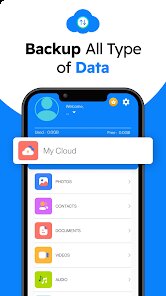
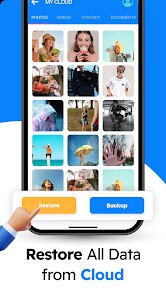
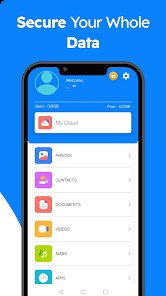
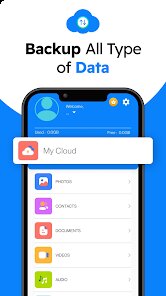
Cloud Backup: Cloud Storage from MAPIDIRECTIONS STUDIOS is available as a free download on Google Play, positioning itself as a practical tool for anyone looking to secure their mobile data without spending money upfront. The app focuses on backing up contacts, call logs, messages, photos, and videos to a cloud-based server, with the option to schedule automatic backups or trigger them manually. During my initial exploration after installation, I noticed that the app includes ads, which is expected for a free offering, and there are in-app purchase options to remove those ads and unlock additional storage quotas. The interface is straightforward; once you create an account through the app, you can select which data categories to protect and set a backup frequency that suits your habits.
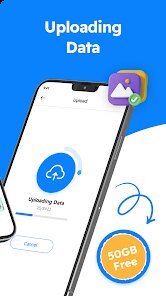
Navigating the app reveals a clean but somewhat basic design, where each backup category is listed clearly on the main screen with toggle switches for activation. Tapping a category opens a more detailed view showing file sizes and last backup dates, which I found helpful for keeping track of what has been saved. The app supports Wi-Fi-only backups to conserve mobile data, and the restore process is similarly simple: selecting a backup file from the cloud pulls your data back to the device. I tested a manual backup of my photos and messages, and the process ran smoothly over a decent Wi-Fi connection, completing within a few minutes for about 500 images. The app also encrypts data during transfer, adding a layer of security that I appreciate, though local storage encryption is not available.
Compared to similar tools like Google Drive backups or dedicated backup apps such as Super Backup & Restore, this app splits the difference between simplicity and cloud functionality. Google Drive offers deeper integration with Android but requires manual setup for specific data types, while Super Backup excels in local file creation but lacks native cloud support. Cloud Backup provides the convenience of automatic cloud storage without the need for extra accounts, though its server performance can be slower than major competitors. I found the app's limited customization options a minor drawback; for instance, you cannot select individual files within a category for backup, which forces batch operations. Overall, it serves as a decent middle-ground option for users who want straightforward protection without navigating complex settings.
features
- The schedule backup feature allows you to set daily, weekly, or monthly intervals, which I configured for weekly runs to avoid constant background activity. This works reliably once set, though I noticed occasional delays if the app hadn't been opened recently. Unlike some competitors that offer real-time syncing, this app's scheduled approach is less intrusive on battery life but means newer files may not be protected immediately.
- One useful aspect is the selective backup category system, where you can enable or disable backing up specific data types like just contacts or messages. During my use, I chose to exclude videos due to their large size, which saved cloud storage space and sped up the backup process. This granular control is more refined than some free apps that force all-or-nothing backups.
- The restore process is intuitive: you pick a backup file from a list sorted by date and size, and the app restores selected categories to your device. I tested this after resetting a test phone, and it successfully brought back contacts and call logs within minutes. However, I did notice that some apps linked to backed-up messages were not restored, which is a limitation common among backup tools.
- A subtle benefit is the built-in data preview before full backup, which shows file counts and sizes for each category. This helped me decide what to include, preventing accidental storage overuse. This is a small but thoughtful addition that many similar apps lack.
pros
- Scheduling automatic backups reduces the need to remember manual actions; I set it once and the app handled the rest weekly, which gave me peace of mind without extra effort.
- Restoring data after a device reset or upgrade becomes straightforward; I transferred everything to a new tablet without plugging into a computer, saving time and cables.
- The free tier covers basic data types adequately; I used it to backup contacts and messages without paying, and the ad frequency was tolerable during my free usage.
cons
- Backup speeds can be inconsistent; on a slower connection, my photos took noticeably longer to upload than advertised, which sometimes led to incomplete backups if the session got interrupted.
- Storage limits on the free plan are modest; after backing up a few thousand messages and photos, I hit the default quota and had to either delete old backups or consider in-app purchase upgrades.
- No option exists for local backup copies; all data must reside in the cloud, which may be a concern if you prefer offline backups or have privacy concerns about third-party servers.
Articles
![]()
Guide
How to Update Google Play Store on Android 2026
![]()
Guide
How to Download Older Versions of Android Apps
![]()
Guide
How to Download Apps Without Google Play Store
![]()
Guide
What Is an APK File for Android?
If you use an Android phone, you may have seen the term APK while searching for apps or games online. Some websites offer an APK download instead of a Google Play install button. Some users also mention APK files when talking about apps that are not available in their region, older app versions, or Android games downloaded outside the Play Store.
![]()
Guide
How to Install Games from Google Play for Beginners
Installing games on an Android phone is usually simple, but for beginners, the process can still feel confusing at first. You may not know where to search, which button to tap, whether the game is safe, or why Google Play sometimes asks for account settings, storage access, or payment information. If you are using an Android phone for the first time, learning how to install games from Google Play is one of the easiest ways to get started.
![]()
Guide
How Useful Gemini Is for Everyday Questions and Quick Tasks
emini feels different from many AI apps because it is not only trying to be a chatbot. After using it for everyday questions, quick writing, image understanding, and planning, I think its biggest strength is convenience.
![]()
Guide
What to Know Before Downloading APKs
For many Android users, downloading an APK is a common way to install apps and games. Sometimes an app is not available in a certain country.
![]()
Guide
ChatGPT Review: Is It Still the Best AI App in 2026?
![]()
Guide
Seedance 2.0 vs Sora: The Future of AI Video Generation
The AI video race has intensified dramatically over the past two years. Platforms like Sora from OpenAI and Luma Dream Machine pushed the boundaries of text-to-video realism. Yet, despite their impressive outputs, most tools still operate as probabilistic generators—you describe a scene, and the model interprets it. Control remains limited. With the February 2026 release of Seedance 2.0, developed by ByteDance, the paradigm shifted. Internally known as Jimeng 2.0, Seedance does not position itself as just another video model. It positions itself as an AI Director. Rather than guessing what you want, Seedance 2.0 allows you to direct what happens. This distinction defines everything that follows.









Recommended Apps
![]()
Home Design 3D
Anuman4.2
![]()
Truth or Dare Game - Party App
Chouic4.8
![]()
Photo Collage Maker
Scoompa4.7![]()
Learn to Draw Flower
Creative APPS4.2![]()
FIFA World Cup 2026™
FIFA2.8![]()
Mirror Plus: Mirror with Light
Digitalchemy, LLC4.4![]()
Meitu- Photo Editor & AI Art
Meitu (China) Limited4.5![]()
Perplexity - Ask Anything
PerplexityAI4.7![]()
GhostTube SLS Camera Alternate
GhostTube4![]()
Boom Chip Blast: 2-Player
Black Pyramid 3D Games Studio0![]()
Healthy Benefits+
Solutran, Inc.4.5![]()
Deepcheck AI Search Assistant
rohe.ai4![]()
Idol Prank Video Call & Chat
LightCode Solutions4![]()
Face Shape - Pretty Scale
GlintTec Apps3.9![]()
Plant App - Plant Identifier
ScaleUp4.6











































