

Bug Filter: Funny Prank App

Installs
HKL Game Studio
Developer
-
Entertainment
Category
-
Everyone
Content Rating
-
tapkichteam@gmail.com
Developer Email
-
https://sites.google.com/view/pp-bug-filter/home
Privacy Policy
Screenshots
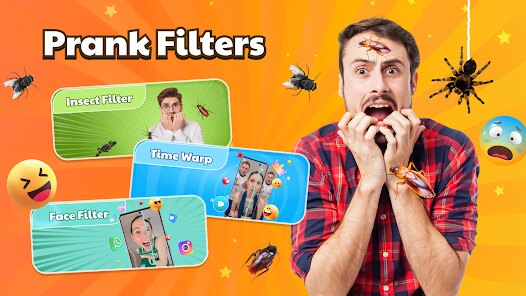

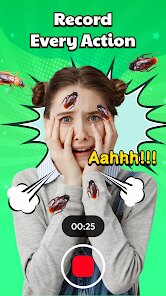
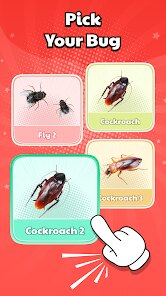
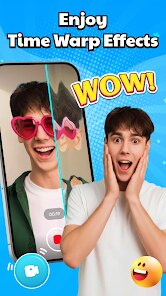

editor reviews
Bug Filter has been available on Google Play for about a year now, and it comes from HKL Game Studio, a developer known for novelty applications rather than serious tools. The app presents itself as a prank utility, giving users the ability to fake the appearance of bugs crawling across their device screen. It is free to download and install, though like many apps in this category, it includes ads and offers optional in-app purchases for removing them or unlocking additional insect types. The core concept is straightforward: you launch the app, select a bug, and it appears to scurry across your display, often startling anyone who happens to be looking at your phone.
Once you have the app installed, interacting with it is simple. You pick from a collection of digital insects, ranging from spiders to cockroaches, and place them on the screen. They move with enough realism to catch people off guard, especially if they are not expecting it. Tapping the bug makes it react, either by speeding up or changing direction, which adds a small layer of interactivity. There is no deep gameplay mechanics here, but that is not really the point; the experience hinges on the moment of surprise when someone sees what they think is a real bug crawling across your phone.
Compared to other prank apps on Google Play, Bug Filter leans more into visual realism than gimmicky sound effects. Some similar apps rely heavily on loud noises or fake crash screens, but this one focuses on the visual trick, which I personally find more effective in certain situations. The insects are animated reasonably well, though not photo-realistic by any means. Where it falls short is in variety and polish; some competing prank apps offer more environmental context, like fake repair screens or simulated damage, while Bug Filter sticks to a single trick. That narrow focus might appeal to someone looking for a specific kind of prank, but it also limits replay value.
features
- The animation quality is decent for a free app; bugs move with an erratic, insect-like motion that sells the illusion fairly well. I have seen similar apps where the movement feels too mechanical, so this stands out slightly. The spider in particular skitters across the screen in a way that mimics real behavior, which is probably why it remains the most popular choice among users.
- Performance on my mid-range Android device was smooth, with no noticeable lag during the bug animations. The app loads quickly and does not drain battery excessively, which is important because pranks often require quick access without fumbling around. Some alternatives I have tried feel sluggish when launching, which ruins the timing of a good prank.
- One feature that stands out is the ability to adjust bug size and speed, though the options are limited to a few presets. In comparison, app like Fake Bug Screen offers more granular control, but Bug Filter keeps it simple enough that you can set it up in seconds. That trade-off between simplicity and customization works in its favor for spontaneous use.
- The ad placement is relatively unobtrusive by free app standards. Banners appear at the bottom of menus but do not pop up during active bug animation, which would ruin the prank. That design choice shows some consideration for the user experience, though the prompts to purchase the ad-free version can feel a bit frequent after multiple uses.
pros
- It works well as an icebreaker in social settings; pulling out your phone and having a bug crawl across the screen almost always gets a reaction from people nearby.
- The low file size means it installs quickly and does not take up much space on devices with limited storage, making it easy to keep around without sacrificing room for other apps.
- Since it does not require an internet connection to function after installation, you can use it in areas with poor signal or during airplane mode without any issues.
cons
- The selection of bugs feels limited after a few uses, and I found myself wishing for more variety or seasonal additions to keep the app fresh.
- Occasionally, the touch detection for tapping bugs does not register properly, which can break the illusion when the insect does not react as expected.
- There is no option to export or share the prank in video form, which other apps in this genre sometimes offer for social media use.
Articles
![]()
Guide
How to Update Google Play Store on Android 2026
![]()
Guide
How to Download Older Versions of Android Apps
![]()
Guide
How to Download Apps Without Google Play Store
![]()
Guide
What Is an APK File for Android?
If you use an Android phone, you may have seen the term APK while searching for apps or games online. Some websites offer an APK download instead of a Google Play install button. Some users also mention APK files when talking about apps that are not available in their region, older app versions, or Android games downloaded outside the Play Store.
![]()
Guide
How to Install Games from Google Play for Beginners
Installing games on an Android phone is usually simple, but for beginners, the process can still feel confusing at first. You may not know where to search, which button to tap, whether the game is safe, or why Google Play sometimes asks for account settings, storage access, or payment information. If you are using an Android phone for the first time, learning how to install games from Google Play is one of the easiest ways to get started.
![]()
Guide
How Useful Gemini Is for Everyday Questions and Quick Tasks
emini feels different from many AI apps because it is not only trying to be a chatbot. After using it for everyday questions, quick writing, image understanding, and planning, I think its biggest strength is convenience.
![]()
Guide
What to Know Before Downloading APKs
For many Android users, downloading an APK is a common way to install apps and games. Sometimes an app is not available in a certain country.
![]()
Guide
ChatGPT Review: Is It Still the Best AI App in 2026?
![]()
Guide
Seedance 2.0 vs Sora: The Future of AI Video Generation
The AI video race has intensified dramatically over the past two years. Platforms like Sora from OpenAI and Luma Dream Machine pushed the boundaries of text-to-video realism. Yet, despite their impressive outputs, most tools still operate as probabilistic generators—you describe a scene, and the model interprets it. Control remains limited. With the February 2026 release of Seedance 2.0, developed by ByteDance, the paradigm shifted. Internally known as Jimeng 2.0, Seedance does not position itself as just another video model. It positions itself as an AI Director. Rather than guessing what you want, Seedance 2.0 allows you to direct what happens. This distinction defines everything that follows.









Recommended Apps
![]()
Home Design 3D
Anuman4.2
![]()
Truth or Dare Game - Party App
Chouic4.8
![]()
Photo Collage Maker
Scoompa4.7![]()
Learn to Draw Flower
Creative APPS4.2![]()
FIFA World Cup 2026™
FIFA2.8![]()
Mirror Plus: Mirror with Light
Digitalchemy, LLC4.4![]()
Meitu- Photo Editor & AI Art
Meitu (China) Limited4.5![]()
Perplexity - Ask Anything
PerplexityAI4.7![]()
GhostTube SLS Camera Alternate
GhostTube4![]()
Boom Chip Blast: 2-Player
Black Pyramid 3D Games Studio0![]()
Healthy Benefits+
Solutran, Inc.4.5![]()
Deepcheck AI Search Assistant
rohe.ai4![]()
Idol Prank Video Call & Chat
LightCode Solutions4![]()
Face Shape - Pretty Scale
GlintTec Apps3.9![]()
Plant App - Plant Identifier
ScaleUp4.6











































